Showing posts with label Ekos. Show all posts

Sunday, August 9, 2026

KStars 3.8.4 Released

KStars v3.8.4 is released on 2026.08.09 for Windows, Linux, and MacOS.

For Linux users, it's highly recommended to use the official KStars Flatpak hosted at Flathub.

This release brings major improvements including the World's First AI powered Guider! Furthermore, KStars now ships with an MCP server which enables connection to any LLM for full control. In this release a limited subset of skills have been introduced, and we hope to make the MCP server feature complete by the next release. Additionally, we improved rotator calibration, guide camera streaming support, and scheduler performance with large job lists. We've also fixed dozens of stability issues and added comprehensive tilt correction for mosaic masks. Here are some highlights.

AI Guiding Assistant

Pavan Kumar is our brilliant Google Summer of Code student who spent the summer developing an AI assisted guider. He delivered the AI Guiding Assistant for Ekos, a mount specific predictive guiding architecture that trains custom models for worm gear, harmonic drive, and direct drive mounts. The wizard walks you through system identification protocols, exports training data, and loads trained models for feed forward correction.

The assistant adds a feed forward predictive layer on top of Ekos's existing proportional guiding controller. A one time characterization wizard runs a system identification pass on your mount, and the resulting data trains a small model specific to your mount class (worm gear, harmonic drive, or direct drive). During guiding, a confidence gated controller blends the AI's predicted corrections with the classic proportional fallback, so the system defers to the proven controller whenever its own confidence is low. It runs entirely on device with no cloud dependency and no GPU requirement, does not need retraining every session, and deliberately does not attempt to predict stochastic noise sources like atmospheric seeing.

  • AI Guide protocol separated from the wizard UI for better modularity
  • Fixed filter models and reworked the system identification protocol and trainer
  • Wizard navigation fixed when closing and reopening; export now only includes the latest session logs
  • Added button to read offline training instructions directly from the wizard
  • Oscillator improvements for better stability during training
  • Fixed the fingerprint builder to correctly validate model compatibility across sessions

The AI Assisted Guider is still in experimental stage. Help us by sharing your feedback and exporting logs to us to analyze.

Guide

Andreas R. landed a run of guiding fixes this release:

  • Fixed streaming guide mode calibration failures on fast and harmonic mounts. The pulse guard is no longer armed during calibration, preventing "Lost track of the guide star" aborts that starved the AI Guider's system identification run
  • Fixed dark guiding (GPG and AI feed forward) in streaming mode by distinguishing between frame prediction pulses from real correction pulses, so the measurement loop no longer starves at the 0.5 s dark interval
  • Fixed the AI feed forward block reading declination from FITS headers. OBJCTDEC is a sexagesimal string, but the code was calling toDouble(), so declination silently stayed 0.0 on every frame. Now reads altitude, declination, and pier side directly from the mount object instead of headers
  • Added per optical train persistence for Predictive Guiding (GPG) period length, so users switching between worm gear and harmonic drive mounts on the same machine no longer clobber each other's tuned period values
  • Fixed the GPG circular buffer losing insertion order after 8192 samples. The read offset (start) was never advanced when the buffer filled, corrupting the chronological sequence and breaking the Gaussian Process training after roughly 68 to 82 minutes of continuous guiding at short exposures
  • Fixed guide camera binning not restored from optical train settings on Ekos startup with real hardware. The combo box was empty when setAllSettings() ran, so the saved binning was silently dropped. Also fixed a false "not supported" detection that compared against the driver's current binning instead of its maximum
  • Added an "Assume DEC orthogonal to RA" calibration option, which bypasses independent DEC angle measurement when periodic error or backlash causes erratic DEC calibration datapoints, deriving the guide angle solely from the RA axis with DEC forced to a 90 degree offset

Rotator

  • Fixed rotator auto reverse detection and added direction parity correction. The wrong direction detector never fired because the PA error tracker was unconditionally cleared before the confirming solve could check it. Now detects reversed rotation, trials the parity flag, recalibrates the offset immediately, and persists the correction only once a retry confirms it worked
  • Renamed internal flag to m_RotatorParityRetried to avoid confusion with the rotator's own driver level reverse functionality
  • Exposed the learned parity as a "Rotator direction reversed" checkbox in Align settings (below Flip Policy), so it can also be set manually without touching the driver's ROTATOR_REVERSE switch
  • Clear previousPAError when rotator times out or fails, preventing false positive auto reverse triggers
  • Fixed false positive rotator wrong direction detection by resetting m_PreviousPAError at key state transitions (successful rotation, mount slew, PA error decrease)
  • Rotator motion commands are now only sent when necessary, reducing unnecessary chatter

Camera & Capture

  • Added simple option for camera warmup instead of requiring users to create a task action for it, so camera sensors can now pre warm before a session starts
  • Andreas R. fixed the filter combo not reflecting the selected job in the Sequence Editor. In standalone mode, filter name lookup always returned -1 because filterLabels() returned an empty list without an INDI connection. Now resolves by name against the combo box contents
  • Auto default remote directory based on frame type in the capture module: %h/Videos for Video frame type, %h/Pictures otherwise, whenever the field is empty or still holds a previously auto generated %h path
  • Fixed an issue where video frame type selections didn't properly disable preview and loop, and set remote directory to a sane value so INDI can successfully write the video file

Scheduler & Observatory Automation

Andreas R. contributed two fixes here:

  • Added a wall clock timeout to the guiding stage (reusing the existing CaptureOperationsTimeout setting, default 300s) to prevent infinite retry loops when PHD2 fails to find a guide star, preventing wasted nights on a single target
  • Cached .esq file content to eliminate O(N) disk I/O per evaluation cycle. With 80 jobs on a Raspberry Pi, the greedy scheduler was spending 9 to 10 minutes of pure overhead re reading and parsing XML files from the SD card per cycle. The cache is keyed by file path and modification time; XML is still re parsed per call but disk I/O is eliminated

Hy Murveit sped up loading large .esl files by not repeatedly calling currentPositionChanged. A 100 job file now loads in a second or two instead of 40 seconds.

Wolfgang Reissenberger made two scheduler improvements:

  • Replaced stderr output with debug log output in the scheduler for cleaner diagnostics
  • Changed doubled sequence validation to only emit a warning instead of blocking, allowing setups with multiple cameras to use the same sequence on different targets

Alignment & Mount Modeler

Christian Kemper fixed two solver related issues:

  • Fixed solver algorithm selection based on available hints, so constrained plate solves now run faster than blind solves on multi core machines. The patchMultiAlgorithm() logic now selects MULTI_DEPTHS when a position hint is present and the scale window is narrow enough, MULTI_SCALES otherwise. The 1 Default align profile is now created with sensible bounds so fresh installs benefit immediately
  • Fixed scale bounds being double widened. Align::startSolving() and PolarAlignmentAssistant::startSolver() were applying their own 0.8x/1.2x margin on top of the same widening in SolverUtils::prepareSolver(), producing a net [low × 0.64, high × 1.44] window instead of the intended [low × 0.8, high × 1.2]
  • Fixed several Sentry and user reported crashes on camera timeout and restart drivers; Focus, Align, and Capture now have consistent timeout behavior
  • Salman Naheed added mount model commands for programmatic access
  • Andreas R. fixed filter not being reset to Sequence Job filter post meridian flip if the filter was different in Align
  • Process JSON alignment data from INDI mounts for improved integration
  • When running plate solving manually, reset target position angle and previous PA error, since otherwise they remain forever until successful or another load and slew is called

FITS Viewer & File Handling

  • Fixed unwarranted 180 degree rotation when pier side differs from the FITS file used for Load and Slew
  • Andreas R. fixed the Statistics panel showing full image stats when ROI is active. When a new image loaded while the selection rectangle was active, the panel reverted to full image statistics and users had to "jiggle" the box to refresh. Now checks whether the selection rect is shown and recalculates the ROI buffer from the new image data automatically
  • Christian Kemper fixed a CFITSIO_LIBRARIES typo that was dropping cfitsio from the link line. The variable name was missing the trailing S, silently overwriting the library and causing undefined references at link time for targets that depend only on Qt::Core and cfitsio

Focus

  • Added Tilt Correction Advisory to the Aberration Inspector, which computes and displays suggested tilt plate adjustments after autofocus with a mosaic mask. Supports 3 point plates (ETA, Octopi, manual 3 screw) and 4 point plates (TouTek style corner screws). Includes a rear view diagram with color coded points, mode toggle (Relative or Push only), thread presets (M2.5 to M6, Wanderer ETA, Custom), camera rotation dial, and an "Apply to ETA" button that sends corrections directly to Wanderer ETA M54 via INDI

Thomas Nemer fixed two focus related bugs:

  • Fixed Focus::autoFocusLinear and scanStartPos passing measure as weight. Two callsites passed getLastMeasure() into a weight slot instead of getLastWeight(), corrupting the V curve fit and the weights exposed via Focus Advisor
  • Fixed Focus::focusOut ignoring caller supplied step count. A duplicate assignment was unconditionally overwriting any explicit value, so focusOut(100) always moved by the UI default

MCP Server (Remote Control)

Thomas Nemer established the MCP server foundation, an in process MCP server inside Ekos that lets external clients drive KStars over JSON RPC 2.0 over HTTP, with bearer token auth and an optional read only token. It includes transport, tool registry, server orchestrator, settings UI, and comprehensive unit tests. His additional work this release includes:

  • MCP mount control tool family (12 tools: coords, goto, goto_target, sync, park/unpark, abort, set_tracking, set_track_mode, set_slew_rate, get_slew_rates, set_meridian_flip)
  • MCP catalog search tool, which resolves fuzzy or user supplied names ("M42", "andromeda", "polaris") into canonical KStars names for use with mount_goto_target
  • Focuser tool family (status, move_absolute, move_relative, abort_move) with a shared device lookup helper
  • Image access tool family (image_last_info, image_last_thumbnail) with per camera frame cache
  • "Available tools" panel in MCP settings, so operators can see which tools are exposed, what each does, and enable or disable individual tools or entire families via checkboxes
  • Unit tests isolated from the real token keychain, so the test suite no longer clobbers the developer's stored MCP credentials
  • Silenced Wmissing field initializers warnings in tool registrations

Stability & Bug Fixes

  • Ilia Belov fixed a crash when a stale EkosLive dialog response arrives after the dialog was dismissed. KSMessageBox is a reused singleton, and buttons of a dismissed dialog stayed as its children; a remote response sent after dismissal clicked a stale button and crashed KStars with SIGSEGV
  • Andreas R. fixed missing i18n and null check crashes in BuildFilterOffsets: button labels, tooltips, and status text were untranslatable, and several methods accessed m_BFOModel.item() without null checks
  • Fixed a crash when building offsets by using showDialog properly
  • Made Build Filter Offsets accessible programmatically and via EkosLive
  • Set proper unique object names for both Filter Manager and Build Filter Offsets
  • Fixed an issue where combo boxes in global config were not getting saved; only write the combo's index when it is populated and has a valid selection
  • Fixed -1 corrupting persisted combo settings before device connects. Several combos (guide/CCD binning) are only populated once a device connects, so currentIndex() returned -1 and overwrote the saved option
  • Suppress pulses from reaching the mount when disabled
  • Mark state as aborted if user explicitly cancels the dialog
  • Shut the profile down instead of indefinitely waiting when checkINDITimeout fires
  • Correctly wait for remote drivers and add contribution of all sequence files

Build & Infrastructure

  • Attempt to make Flatpak arm64 builds use only 4 cores to work around OOM errors
  • Limit Eigen to 4 CPU cores so it can build on the arm64 Flatpak CI runner
  • Do not build testing, demos, docs, or Fortran in Eigen
  • KStars now compiles with OpenCV 5
  • Scarlett Moore added cmake root path env for Snapcraft

Other Improvements

  • Extended filter offsets maximum range to 1 million per user request
  • Added a script to generate indidrivers.xml
  • Fixed wizard state transition when stopped
  • Offset is now updated after each solve, with more logging to diagnose future issues
  • Guilherme Marçal Silva updated the kstars.notifyrc file

Christian Kemper made three additional fixes:

  • Added KSPaths bundle Resources/kstars/ search on macOS, so data files are now found directly in the app bundle
  • Corrected DST rule for countries that abolished daylight saving in citydb
  • Normalized the country column in citydb to ISO 3166 1 alpha 2 codes
  • Replaced the binary citydb.sqlite with a source built TSV format; the database is now generated at build time

Thursday, October 3, 2024

KStars v3.7.3 is Released

KStars v3.7.3 is released on 2024.10.03 for Windows, MacOS & Linux. It's a bi-monthly bug-fix release with a couple of exciting features.

Extension Interface

Ed Lee contributed the Extension Interface for KStars.

Extensions are small programs that can be added to interact with KStars/Ekos/INDI in order to provide extra functions and features. Extensions are separate from KStars. They are not provided as part of this software. Only a means to call them is provided for convenience. Make sure that you understand the requirements and risks of using an extension.


Three extensions are ready for release:

  • FireCapture launcher (FC_launcher): disconnects the current primary camera INDI driver and launches FireCapture. Upon close restarts the INDI driver.
  • KStars Backup (KS_backup): provides a GUI for the archiving and restoration of KStars/INDI (and optionally others) configuration directories to/from .tar.gz archives/
  • Sirial_EEA: provides live stacking of the preview job from the Capture Module and displays it auto-stretched in the Ekos preview window.

Each extension must have a companion configuration file also located in the extensions directory, named the same as the executable with the addition of a .conf eg: an extension named example must also have a configuration file named example.conf A configuration file is a plain text file that provides configuration settings to the extension program and usage information to the user. A configuration file is only valid if it contains a line starting with: minimum_kstars_version=x.y.z The x.y.z is the minimum release of KStars that the extension is designed/tested against. This value is checked against the current KStars KSTARS_VERSION macro defined in version.h and must be equal or lower for the extension to be considered valid. The extension should also check that this minimum_kstars_version string matches what it expects.

Optionally each extension can also provide an icon file for display in the Extension drop down list. Again the naming should match the extension executable with a valid file extension (.jpg, .bmp, .gif, .png or .svg) and be placed in the same extensions directory. A default icon is used for any extension that does not provide it's own icon.

Several new DBus functions/signals are added to enable general extension use and for a specific upcoming extension.

Multi-Target Scheduler

Wolfgang Reissenberger continued the development of multi-camera acquisition and now scheduling with many exciting updates!

Multi-Camera Scheduling

With this new release it is possible to create and run schedules for two or more optical trains in parallel within the same KStars instance. All mount related events like slewing, dithering, alignment and meridian flip are synchronized, i.e. capturing on all optical trains takes these events into account.

Lead and follower jobs

If you want to run capturing on multiple optical trains in parallel, you need to decide, which of the optical trains is the lead job, which defines the target and the scheduling criteria. All other optical trains will be follower jobs, for which only the capture sequence to be used is relevant.

Job Synchronization

Ekos ensures that no mount motion happens while one of the optical trains is capturing to avoid star trails.

In case of dithering, the capture module decides what to do as soon as dithering is requested, depending on the setup of the lead job. If the remaining capture time of a follower train is more than 50% of the lead job exposure time, capturing of the follower train is stopped and restarted after dithering. If the remaining capture time is less than 50%, the Capture module waits for the follower to finish its capture.

For the meridian flip and re-alignment: both are controlled by the lead job. All running follower capturing sequences are stopped and restarted after a successful completion of the respective action.

Recommendations

  • The lead job should have the longest exposure times, especially if dithering is used.
  • If you use re-focusing, consider to not suspend guiding during focusing, since the other optical train might capture in parallel.
  • Configure the same optical train in the Align module that you use in the lead job. This is important if you use the re-alignment check option of the scheduler.
Do not use the Force re-alignment before re-starting jobs, since each new iteration of the lead job stops capturing of the follower trains. Consider using Verify captured image position every n frames instead, since this option triggers re-alignment only if it is necessary.

Adhoc focus with Multi-Camera setups

Wolfgang Reissenberger added support for simultaneous parallel focusing when you are running multi-camera setup. It would be a good idea to disable Suspend Guiding so that guiding is unaffected when focusing operation commences.

Invent Multi-Star Guide Star

Hy Murveit introduced an experimental Multi-Star parameter. In the original (conservative) multi-star guiding implementation, although many stars contributed to the computed guiding drift computation, there still was one more important star that anchored the scheme.

With this change, all the guide stars contribute equally to the guiding calculations. This removes the risk that an unfortunate selection of a double star for the more-important main guide star would degrade performance.

Improvements & Bug fixes

Thursday, June 1, 2023

KStars v3.6.5 is Released


KStars v3.6.5 is released on 2023.06.01 for MacOS, Linux, and Windows. It's a bi-monthly bugfix release with a couple of exciting features.


Sky Map Rotation


Akarsh Simha added a new feature to allow the user to rotate the sky map. It also allows some standard settings like inverted view. Here are some the highlights:
  1. Rotate the sky-map freely: Shift + mouse drag on the sky map
  2. Pick pre-defined orientations: Zenith Up / Zenith Down / North Up / North Down depending on the coordinate system being used
  3. A magic mode for Dobsonians: The Erect Observer Correction feature, when selected along with Horizontal Coordinates / Zenith Down settings, will reproduce the orientation seen in the eyepiece of a Dobsonian. May need a one-time adjustment for your specific Dobsonian using the shift + drag feature.


Optimal Sub-Exposure Calculator


Joseph McGee made his first contributor to KStars with the Optimal Sub-Exposure Calculator. This is the first iteration of the calculator and only a handful of camera profiles is supported. There are different points of view within the astrophtography community on how optimal sub-exposure should be calculated and whether we should consider other factors such as processing time given the volume of data produced. Your feedback would be appreciated on this first iteration of the calculator.

Implementation of an optimal sub-exposure calculator based upon the work of, and presentation by, Dr Robin Glover. The calculator considers multiple inputs to determine a sub-exposure time which will provide minimal overall noise in the image:


  • A sky quality measurement (SQM) for light pollution
  • The optic focal length
  • A filter bandwidth
  • Camera read-noise (based upon gain/iso)
  • An optional adjustment to the allowable increase in noise from light pollution

As inputs are adjusted the calculator will refresh graphic presentation of potential exposure times of the range of gains, and update calculated outputs. The output values are separated into two sections: one for the sub-exposure, and another for image stacks of various integration times.

The sub-exposure outputs are:

  • the optimal sub-exposure time
  • the count of electrons produced from light-pollution
  • the shot noise, (noise from light pollution)
  • the total exposure noise, (the combined noise from light-pollution and camera read-noise)

The image stack information is presented in a table showing:

  • planned integration hours
  • the count of exposures to reach the planned integration hours
  • the actual stack (integration time) in seconds
  • the noise for the stack
  • a ration of stack time to noise, (as a indicator of quality)

An instance of the sub-exposure calculator can be started from a new 'clock' icon on the ekos capture screen. Multiple instances of the sub-exposure calculator can be started concurrently so that side-by-side comparisons can be made for variations in inputs.

Data for camera read-noise will be provided through individual xml files which will be user maintained and published in a repository. These camera data files persisted within a folder "exposure_calculator" under user/local/share/kstars. The calculator includes the capability to download camera files from a repository. Upon the initial start of the calculator at least one camera data file download will be mandatory before the calculator can be instantiated.

The intent is that camera data file names will be used to allow the calculator to select an appropriate camera data file based upon the device id of the active camera. (But some of the initial camera files were named using educated guesses, and will likely need to be re-named).


Rotator Dialog Improvements


Toni Schriber merged improvements and fixes for the Rotator Dialog. As shown in the illustrations the user interface is very simple and there is only one parameter to set: The Camera Position Angle. It is a very consistent term and easy to understand. The same Position Angle (PA) is also used in Alignment, Scheduler, and the Sky Map.


In the gauge this angle is presented in the same color as the FOV in the planetarium sky and in viewing direction. This way one can relate and understand this angle intuitively. The rotator angle is presented in gray and also in viewing direction. This angle is calculated from the Camera PA and the Cameras Offset Angle which is calibrated each time a [Capture & Solve] or a [Load & Slew] is brought into action. For further clarity the rotator angle and the camera offset is displayed again in a information window together with the current pier side.

The Rotator Settings can be accessed either in the Capture or Align modules.


Focus Linear 1 Pass Improvements


John Evans continued his phenomenal improvements to Ekos Focus module with L1P Phase 2 changes as detailed in the Linear Focus Phase 2 document. Here are the highlights:

  1. Optimized curve fitting . Should be faster and more accurate and includes outlier rejection.
  2. Currently HFR is the only fitting "measure" available. The following have been added: a) HFR Adj (adjusted HFR to compensate for star brightness vs background variation) b) FWHM c) Number stars (max at focus rather than a min) d) Fourier Power (alternative focus method not requiring star detection)
  3. Focus units can be displayed in pixels or arc-seconds.
  4. Critical Focus Zone - a calculator with 3 different algorithms has been added
  5. Focus Offset Utility to automatically build focus offsets.
  6. Take flats at same focus point as lights has been fixed.
  7. Focus Adviser. Still working on this but a tool to help with focus parameters (since there are now so many).
  8. SEP parameters suggestions for focus. Keen to get some feedback on this.
  9. Adaptive focus to adapt the focuser position between Autofocus runs, aiming to keep optimum focus for each sub-frame. Adaptations for Temperature and Altitude are supported.
  10. Adaptive focuser start . The starting position for an AF run can be filter and Adaptive Focus adjusted.
  11. Focus walks added to control how the inward sweep of the AF process performs.
  12. AF Overscan originally implemented in the Linear algorithm and then reused by Linear 1 Pass now extended to all focuser movements.

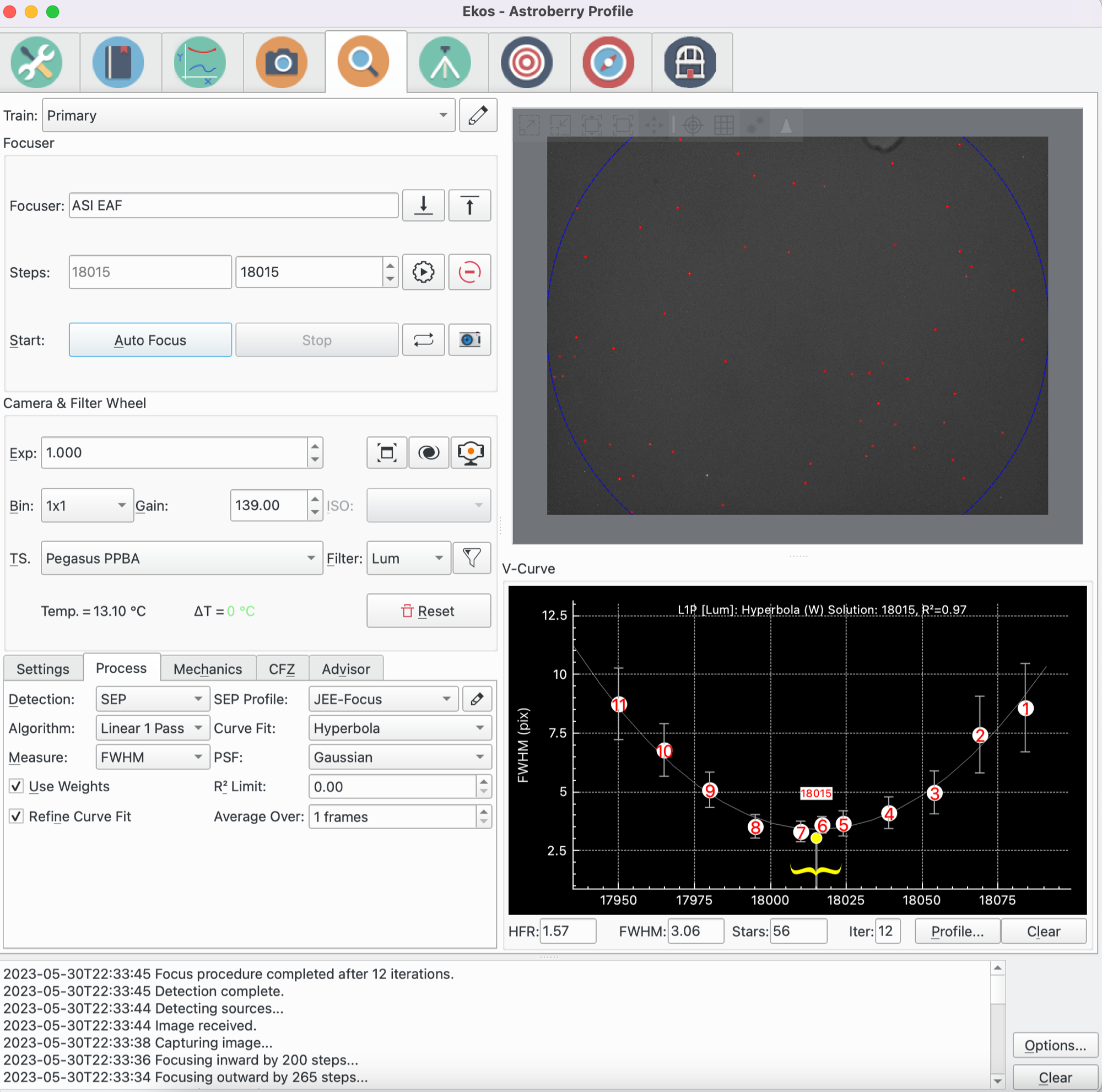
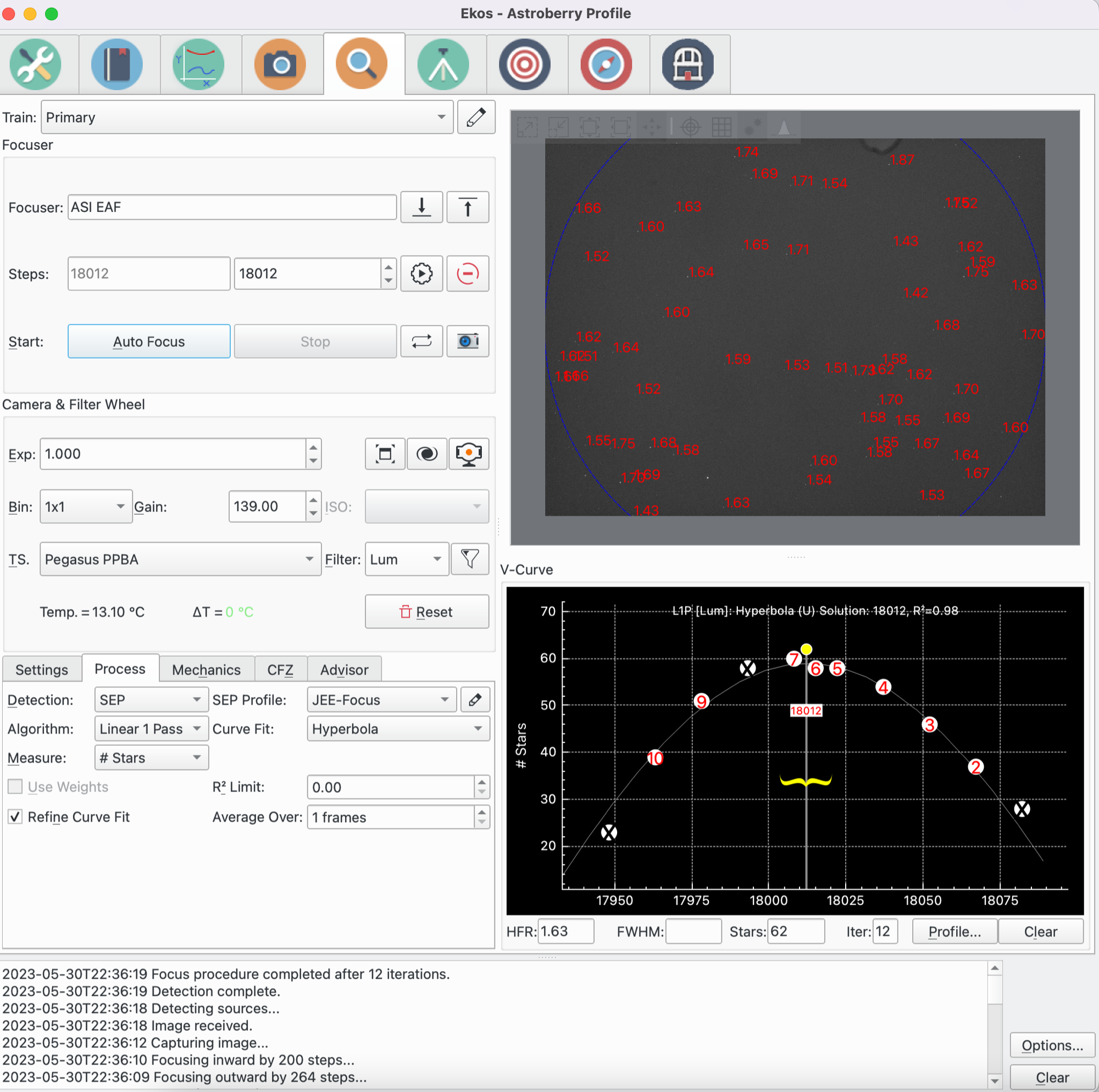
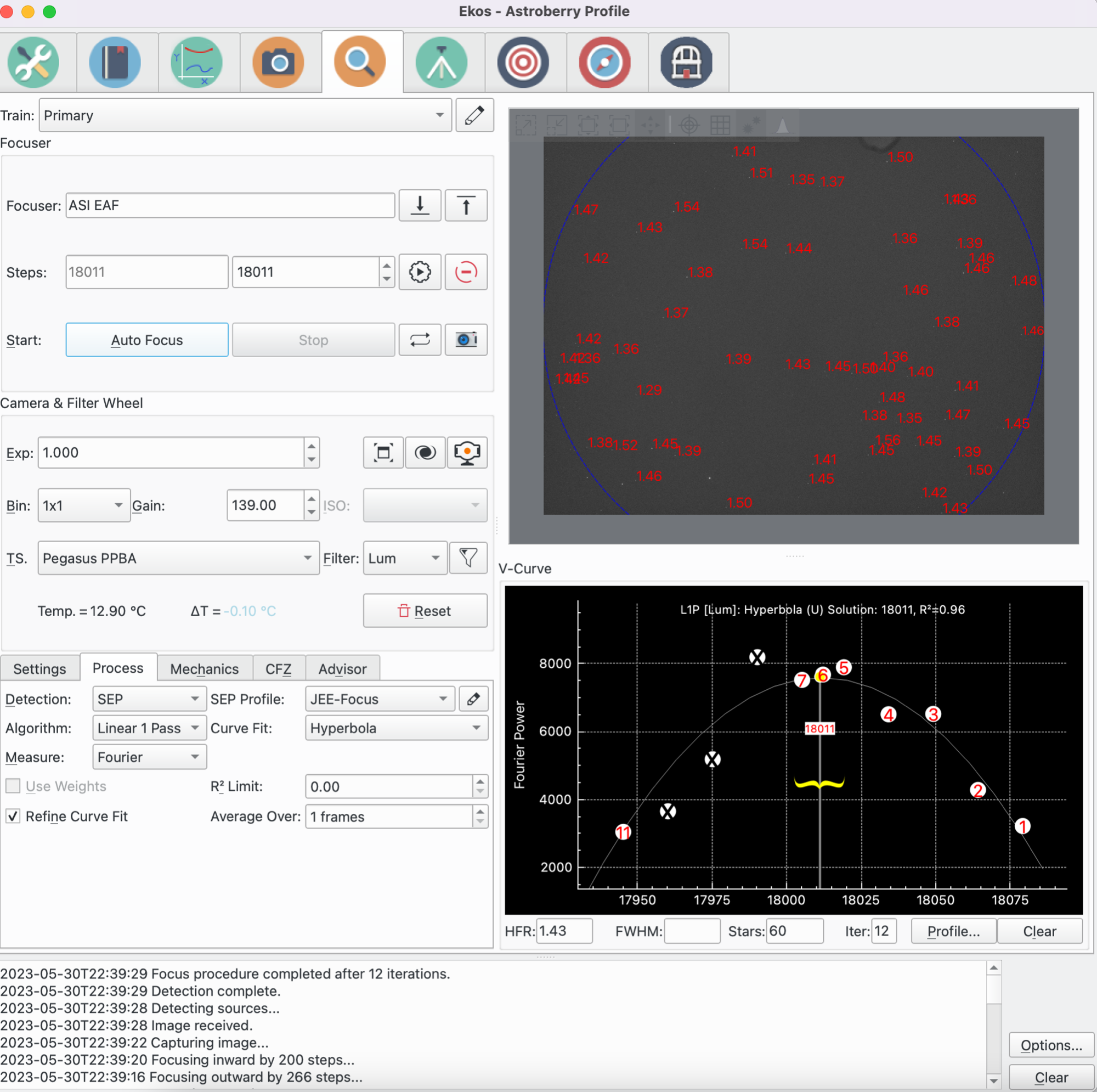
In addition to HFR, you can now use different measurements (FHWM, # of Stars, Fourier Power) that may work well with your setup and environment. Here are some focus runs with each of the new measurements types. You will notice that the solutions are very close to each other.

FWHM


# Of Stars


Fourier Power


Focus Aberration Inspector


Wolfgang Reissenberger introduced the mosaic view well known from PixInsight's AberrationInspector script that builds a mosaic from all image corners and center tiles such that they can be compared directly.

Supernovae are back


The last few releases was missing supernovae data since the online source that was providing the data decided to go offline. Thankfully, Philipp Auersperg-Castell communicated with the fine folks over the Transient Name Server (IAU Supernovae Working Group) to obtain daily supernovae updates and imported them to KStars. All Recent supernovae should be available now in KStars.


Saturday, July 30, 2022

KStars v3.6.0 Released

KStars v3.6.0 is released on 2022.07.30 for MacOS, Linux, and Windows. It's a bi-monthly bugfix release with a couple of exciting features.

Linear 1 Pass Algorithm

John Evans contributed a new Focus algorithm: The Linear 1 Pass Algorithm. When using this algorithm, Ekos initially performs like the Linear algorithm in establishing the first pass V-Curve and fitting a curve to it to find the solution. Then, however, it moves directly to the calculated minimum. Key features include:

  • The algorithm compensates for focuser backlash, providing that backlash is consistent.

  • The algorithm is fast, taking 1 pass to identify optimum focus.

  • The algorithm uses more sophisticated curve fitting to pinpoint the optimum focus position.

  • The algorithm is highly configurable with user control over many parameters like step size and number of steps.


Early tests by various users shows very promising and stable results

Polar-alignment V3


Hy Murveit introduced a new Polar Alignment method based of plate solving. The original polar-alignment error measurement scheme has not changed. The user interface has changed slightly--different messages and a new LED display to indicate progress.

The original polar-alignment refresh/correction method still exists (if you choose the MoveStar or MoveStar & Cal Err refresh methods).

A new polar-alignment refresh/correction method is provided called PlateSolve. It allows for corrections of larger polar-misalignment in a single pass, does not depend on the image display, and may be more reliable if your plate solving is working well.

A new alternative to MoveStar is the PlateSolve method. This can polar align mounts with larger alignment errors in a single procedure. A similar triangle is displayed on the image display, but it is not central to this scheme. 


Rather the user should concentrate on the Updated Error line at the bottom of the display, and attempt to zero the Altitude and Azimuth errors. Also, arrows display the direction the mount needs to move to reduce error.

The method works by plate-solving images as they are captured, and then estimating the user's knob-adjustments from the plate-solve solutions. Note that, since knobs may be moved during exposures, some images may have large star trails and plate solves may fail. Be patient and allow the system to capture a clean image before relying on the error estimate. 

Image ROI Statistics


Madhav Prabhu made his first contribution to KStars by adding Region-Of-Interest (ROI) selection in FITS viewer where users may view statistics for a particular region of the image. The stats include average, median, and standard deviation.


You can select from existing probes of varying sizes (50x50, 100x100..etc), or you can simply hold down the Shift key and drag the mouse to create your own rectangle.

Profile Scripts


For complex equipment profile that have inter-dependencies requiring script execution or programmable delays, the new Script Profile edit provides complete control over the driver startup sequence.


You may define a Pre-Delay and Pre-Script before a driver is executed (e.g. script to turn on the observatory electricity), and define a Post driver delay and script if desired. For some drivers like Pegasus Ultimate Power Box, it is often desirable to start this driver before other drivers so that all configuration is loaded.

Geographic Map Update


Ed Lee made his first contribution to KStars by replacing the old geographic map from a new high quality version from NASA. This should play more nicely on larger monitors and high DPI displays.

Misc. Updates


Small but important quality of life improvements to KStars & Ekos.
  • Hy Murveit Show number of clipped pixels on fitsviewer status bar if show-clipping is enabled
  • Akarsh Simha Improve the manual focus dialog for the SkyMap
  • Sophie Taylor Correct nomenclature for Linear1 focus algorithm with "R2" -> "R²", and add a default and minimum value for R² limit
  • Akarsh Simha Further improvements to Add Catalog Object UI, including auto-filling data from text.
  • Sophie Taylor Improve tooltips for GPG expert settings
  • Akarsh Simha Various fixes and improvements related to DSO catalogs and visibility.
  • Akarsh Simha Refactor `DmsBox` widget and improve the Add Catalog Object form.

Thursday, May 26, 2022

KStars v3.5.9 Released

KStars v3.5.9 is released on 2022.05.26 for MacOS, Linux, and Windows. It's a bi-monthly bugfix release with a couple of exciting features.

DSS Offline HiPS

HiPS (Hierarchical Progressive Surveys) is a technology that provides progressive high resolution images of the sky at different zoom levels. KStars fully supports online HiPS where data is downloaded from online servers and cached to display on the Sky Map.


One of the most popular catalogs in KStars is the DSS Colored progressive survey. With v3.5.9, you can now specify directory where the offline DSS catalog is located. You can download the data from various HiPS services online. For best experience, it's recommended to download 3rd, 4th, and 5th (Norder3, Norder4, and Norder5) order directories which would take around 1GB of storage space. You may download further orders (i.e. higher zoom levels) at the expense of more storage space.

The following shows a sample of downloaded order directories, at minimum you need Norder3 folder for this functionality to work.


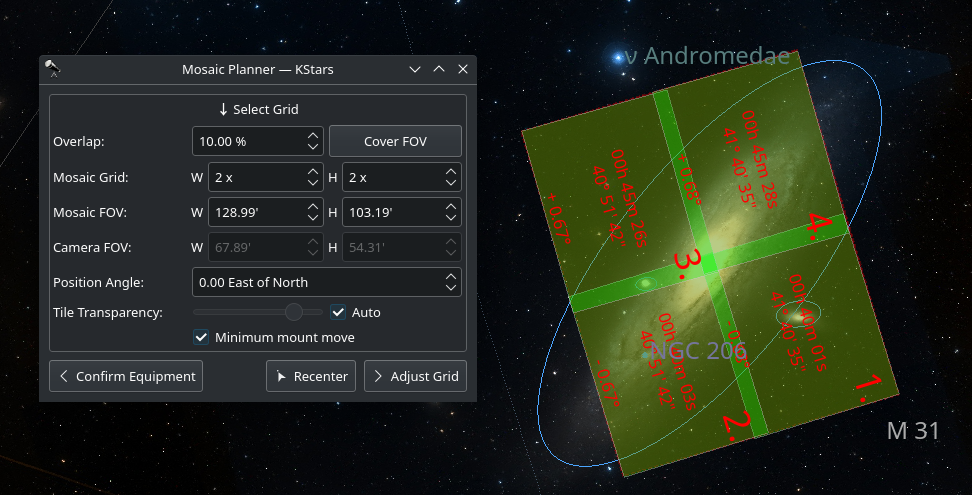
Revamped Mosaic Planner

New simplified and powerful Mosaic Planner directly integrated in the Sky Map. It greatly benefits from HiPS overlay to make your target framing spot on. Toggle the Mosaic View from the tool bar, and select your equipment and the mosaic configuration. You can also use it as a very simple tool to frame a single 1x1 tile.


Adjust the tile center either by manually specifying the J2000 center or by dragging the tiles across the sky map. Once done, you can command the mount to go to the target and solve. Alternatively, you can proceed to create jobs for the Ekos Scheduler. After the jobs are added, you may start the scheduler at any time to plan the mosaic session accordingly.

Refocus After Meridian Flip


Dušan Poizl
 added the ability to refocus after a meridian flip is complete. This is very useful for some optical train setups where the focuser might shift duration the flip.

New Index Files


Robert Lancaster added the new 5200 astrometry index files. The difference is just which star surveys were used to build which indexes. The 4200 Series was made from 2MASS and covers all the image scales. The 4100 series was made from Tycho2 but only covers wide image scales. The 5200 series was just recently added, was made by blending Tycho2 and Gaia, and complements the 4100 series to give it the smaller scales.

Internal Plumbing: Introducing Device Adapter

Wolfgang Reissenberger continues his outstanding work refactoring Ekos state machine by introducing the device adapter. Next step extracting state handling from Capture into a dedicated state machine. In this step devices are managed by a dedicated device adapter (successor of the command processor). With this refactoring it is no longer necessary to route device events from Capture through SequenceJob to the state machine, the device adapter sends the events directly to the state machine.

Capture Progress face lift


Wolfgang Reissenberger streamlined the capture progress section of Capture:

  • Remaining time for frame and sequence displayed as hh:mm:ss
  • Display of average download time (in calculation, all download times are taken into account and not only those > 1)
  • New status widget with a color LED displaying the capture status (and no longer using the seconds text for this)
  • Using the same widget on the Master tab 

Greedy Scheduler Speeds up


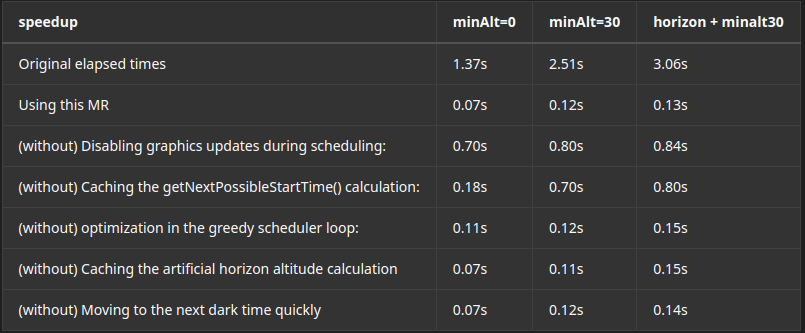
Fans of Greedy Scheduler rejoice! Hy Murveit made significant speedups to the Greedy Scheduler, especially for very large scheduler. 


Saturday, November 21, 2020

KStars v3.5.0 is Released

Glad to announce the release of KStars v3.5.0 for Windows, MacOS, and Linux. This release marks a significant milestone for KStars with the integration of StellarSolver, the Cross Platform Sextractor and Astrometry.net-Based Internal Astrometric Solver.

Check out the Change log for more details.

StellarSolver

Robert Lancaster spent a significant portion of 2020 developing and refining this amazing library. Here is an excerpt from StellarSolver Github on the motivations behnd its development:

Astrometry.net is a fantastic astrometric plate solver, but it is command line only and has many dependencies such as python, netpbm, libjpeg, cfitsio, and many other things. It is fairly easy to install on Linux and works incredibly well in that environment. With the correct recipes in homebrew, craft, macports, or other package managers, it can be installed and run from the command line on Mac OS X as well. On Windows, however, it must be run within a compatibility layer such as Microsoft Subsystem for Linux, Cygwin, or Ansvr. None of these things will stop the program from running, but it does make it more difficult to set up and use and all of the files and dependencies and configuration files must be setup properly in order to get it to work.


StellarSolver major features:
  • An Astrometric Plate Solver for Mac, Linux, and Windows, built on Astrometry.net and SEP (sextractor)
  • Meant to be an internal library for use in a program like KStars for internal plate solving on all supported operating systems
  • Python is not required for the library.
  • Netpbm is not required for the library.
  • Internal Library, so calls to external programs are not required.
  • No Astrometry.cfg file is needed, the settings are internal to the program
  • Directly loads the image data into SEP and then takes the generated xy-list internally from Sextractor into astrometry.net, so there is no need to save any files.
  • No temporary files need to be created for solving and no WCS file needs to be created to read the solved information. Although astrometry.net does monitor for the creation of 2 files indicating that a field is solved or a cancel was made, so these are created for now.
  • The Index Files are still required for solving images, but the program or the user can specify the folder locations rather than putting them in the config file.

It took significant re-tooling inside KStars to integrate StellarSolver, but right now we are confident in the benefits in will bring to all our users. For the first time since Ekos was developed back in 2012, KStars does not require any external applications to perform any of its astrophotography related tasks. The solver is completely built-in and supported on all platforms equally. Windows users would be glad to learn they do not have to download and install extra programs to get the astrometry functionality to work.


But StellarSolver is not only limited to astrometry, its major function in Ekos is actually for star detection. Therefore, it is now used in Capture, Guide, and Focus modules as well. Future versions should pave the way to perform photometric calculations right within FITS Viewer.

FITS Viewer

While the name remains as FITS viewer, we also added support to load JPG/PNG and RAW files from DSLR cameras. Granted, not all the features of a FITS file is going to be available, but this feature has long been requested by users and now we finally have it baked in!


Analyze Module

Hy Murveit introduced a new Ekos module to help analyze the imaging session in details. It records and displays what happened in an imaging session. That is, it does not control any if your imaging, but rather reviews what occurred.


Sessions are stored in an analyze folder, a sister folder to the main logging folder. The .analyze files written there can be loaded into the Analyze tab to be viewed. Analyze also can display data from the current imaging session.The Analyze Module records and displays what happened in an imaging session. That is, it does not control any if your imaging, but rather reviews what occurred. Sessions are stored in an analyze folder, a sister folder to the main logging folder. The .analyze files written there can be loaded into the Analyze tab to be viewed. Analyze also can display data from the current imaging session.

Testing Framework

This release culminates 3 months of continued incremental improvements to KStars testing framework spearheaded by Eric Dejouhanet. These tests cover both Unitary tests and User Interface tests. While we are still far away from covering sufficient tests for all KStars uses, it paves the way to Test Driver development approach in which tests are created to illustrate the issue and then fixes.

MR #114 by Wolfgang Reissenberger perfectly highlights Test Driven development and we hope to follow this model in upcoming releases.

Sunday, June 23, 2019

KStars v3.3.1 is released

KStars v3.3.1 is released for Windows, MacOS, and Linux on all platforms (Intel/AMD and ARM). This is yet another maintenance release with a few new experimental features and addons.

MacOS Updates


Robert Lancaster cleared all the issues reported on astrometry.net problems on MacOS. After gathering the feedback of users with experimental releases on this dedicated INDI thread.

Astrometry on MacOS

Furthermore, DBus is now working again in this release which would make the Ekos Scheduler operational again under Mac.

New Observatory Module


Wolfgang Reissenberger developed a new Ekos Observatory module to manage the dome and weather-triggered shutdown procedure. This is the first iteration of the module with more expected in the upcoming months but it provides a compact and friendly interface to observatory management. Feedback is welcome.


Meridian Flip is gone!


Well, sorta of. Wolfgang Reissenberger removed Meridian Flip from the Capture Module and moved it to the Mount Module. This way the meridian flip can be controlled even if there is no active capture session going on.


So just set when you want the meridian flip to occur at the mount module. Remember that the setting is in Hour Angle (HA). 1 HA = 15 degrees, therefore 0.1 HA = 1.5 degrees West of the Meridian. 

Always use a positive value to ensure proper meridian flip takes place. Using zero could theoretically work but it is at the very edge where the decision to flip or not is made by the mount, so it's safer to use a slightly higher value like 0.1 HA.

Stream Window


Due to popular demand, the FPS control in the Stream window is replaced Frame Duration in seconds control. So a setting of 0.1 seconds would yield a frame rate of 10 FPS (1/0.1 = 10) if the hardware can support that. The duration can be set as low as 1 microsecond but only if supported by the driver and camera!


Other highlights:


  • Reset focus frame when mount slews.
  • Do not abort PHD2 guiding while suspended.
  • Switching to homebrew, python3, and astroy for plate solving on OS X.
  • Check if dust cap is detected before checking whether the camera is shutterful or shutterless.
  • Fix translation issue with Sun, Moon, and Earth designations.

Sunday, May 12, 2019

KStars v3.2.2 is Released!

Thanks to all to the hard work by KStars developers and volunteers, we are happy to announce KStars v3.2.2 release for Windows, MacOS, and Linux.

In this release, support for x86-32 bit architecture has been dropped and the Windows 10 executable now requires an x86-64 bit system.

Improved Observing List Wizard


This is a maintenance release to fix a few bugs and introduce a few enhancements:

  • Important stability fix for crashes reported with FITS Viewer.
  • Ignore Video Streaming when guiding via PHD2 with a video device.
  • Automatic syncing for Active Devices on Startup.
  • Meridian Flip Fixes.
  • Keep GUI parameters for scheduler and capture in sync with row selection
  • When a manual filter is detected, prompt user to change the filter and update the driver accordingly.
  • Fix observing list wizard object filter by time and altitude and introduce a coverage param where the user can control the percentage.
  • Improved saving of settings in all Ekos modules.


Thursday, February 28, 2019

KStars v3.1.0 is released!

I'm glad to announce KStars first release of 2019: v3.1.0 for MacOS, Linux, and Windows. This release focuses on improvements to stability & performance of KStars. In 3.0.0, we introduced quite a few features which resulted in a few regressions that we worked hard to iron out in this release.


Ekos Scheduler


Eric Dejouhanet fixed a few bugs with the Ekos Scheduler along with making steady improvements to cover all corner cases for multi-object multi-night scheduling which can become quite complex.


Ring-Field Focusing


Eric also added a new feature to the Focus module: Ring-field focusing. This method limits the area which stars are detected between an inner and an outer ring. This can be useful in images where
galaxies or nebulaes can be mistaken as stellar object which often lead to erroneous HFR reporting.

This can only be used for full-field focusing.


Meridian Flip


Wolfgang Reissenberger migrated the Meridian Flip handling code to the Ekos Mount tab. This makes meridian flip possible even if there is no capture process going. If the mount is tracking and passes the meridian, it can be triggered to flip now in the Mount Module.


Ekos Documentation


Yuri Chornoivan migrated online Ekos documentation to KStars official documentation. This was a tremendous effort due to the volume of the documentation data involved. Now Ekos documentation are properly managed by us in KDE and should get translations like the rest of the official documentation.


Ekos PAA for Non-GOTO mounts


Sebastian Neubert introduced manual workflow for users who would like to use Ekos Polar Alignment Assistant Tool with manual non-GOTO mounts. Now the users are prompted to rotate the mount when it is required to do so until the process is complete. This is Sebastian's first code contribution to KStars, welcome to the team!


MacOS Build Script


Robert Lancaster developed a comprehensive script along with detailed documentation for building KStars with Craft on MacOS. This enables users to wish to either develop for KStars or use the latest bleeding edge versions from trying it out with a single script that pulls all the sources and compile them accordingly with the aid of KDE's spectacular Craft technology.


DSLR LiveView


The LiveView window received a few enhancement to enable zooming and panning for supported DSLR cameras.


Other Fixes & Improvements

  • The FITS Viewer window is now automatically raised to the foreground when a new image arrives.
  • Dark Library now considers all DSLRs to be shutterless.
  • Mounts are grouped by manufacturer in the Equipment Profile Editor.
  • Preliminary support for websocket to INDI::CCD on the client side.
  • DBus interface expansion to provide more fine control over KStars.
  • Fixed relative focuser bug in autofocus mode.
  • Improved multi-channel histogram by providing dedicated controls to each channel.
  • Fixed Auto-Stretch affecting raw image values.
  • Support for compressed FITS (*.fits.fz) in INDI. This can cut the transmission time to 30%!
  • Improved display of Parked status.
  • KStars defaults to limited resource mode on ARM architecture.
  • When there is binning change, always FORCE setting of frame values even if they did not change

Thursday, July 26, 2018

KStars v2.9.7 is Released!

Just in time before the next total lunar eclipse of 2018, KStars v2.9.7 is out for Windows, Linux, and MacOS.

This is a feature-rich release while still continuing on making KStars more resilient and reliable.

MacOS improvements

Robert Lancaster diligently worked to improve INDI driver support on MacOS while adding a new FFMPEG-based Web Camera driver that can even records videos streamed directly from your phone. Furthermore, drivers from SBIG, MGEN, ATIK, INDuino, SSAG, Morovian, Fishcamp, and Radio Detectors have been migrated successfully to MacOS. Peter Polakovic graciously offered assistance in the SSAG and ATIK migrations.

With INDI Webcam driver on MacOS

Robert Tricking Star Detection Algorithm!
Ekos Scheduler

Eric Dejouhanet & Wolfgang Reissenberger contributed significantly to the Ekos scheduler to improve its behavior under a number of scenarios. As a result, the scheduler is now more user-friendly and quite straight forward to setup and monitor progress. More work is pending for the next release to further enhance the scheduler.

Planning Sadr Mosaic with Scheduler
Polar Alignment Assistant

The PAA tool received few improvements to simplify the process, it's now literally a 1-button click operation.

Ekos Live

Support for EkosLive is added in this release. EkosLive is a real-time web application that communicates with Ekos via websockets to provide a feature-rich yet simple interface to control and monitor all the observatory equipment. Backed by Cloud services for storage, users can store their images on the cloud and access them at any time and from anywhere. Thanks to the rich metadata system that ships with EkosLive, it is very easy to search and categorize your astro images.


EkosLive is currently in Beta.

Custom Drivers

Long requested by the community, KStars now offers an easy method to add INDI custom drivers. This is perhaps more important to users who have multiple devices and want to distinguish them. Suppose you have two SBIG cameras and want to use them simultaneously with Ekos. Currently, there is no way to do this out-of-the-box. You need to manual create an alias by copying over the SBIG XML file under /usr/share/indi, and then rename the label to be able to use a different alias.


With the Custom Drivers dialog, it's now quite straight forward to create any alias for any driver. After a restart, you can see the new alias in the Profile Editor. Moreover, this feature also works with INDI Web Manager, so you can create aliases for remote drivers as well!

Here are more highlights:

+ Support for loading compressed FITS (*.fits.gz) in FITS Viewer.
+ Android fixes + improvements by GSoC 2018 student Csaba.
+ Disabled internet check for online astrometry solver to workaround Qt bug.
+ Fixed PHD2 file not found issue.
+ Added option to restart alignment process in scheduler in case of calibration failure.
+ Support for manual dither plus dithering to a specific X,Y location.
+ Support for Auto Park Timer in Mount Module.
+ Support for Remote Drivers in the Profile Editor.
+ Added video exposure duration control to the Video Stream window.


Ekos Auto Park Timer


Saturday, May 26, 2018

KStars 2.9.6 is Released!

I'm glad to announce the release of KStars 2.9.6 for Windows, MacOS, and Linux. This is a minor bugfix release.

KStars on MacOS with QHY
Here are some the highlights:
  • Numerous scheduler fixes and improvements by Eric Dejouhanet.
  • Fixed long-standing bug where Time zone was not updated correctly from INDI GPS.
  • Fixed Filter Manager settings as it was not updating the database properly.
  • Fixed centering & tracking of empty sky.
  • Fixed Polar Alignment Assistant rotation in the southern hemisphere.
  • Added a method to clear DSLR info in case they were entered incorrectly.
  • Added J2000 support in the Mount Control panel in addition to the standard JNow.
  • Alignment FOV is now always editable.
  • CCD Capture format and directory are now persistent.
  • Guiding is aborted when mount is slewing or parking.
  • Clang fixes by Csaba Kertesz as part of GSoC 2018.
Updated Ekos tutorials for the various Ekos modules are now also available. I should be adding more soon.