Showing posts with label Guide. Show all posts

Monday, June 1, 2026

KStars 3.8.3 Released

KStars v3.8.3 is released on 2026.06.01 for Windows, Linux, and MacOS.

For Linux users, it's highly recommended to use the official KStars Flatpak hosted at Flathub.

This release brings major improvements to the Mount Modeler with artificial horizon filtering and uniform point distribution, significant connection speed optimizations, better guide streaming integration, and enhanced rotator handling. We've also fixed several scheduler and stability issues reported by the community. Here are the highlights:

Alignment & Mount Modeler

  • Christian Kemper added Artificial Horizon filtering to the Mount Modeler wizard, allowing generated alignment points below the active horizon to be automatically filtered out. Candidate coordinate points (both generated AltAz coordinates and snapped catalog objects) are now checked and rejected if they fall into active artificial horizon regions.
  • New Uniform Distribution mode generates points spread evenly across the visible sky using a Halton sequence, sampling in AltAz space to guarantee every point is above the configured minimum altitude. Points whose declination exceeds +/-80 degrees after conversion are rejected. The Any Stars, Named Stars, and Any Object modes now adopt this distribution internally and snap each generated position to the nearest qualifying object.
  • Auto-sorted wizard output: points added by the wizard are automatically sorted in nearest-neighbour slew order, minimizing total slew distance. Users no longer need to click Sort after running the wizard. Clicking Sort during a run reorders only the remaining unvisited points, leaving completed rows undisturbed.
  • The wizard now automatically configures the solver for each alignment point. Blind solves are used by default because no pointing model exists yet at the start of a run, so the mount's reported position may be significantly off. The GOTO mode is forced to Sync so the mount is updated after each successful solve. The original settings are saved and restored when the run finishes, is aborted, or is reset.
  • Refactored point generation logic to eliminate duplicated generation and conversion math in the test suite, improving generator efficiency using a stateful sequence
  • Toni Schriber fixed activation of the rotator button in the align module
  • Fixed effective focal length calculation to use radians in the DSLR branch

Guide

  • Thanks to Andreas Ruthner, guide streaming now correctly handles video stream window interaction. The video window no longer pops up when guide streaming starts, displays frames correctly when opened from the Capture module after a guide session, and now renders 16-bit mono stream frames (previously only 8-bit mono and RGB were handled).
  • Andreas also fixed frame, binning, gain and exposure sync for streaming mode. When starting guide streaming, the module now applies the same frame settings that captureOneFrame() applies for single-frame captures. Previously, streaming mode skipped this setup entirely, causing stale values from other modules to remain active in the driver.
  • Frame ROI and binning now sync on stream start, live gain updates apply immediately when the user changes the spinner during active streaming, and binning/exposure changes automatically stop and restart the stream
  • Added 0.001-0.01s exposure values to the guide exposure spinner for fast streaming and daytime testing

Rotator

  • Fixed several issues with Reversed rotator state not taken into account in various rotator operations
  • Rotation now aborts if the Position Angle error keeps increasing due perhaps to reversed rotator behavior

Ekos Profiles & Connection

  • Significantly cut down time to connect to INDI web manager by skipping DNS resolution if we already have an IP address specified for the remote host
  • Fixed rare crash due to dangling clientManager pointer with test to verify the fix

Capture & Livestacking

  • Use OpenCV debayering by default. Enforce even ROI selection to ensure bayer boundaries are respected.
  • Always sync from INDI to overwrite shadow states in the Camera process
  • Account for STREAM_FULL_DEPTH when streaming
  • John Evans added support for Live Stacker Alt/AZ data via Seestar S30 Pro. It should support other telescopes in Alt/AZ mode.
  • John added a gradient removal option to post processing in Live Stacker.

FITS Viewer & File Handling

  • Use standard gzip compress instead of Qt own compression algorithm
  • Support loading .fits.gz and .xisf.gz in the viewer

Scheduler & Observatory Automation

  • Fixed scheduler freezes when loading ESL referencing many ESQ files (patch by Tomas). BUGS:519294
  • Autopark should work over multiple nights now
  • If observatory is not started, skip shutdown procedure
  • Fixed issue where post-shutdown script run in infinite loop
  • Fixed scheduler and capture scripts not running inside flatpak

Optical Trains & DBus API

  • Added DBus call to set and get Pictures directory
  • Fixed warning of missing devices when we already selected alternative devices in the optical train

Build & Infrastructure

  • Use KSUtil to consolidate all calls to external executable so they can run correctly within a flatpak as well
  • Within flatpak, run the external scripts on the host system since it may require libraries that are only available on the host system
  • Christian Kemper fixed macOS iconutil failure by adding 256px and 512px icon sizes rendered from the existing SVG source, which are required by iconutil on macOS 15 (Sequoia)
  • Wolfgang Reissenberger updated the Dockerfile to be based on installation scripts for all steps: INDI, StellarSolver, PHD2, GSC, openCV. All scripts are built uniformly such that existing packages or installations are preferred. If the package is missing, first installing the appropriate package is tried. If this fails, the package is built from sources

Stability & Bug Fixes

  • Fixed crash reported in crash-reports.kde.org regarding invalid base device or message text. The check for message text now occurs earlier in the process to protect against this crash.
  • Milhan Kim fixed test deadlock by replacing QTest::mouseClick with animateClick(), which posts the click through the event loop and prevents tests from hanging indefinitely on QDialog::exec() loops
  • Fixed an issue where frequent temperature updates can cause the dark cover check to run indefinitely
  • Hy Murveit fixed green lines display issue
  • Fixed solution assignment
  • Fixed crash and distorted artifacts in video streaming
  • Replaced all abs and fabs with std::abs for consistency
  • Modernized signals and slots

Many thanks to Christian Kemper, Andreas Ruthner, Toni Schriber, Hy Murveit, John Evans, Milhan Kim, Wolfgang Reissenberger, Tomas, and all others who contributed fixes and improvements to this release! Your work makes KStars better for everyone.

Download KStars v3.8.3 today and enjoy improved mount modeling, faster connections, and more reliable guiding!

Thursday, October 3, 2024

KStars v3.7.3 is Released

KStars v3.7.3 is released on 2024.10.03 for Windows, MacOS & Linux. It's a bi-monthly bug-fix release with a couple of exciting features.

Extension Interface

Ed Lee contributed the Extension Interface for KStars.

Extensions are small programs that can be added to interact with KStars/Ekos/INDI in order to provide extra functions and features. Extensions are separate from KStars. They are not provided as part of this software. Only a means to call them is provided for convenience. Make sure that you understand the requirements and risks of using an extension.


Three extensions are ready for release:

  • FireCapture launcher (FC_launcher): disconnects the current primary camera INDI driver and launches FireCapture. Upon close restarts the INDI driver.
  • KStars Backup (KS_backup): provides a GUI for the archiving and restoration of KStars/INDI (and optionally others) configuration directories to/from .tar.gz archives/
  • Sirial_EEA: provides live stacking of the preview job from the Capture Module and displays it auto-stretched in the Ekos preview window.

Each extension must have a companion configuration file also located in the extensions directory, named the same as the executable with the addition of a .conf eg: an extension named example must also have a configuration file named example.conf A configuration file is a plain text file that provides configuration settings to the extension program and usage information to the user. A configuration file is only valid if it contains a line starting with: minimum_kstars_version=x.y.z The x.y.z is the minimum release of KStars that the extension is designed/tested against. This value is checked against the current KStars KSTARS_VERSION macro defined in version.h and must be equal or lower for the extension to be considered valid. The extension should also check that this minimum_kstars_version string matches what it expects.

Optionally each extension can also provide an icon file for display in the Extension drop down list. Again the naming should match the extension executable with a valid file extension (.jpg, .bmp, .gif, .png or .svg) and be placed in the same extensions directory. A default icon is used for any extension that does not provide it's own icon.

Several new DBus functions/signals are added to enable general extension use and for a specific upcoming extension.

Multi-Target Scheduler

Wolfgang Reissenberger continued the development of multi-camera acquisition and now scheduling with many exciting updates!

Multi-Camera Scheduling

With this new release it is possible to create and run schedules for two or more optical trains in parallel within the same KStars instance. All mount related events like slewing, dithering, alignment and meridian flip are synchronized, i.e. capturing on all optical trains takes these events into account.

Lead and follower jobs

If you want to run capturing on multiple optical trains in parallel, you need to decide, which of the optical trains is the lead job, which defines the target and the scheduling criteria. All other optical trains will be follower jobs, for which only the capture sequence to be used is relevant.

Job Synchronization

Ekos ensures that no mount motion happens while one of the optical trains is capturing to avoid star trails.

In case of dithering, the capture module decides what to do as soon as dithering is requested, depending on the setup of the lead job. If the remaining capture time of a follower train is more than 50% of the lead job exposure time, capturing of the follower train is stopped and restarted after dithering. If the remaining capture time is less than 50%, the Capture module waits for the follower to finish its capture.

For the meridian flip and re-alignment: both are controlled by the lead job. All running follower capturing sequences are stopped and restarted after a successful completion of the respective action.

Recommendations

  • The lead job should have the longest exposure times, especially if dithering is used.
  • If you use re-focusing, consider to not suspend guiding during focusing, since the other optical train might capture in parallel.
  • Configure the same optical train in the Align module that you use in the lead job. This is important if you use the re-alignment check option of the scheduler.
Do not use the Force re-alignment before re-starting jobs, since each new iteration of the lead job stops capturing of the follower trains. Consider using Verify captured image position every n frames instead, since this option triggers re-alignment only if it is necessary.

Adhoc focus with Multi-Camera setups

Wolfgang Reissenberger added support for simultaneous parallel focusing when you are running multi-camera setup. It would be a good idea to disable Suspend Guiding so that guiding is unaffected when focusing operation commences.

Invent Multi-Star Guide Star

Hy Murveit introduced an experimental Multi-Star parameter. In the original (conservative) multi-star guiding implementation, although many stars contributed to the computed guiding drift computation, there still was one more important star that anchored the scheme.

With this change, all the guide stars contribute equally to the guiding calculations. This removes the risk that an unfortunate selection of a double star for the more-important main guide star would degrade performance.

Improvements & Bug fixes

Sunday, July 19, 2020

KStars v3.4.3 is Released

After 3 months of development, we're glad to announce the availability of KStars 3.4.3 for Windows, MacOS and Linux.

Let's check out the highlight of this release!

New Bahtinov Mask Focus Assistant

Patrick Molenaar added a long requested feature: The Bahtinov Mask focus assistant tool. Users can activate the new algorithm in the Focus module.

Focus Bahtinov Assistant Tool

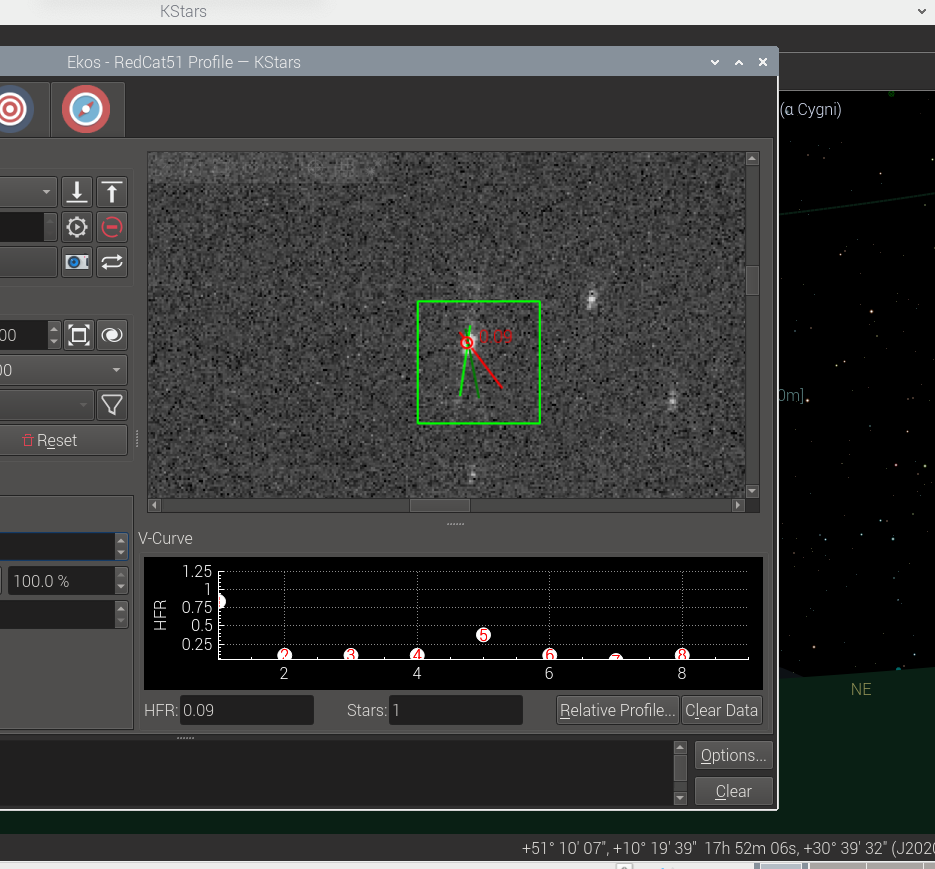
It is useful for users who do not have a motorized focuser and prefer to focus manually with the aid of the mask. After capturing an image in the focus module with the Bahtinov mask algorithm selected, Ekos would analyze the images and stars within it.  if Ekos recognizes the Bahtinov star pattern, it will draw lines over the star pattern en circles on the center and on an offset to indicate the focus.

Autofocus on Temperature Change


Florian Signoret added support for triggering autofocus procedure when the temperature exceeds a certain delta threshold in the capture module. The temperature is sourced primarily from the focuser itself, and in unavailable, then it falls back to the weather station, if any.

Focus Logs

Doug Summers added a dedicated focus logger to help users analyze their autofocus runs to better understand their behavior and improve them in the future.

Camera Driver Restart

An experimental camera driver restart feature was added to the capture module. It should be used as a last resort option in case the camera driver is unresponsive. This feature commands the INDI server to only restart the camera driver without affecting any other drivers, so you don't have to shutdown the whole INDI server if one driver misbehaves. 


Restarting a camera driver might lead to quite a few complicated since it interacts with many subsystems in Ekos. Therefore, it is flagged as experimental in this release pending user feedback.

Mount Hour Angle Limits


Previously Ekos Mount module supported enforcing Altitude limit for the mount motion. The mount is active stopped if its slew or track past there limits. Chris Rowland added the Hour Angle (HA) limits to prevent limit the mount from slewing and/or tracking past there limits. This can protect the equipment in case of a runaway motion that might lead a pier collision.

Filter Names Editor


A simple, but convenient editor was added in Capture module to edit filter names. Previously, you had to change filter names directly in INDI Control Panel which was not intuitive for quite a few users.

Internal Guider Features


Hy Murveint contributed significant new features and improvement to the Ekos Internal Guider.

New Detection Algorithm: SEP MultiStar

This is a new guide-star detection, tracking & drift computation algorithm.


You can select this in the Guide options menu (click Options... in the lower right corner of the Guide tab), and then click on "Guide", and then choose from the "algorithm" menu. There choose the guide-star detector. (e.g. there choices include Smart, SEP, Fast, ...). Try SEP MultiStar. It is more stable in all three respects (guide star selection, detection and drift calculation). You may not notice much difference in a normal guiding session when things are going well, except, perhaps, better choice of a guide star.

GPG RA Guiding: New control algorithm for RA guiding.

Hy added a new guiding algorithm. This is for RA only--that is, guiding for DEC still happens, but using the existing guiding algorithms. This guider is based on the work in this PhD thesis and is the same as the well-regarded PHD2 guide algorithm known as Predictive PEC. You will see Copyright 2014-2017 Max Planck Society, now in the KStars credits for this system. It estimates the periodic error in the guiding system, and tries to fix it before it happens. This system should perform about the same as the standard guider for the first period or two of your mount's periodic error, then improve. When using this system, it's best to set in advance what your mount's worm-gear period is. For example, the Orion Atlas pro is about 480s. You enable this in the Guide options menu, in the GPG RA tab, and then checking "Enable GPG". There are other parameters you can change, but as indicated earlier, the main one to think about is "Major Period".

Graphics Improvements

  1. Added a guide-star SNR plot. This can be useful, e.g. when the SNR starts taking a dive, you know things aren't going well, perhaps a cloud is passing by.
  2. Added a plot of the RMS error (i.e. RA and/or DEC arc-second error RMS-averaged over the past 50 guiding samples).
  3. Separated the zooming for x and y axes. You can use '+' and '-' buttons below the x-axis to change the time scale of the plot (number of minutes plotted), and you can use the mouse scroll (same as before) to zoom in/out of the Y-axis. When you mouse-over the plot, you can see all the values for the different graphs.BTW, in case you didn't know (this isn't something I changed), you can change the amount of space allocated to the drift plot (the circle) and the drift graph by placing your mouse over the short dotted line between them and dragging left of right.

Calibration Backlash Removal

A backlash removal section was added to the "calibration dance". Before it starts calibrating DEC, the Ekos guider will now take 5 DEC steps, without measurement, to make sure there's no backlash in the DEC gears. This should improve the quality of the calibration, however, if you don't like this, you can remove it by unchecking "Remove DEC backlash in guide calibration" in the Guide options menu, in the "Calibration" tab there.

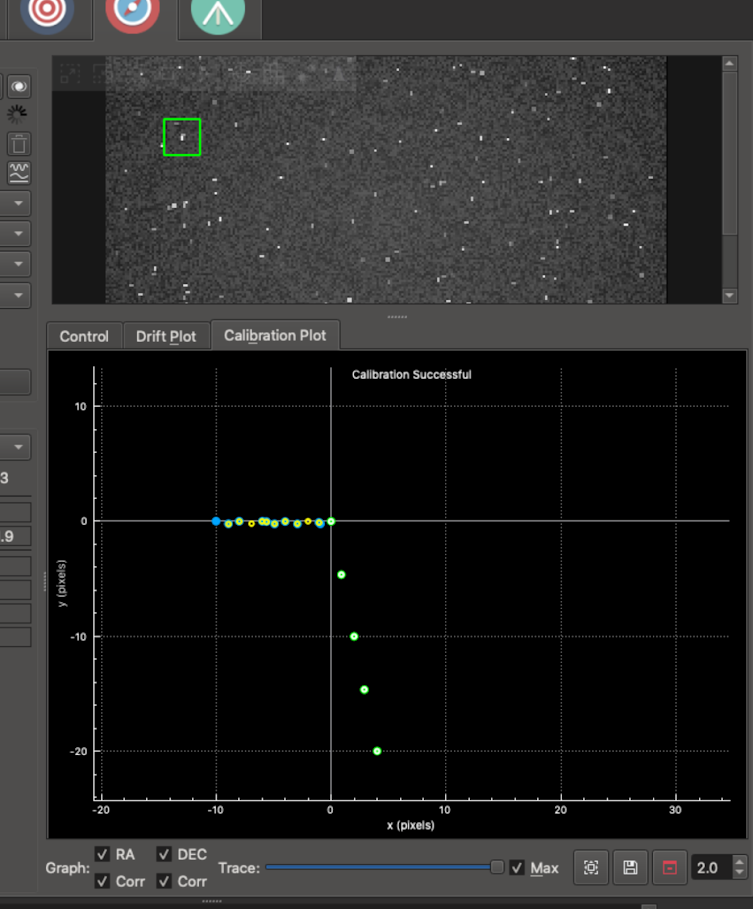
Calibration Plot

A Calibration Plot subtab was added to the right right of the Drift Plot.  It shows the mount positions recorded during internal-guider calibration.

Basically, if things are going well, it should display dots in two lines which are at right angles to each other--one when the calibration pushes the mount back and forth along the RA direction, and then when it does the same for the DEC direction. Not a ton of info, but can be useful to see. If the two lines are at a 30-degree angle, something's not going well with your calibration! Here's a picture of it in action using the simulator


The colored dots (same color scheme as the internal guider) shows the RA and DEC samples on their way out, and the small white and yellow circles show their return paths.

PHDLogView compatibility


phdlogview is a program written by Andy Galasso to analyze PHD2 logs. It's very nice. I've tried to have the internal guider output a mostly compatible log file so that if you installed phdlogview, you could use it to also browse your logs from the Ekos internal guider. A few things to note:
The logs are placed in a directory parallel to the standard KStars logs directory. Instead of logs, it is guidelogs. So, for example, on Linux you'd find them in this directory ~/.local/share/kstars/guidelogs/
You can turn on/off this logging by going into the Options menu on the internal guider tab, clicking on the Guide tab on the left and checking/un-checking the box labeled "Save Internal Guider User Log".

There are many features in phdlogview. Explore and look at Galasso's documentation for how to use it.

PHD2 Integration Fixes

Eric Dejouhanet significantly improved fault tolerance during PHD2 interactions. This includes the following situations.
  • Star does not move enough for calibration to complete. PHD2 may:
    • be looping instead of calibrating, while still notifying calibration.
    • abort but continue to send guide steps and frames.
    • => Fixed: calibration failures are now properly handled in that situation, and forwarded to Guide module.
  • Star disappears because of a mount glitch. PHD2 may:
    • declare star lost and stop without further notice.
    • => Fixed: star-lost notification is now properly handled, and will time out properly (and not restart).
  • Device disconnects briefly. PHD2 may:
    • declare device unusable, eventually after some time (camera timeout is 15s by default), requiring reconnect.
    • => Fixed: equipment dis/connection is now properly handled from both sides, aborts operations and is robust.
  • KStars/Ekos crashes while guiding and is restarted using the existing indiserver.
    • The currentCCD may be null when restoring connection, upon call to executeOneOperation.
    • AppState has to be taken into consideration to restore state as it was before the crash.
    • => Fixed: app-state polling improves robustness, requires up-to-date INDI build.
  • If Ekos is told the equipment is disconnected, it will consider an external cause and will not attempt to reconnect.
    • Ekos will not reconnect, to allow manual intervention is required on PHD2 side.
    • Ekos will detect reconnection and change state automatically.
  • However PHD2 v2.6.8 crashes when INDI drivers are killed, so no solution except restarting PHD2 in a loop (use systemd).
  • One issue remains in Guide, where the stop button remains enabled sometimes (regression?).
    • May not fix in the context of this MR.
  • One issue remains upon server loss, which triggers perpetual reconnect unless the end-user disconnects manually.
    • Issue related to state kept at disconnected.
image

New LED indicators were added for each stage as a visual feedback for the user.

Other Fixes


Check out the complete changelog for more details.