Showing posts with label INDI. Show all posts

Wednesday, August 13, 2025

KStars v3.7.8 is Released

KStars v3.7.8 is released on 2025.08.13 for Windows & Linux. MacOS release is pending. It's a bi-monthly bug-fix release with a couple of exciting features.

Live Stacking

The moment many of you have been waiting for has arrived! John Evans has introduced the highly anticipated Live Stacking feature to Ekos, seamlessly integrated into the FITS Viewer. Once you configure your live stacking directory, any FITS images added will be automatically stacked in real-time.

This feature works independently of your existing sequences or scheduler sessions, allowing you to configure the live stacker to process captured images for an enhanced view of your final results. It's particularly valuable for public observatories and star parties, where real-time feedback can greatly enhance the viewing experience.

Since Live Stacking is still in beta, we welcome your feedback and suggestions for improvement. Check out the demonstration videos below to see the feature in action and learn about its capabilities.


Equipment Profile Editor

The Ekos Equipment Profile editor has received a complete redesign. We've eliminated the limitations of the previous editor—you can now add unlimited drivers to your equipment profiles without restrictions. Need three different mounts in a single profile? No problem!

Both driver and profile lists now include search functionality, making it quick and easy to locate specific drivers. This flexibility gives you unprecedented control over your equipment configurations.


Focus History Navigation

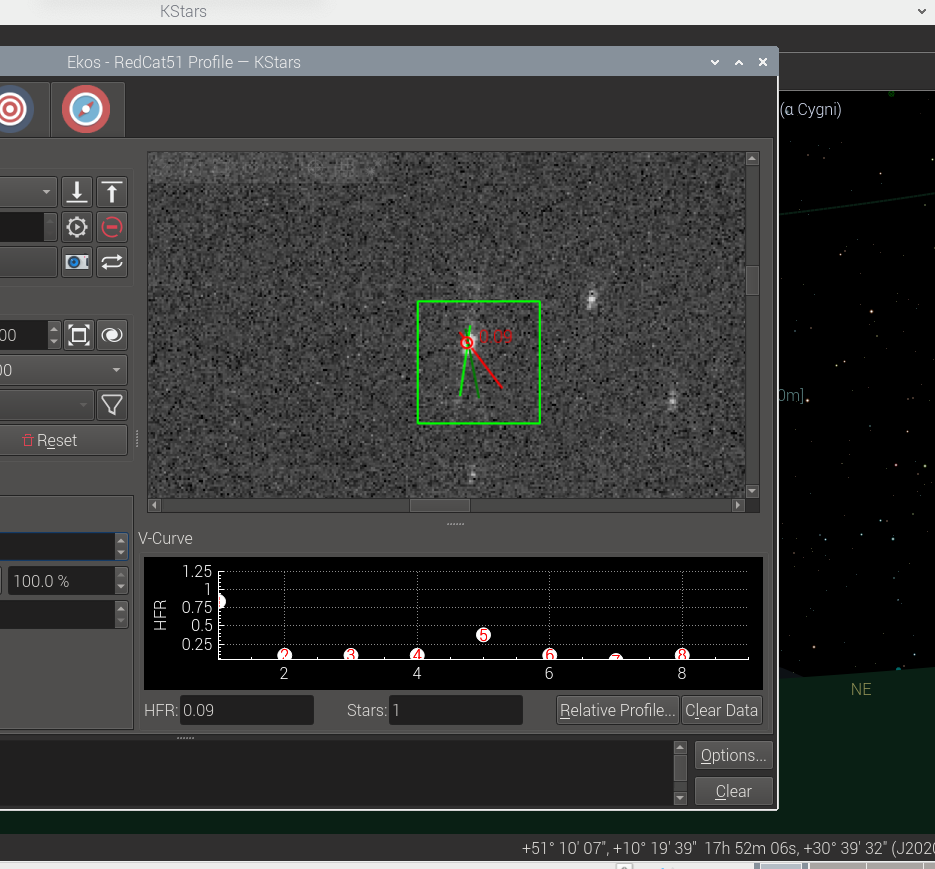
Wolfgang Reissenberger has added an invaluable Focus History navigation feature. When autofocus encounters issues, you can now navigate through your focus frame history to inspect images from all autofocus runs, making troubleshooting much more effective.

The Focus module now includes a dedicated navigation panel. To optimize screen real estate, we've moved the detected stars display and current HFR readings above the V-Curve rather than below it, freeing up valuable space.


To use this feature, simply configure the maximum number of stored frames in your Focus settings. The navigation controls are active only when autofocus sequences aren't running.


FITS Viewer Stretch Presets

Hy Murveit has refined the FITS Viewer stretch sliders and added a convenient preset button that cycles through seven different stretch configurations, offering various combinations of background brightness and contrast levels.

When you display the histogram and zoom in, the sliders provide much finer resolution control—particularly useful for precise black point adjustments.

Flatpak Support

Thanks to extensive collaboration between the Ikarus Technologies team, KDE Infrastructure team, and the Flathub community, we now offer both Stable and Nightly Flatpak packages.

The KStars Flatpak includes all INDI drivers and runs securely within the flatpak sandbox environment. This allows you to install both Stable and Nightly versions simultaneously without conflicts; perfect for testing the latest features and bug fixes while maintaining access to the stable release.

For installation on a brand new system, you'll need to install INDI firmware files. We've prepared comprehensive instructions and a simple installation script for both stable and nightly versions to facilitate this process.

Polar Alignment Improvements

Hy Murveit improved the Polar Alignment algorithm, especially when it the mount is close to the meridian. Wolfgang Reissenberger improved the the size of the arrows indicating the direction of the necessary adjustments so they're more visible in the Polar Alignment Assistant.

Migration to Qt6

This release represents a significant technical milestone with our complete migration to Qt 6 and KDE Frameworks 6. KStars is still compatible with Qt 5 until all major distributions fully switch to Qt 6. While these changes happen behind the scenes, they provide a more robust foundation for future development.

The entire KStars development team contributed to this substantial effort. Special recognition goes to Eric Dejouhanet and Robert Lancaster, who invested countless hours reworking our complex CI/CD pipelines and macOS support builds in KDE's Craft system. This release wouldn't have been possible without their exceptional dedication.


Thursday, May 26, 2022

KStars v3.5.9 Released

KStars v3.5.9 is released on 2022.05.26 for MacOS, Linux, and Windows. It's a bi-monthly bugfix release with a couple of exciting features.

DSS Offline HiPS

HiPS (Hierarchical Progressive Surveys) is a technology that provides progressive high resolution images of the sky at different zoom levels. KStars fully supports online HiPS where data is downloaded from online servers and cached to display on the Sky Map.


One of the most popular catalogs in KStars is the DSS Colored progressive survey. With v3.5.9, you can now specify directory where the offline DSS catalog is located. You can download the data from various HiPS services online. For best experience, it's recommended to download 3rd, 4th, and 5th (Norder3, Norder4, and Norder5) order directories which would take around 1GB of storage space. You may download further orders (i.e. higher zoom levels) at the expense of more storage space.

The following shows a sample of downloaded order directories, at minimum you need Norder3 folder for this functionality to work.


Revamped Mosaic Planner

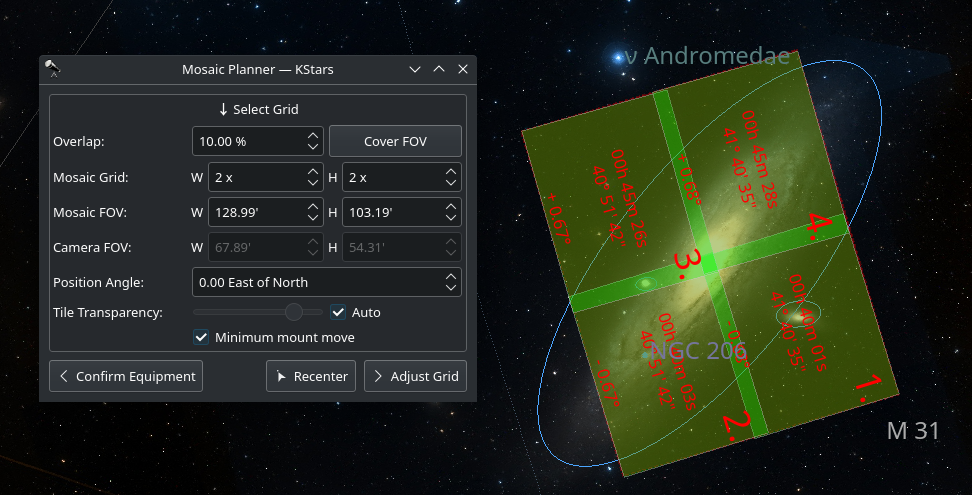
New simplified and powerful Mosaic Planner directly integrated in the Sky Map. It greatly benefits from HiPS overlay to make your target framing spot on. Toggle the Mosaic View from the tool bar, and select your equipment and the mosaic configuration. You can also use it as a very simple tool to frame a single 1x1 tile.


Adjust the tile center either by manually specifying the J2000 center or by dragging the tiles across the sky map. Once done, you can command the mount to go to the target and solve. Alternatively, you can proceed to create jobs for the Ekos Scheduler. After the jobs are added, you may start the scheduler at any time to plan the mosaic session accordingly.

Refocus After Meridian Flip


Dušan Poizl
 added the ability to refocus after a meridian flip is complete. This is very useful for some optical train setups where the focuser might shift duration the flip.

New Index Files


Robert Lancaster added the new 5200 astrometry index files. The difference is just which star surveys were used to build which indexes. The 4200 Series was made from 2MASS and covers all the image scales. The 4100 series was made from Tycho2 but only covers wide image scales. The 5200 series was just recently added, was made by blending Tycho2 and Gaia, and complements the 4100 series to give it the smaller scales.

Internal Plumbing: Introducing Device Adapter

Wolfgang Reissenberger continues his outstanding work refactoring Ekos state machine by introducing the device adapter. Next step extracting state handling from Capture into a dedicated state machine. In this step devices are managed by a dedicated device adapter (successor of the command processor). With this refactoring it is no longer necessary to route device events from Capture through SequenceJob to the state machine, the device adapter sends the events directly to the state machine.

Capture Progress face lift


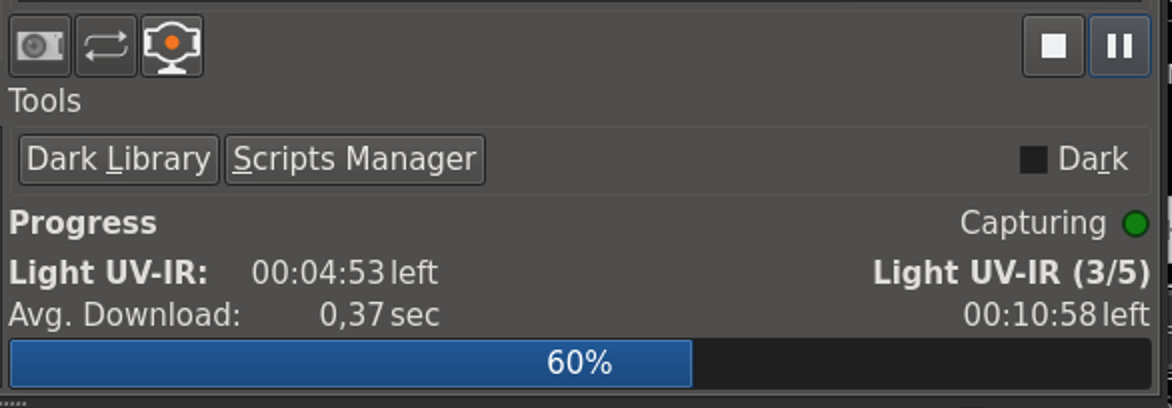
Wolfgang Reissenberger streamlined the capture progress section of Capture:

  • Remaining time for frame and sequence displayed as hh:mm:ss
  • Display of average download time (in calculation, all download times are taken into account and not only those > 1)
  • New status widget with a color LED displaying the capture status (and no longer using the seconds text for this)
  • Using the same widget on the Master tab 

Greedy Scheduler Speeds up


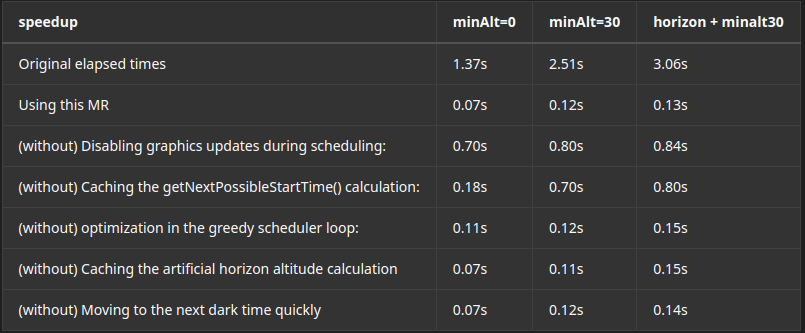
Fans of Greedy Scheduler rejoice! Hy Murveit made significant speedups to the Greedy Scheduler, especially for very large scheduler. 


Sunday, July 19, 2020

KStars v3.4.3 is Released

After 3 months of development, we're glad to announce the availability of KStars 3.4.3 for Windows, MacOS and Linux.

Let's check out the highlight of this release!

New Bahtinov Mask Focus Assistant

Patrick Molenaar added a long requested feature: The Bahtinov Mask focus assistant tool. Users can activate the new algorithm in the Focus module.

Focus Bahtinov Assistant Tool

It is useful for users who do not have a motorized focuser and prefer to focus manually with the aid of the mask. After capturing an image in the focus module with the Bahtinov mask algorithm selected, Ekos would analyze the images and stars within it.  if Ekos recognizes the Bahtinov star pattern, it will draw lines over the star pattern en circles on the center and on an offset to indicate the focus.

Autofocus on Temperature Change


Florian Signoret added support for triggering autofocus procedure when the temperature exceeds a certain delta threshold in the capture module. The temperature is sourced primarily from the focuser itself, and in unavailable, then it falls back to the weather station, if any.

Focus Logs

Doug Summers added a dedicated focus logger to help users analyze their autofocus runs to better understand their behavior and improve them in the future.

Camera Driver Restart

An experimental camera driver restart feature was added to the capture module. It should be used as a last resort option in case the camera driver is unresponsive. This feature commands the INDI server to only restart the camera driver without affecting any other drivers, so you don't have to shutdown the whole INDI server if one driver misbehaves. 


Restarting a camera driver might lead to quite a few complicated since it interacts with many subsystems in Ekos. Therefore, it is flagged as experimental in this release pending user feedback.

Mount Hour Angle Limits


Previously Ekos Mount module supported enforcing Altitude limit for the mount motion. The mount is active stopped if its slew or track past there limits. Chris Rowland added the Hour Angle (HA) limits to prevent limit the mount from slewing and/or tracking past there limits. This can protect the equipment in case of a runaway motion that might lead a pier collision.

Filter Names Editor


A simple, but convenient editor was added in Capture module to edit filter names. Previously, you had to change filter names directly in INDI Control Panel which was not intuitive for quite a few users.

Internal Guider Features


Hy Murveint contributed significant new features and improvement to the Ekos Internal Guider.

New Detection Algorithm: SEP MultiStar

This is a new guide-star detection, tracking & drift computation algorithm.


You can select this in the Guide options menu (click Options... in the lower right corner of the Guide tab), and then click on "Guide", and then choose from the "algorithm" menu. There choose the guide-star detector. (e.g. there choices include Smart, SEP, Fast, ...). Try SEP MultiStar. It is more stable in all three respects (guide star selection, detection and drift calculation). You may not notice much difference in a normal guiding session when things are going well, except, perhaps, better choice of a guide star.

GPG RA Guiding: New control algorithm for RA guiding.

Hy added a new guiding algorithm. This is for RA only--that is, guiding for DEC still happens, but using the existing guiding algorithms. This guider is based on the work in this PhD thesis and is the same as the well-regarded PHD2 guide algorithm known as Predictive PEC. You will see Copyright 2014-2017 Max Planck Society, now in the KStars credits for this system. It estimates the periodic error in the guiding system, and tries to fix it before it happens. This system should perform about the same as the standard guider for the first period or two of your mount's periodic error, then improve. When using this system, it's best to set in advance what your mount's worm-gear period is. For example, the Orion Atlas pro is about 480s. You enable this in the Guide options menu, in the GPG RA tab, and then checking "Enable GPG". There are other parameters you can change, but as indicated earlier, the main one to think about is "Major Period".

Graphics Improvements

  1. Added a guide-star SNR plot. This can be useful, e.g. when the SNR starts taking a dive, you know things aren't going well, perhaps a cloud is passing by.
  2. Added a plot of the RMS error (i.e. RA and/or DEC arc-second error RMS-averaged over the past 50 guiding samples).
  3. Separated the zooming for x and y axes. You can use '+' and '-' buttons below the x-axis to change the time scale of the plot (number of minutes plotted), and you can use the mouse scroll (same as before) to zoom in/out of the Y-axis. When you mouse-over the plot, you can see all the values for the different graphs.BTW, in case you didn't know (this isn't something I changed), you can change the amount of space allocated to the drift plot (the circle) and the drift graph by placing your mouse over the short dotted line between them and dragging left of right.

Calibration Backlash Removal

A backlash removal section was added to the "calibration dance". Before it starts calibrating DEC, the Ekos guider will now take 5 DEC steps, without measurement, to make sure there's no backlash in the DEC gears. This should improve the quality of the calibration, however, if you don't like this, you can remove it by unchecking "Remove DEC backlash in guide calibration" in the Guide options menu, in the "Calibration" tab there.

Calibration Plot

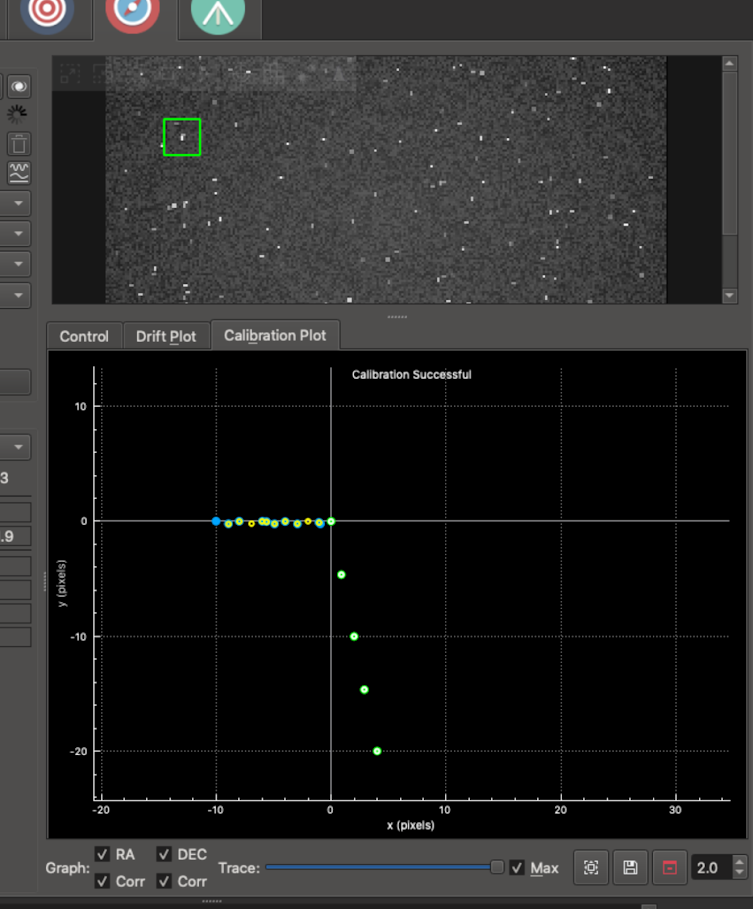
A Calibration Plot subtab was added to the right right of the Drift Plot.  It shows the mount positions recorded during internal-guider calibration.

Basically, if things are going well, it should display dots in two lines which are at right angles to each other--one when the calibration pushes the mount back and forth along the RA direction, and then when it does the same for the DEC direction. Not a ton of info, but can be useful to see. If the two lines are at a 30-degree angle, something's not going well with your calibration! Here's a picture of it in action using the simulator


The colored dots (same color scheme as the internal guider) shows the RA and DEC samples on their way out, and the small white and yellow circles show their return paths.

PHDLogView compatibility


phdlogview is a program written by Andy Galasso to analyze PHD2 logs. It's very nice. I've tried to have the internal guider output a mostly compatible log file so that if you installed phdlogview, you could use it to also browse your logs from the Ekos internal guider. A few things to note:
The logs are placed in a directory parallel to the standard KStars logs directory. Instead of logs, it is guidelogs. So, for example, on Linux you'd find them in this directory ~/.local/share/kstars/guidelogs/
You can turn on/off this logging by going into the Options menu on the internal guider tab, clicking on the Guide tab on the left and checking/un-checking the box labeled "Save Internal Guider User Log".

There are many features in phdlogview. Explore and look at Galasso's documentation for how to use it.

PHD2 Integration Fixes

Eric Dejouhanet significantly improved fault tolerance during PHD2 interactions. This includes the following situations.
  • Star does not move enough for calibration to complete. PHD2 may:
    • be looping instead of calibrating, while still notifying calibration.
    • abort but continue to send guide steps and frames.
    • => Fixed: calibration failures are now properly handled in that situation, and forwarded to Guide module.
  • Star disappears because of a mount glitch. PHD2 may:
    • declare star lost and stop without further notice.
    • => Fixed: star-lost notification is now properly handled, and will time out properly (and not restart).
  • Device disconnects briefly. PHD2 may:
    • declare device unusable, eventually after some time (camera timeout is 15s by default), requiring reconnect.
    • => Fixed: equipment dis/connection is now properly handled from both sides, aborts operations and is robust.
  • KStars/Ekos crashes while guiding and is restarted using the existing indiserver.
    • The currentCCD may be null when restoring connection, upon call to executeOneOperation.
    • AppState has to be taken into consideration to restore state as it was before the crash.
    • => Fixed: app-state polling improves robustness, requires up-to-date INDI build.
  • If Ekos is told the equipment is disconnected, it will consider an external cause and will not attempt to reconnect.
    • Ekos will not reconnect, to allow manual intervention is required on PHD2 side.
    • Ekos will detect reconnection and change state automatically.
  • However PHD2 v2.6.8 crashes when INDI drivers are killed, so no solution except restarting PHD2 in a loop (use systemd).
  • One issue remains in Guide, where the stop button remains enabled sometimes (regression?).
    • May not fix in the context of this MR.
  • One issue remains upon server loss, which triggers perpetual reconnect unless the end-user disconnects manually.
    • Issue related to state kept at disconnected.
image

New LED indicators were added for each stage as a visual feedback for the user.

Other Fixes


Check out the complete changelog for more details.

Thursday, April 12, 2018

Spring season KStars v2.9.4 is Released!

Glad to announce the release of KStars v2.9.4 aka Emad is now release for Windows, MacOS, and Linux!

The new release brings in more performance improvements and bug fixes.

Spring Galaxy Season
Credit Turki AlAmri


Valentin Boettcher
introduced a highly efficient binary interface for asteroids that would allow quite large (> 100MB) and distant catalogs to be loaded into KStars without a major impact on performance. Before this change, loading any JPL catalogs for faint asteroids (> 15 mag) resulted in significant slowdown of KStars during startup as well as during run-time. Now users can comfortably load fainter asteroids given they have enough system memory to handle it.

Automatic Flat field calculations were fixed for multi-channel DSLR frames along with an improved DSLR popup dialog. The online astrometry option with offline server bug was fixed and now users can connect to local instances of astrometry.net without any problems.

The Ekos scheduler workflow was revamped to evaluate all jobs every time a new job is invoked to ensure all scores are updated accordingly and not only on the first job run. More SEP work for star & galaxy detection is merged into the internal guide module resulting in a better object detection even in noisy environments.
Messier Marathon with Ekos Scheduler

Furthermore, the guide module is now a lot more tolerant to passing clouds. When a star lock is lost, it will attempt to reacquire the lost star for several iterations before giving up.

On the capture frontend, users can now instruct Ekos to take flat field frames exactly at the same focus position where light frames of the same filter were captured. For example, suppose you are taking an LRGB sequence, and the best autofocus position for Green filter is 37,000 ticks. By the time you finish the sequence the focus position would most likely have moved due to the Blue filter (unless they're perfectly parafocal). Once you start capturing flat fields afterwards, typically the focus position is kept as-is. However, now it is possible to synchronize the focus position when capturing flat fields as well. When a flat field Green capture is requested, Ekos shall instruct the focuser to move to 37,000 ticks as indicated by the last successful autofocus operation of the same filter.

Finally, users might have noticed especially on slower systems that opening large FITS files can take a while to load up. In v2.9.4, the FITS handling code was optimized with loading times improving on the order of 300%.

FITS Speed improvements

Turns out that statistics calculations were eating up significant amount of precious CPU cycles. Many of these calculations would greatly benefit from SIMD support like SSE/NEON but since KStars runs on multiple architectures, it requires an architecture-agnostic solution and major refactoring of the code base. Another solution that was more readily available is to employ multiple threads to by partitioning the image and therefore spreading the calculations. It is certainly a poor-man's SIMD in a way, but the results were immediately noticeable.

Using 16 threads, computing min and max values was reduced from 122ms to only 30ms. Running mean and standard deviation calculations took 118ms instead of 270ms. Here is an excerpt from the Qt Concurrent magic that made this signifantly easier to code than using plain pthreads.

QList<QFuture<QPair<double,double>>> futures;

for (int i=0; i < nThreads; i++)
{
 // Run threads
 futures.append(QtConcurrent::run(this, &FITSData::getSquaredSumAndMean<T>, tStart, (i == (nThreads-1)) ? fStride : tStride));
 tStart += tStride;
}

double mean=0, squared_sum=0;

// Now wait for results
for (int i=0; i < nThreads; i++)
{
 QPair<double,double> result = futures[i].result();
 mean += result.first;
 squared_sum += result.second;
}

double variance = squared_sum / stats.samples_per_channel;

stats.mean[n] = mean/nThreads;
stats.stddev[n] = sqrt(variance);

There is room for more improvement still, especially since now we are loading the FITS twice unnecessarily. This could be resolved by using an implicit sharing data model among FITS files that does not require a deep-copy of the data until the underlying data is altered. This could result in a 100% improvement in loading speeds when using Ekos as well. Stay tuned!

Tuesday, July 25, 2017

KStars 2.8.0 is released for Windows, MacOS, and Linux


Here comes another KStars release: v2.8.0 For Windows, MacOS, and Linux.

This is a minor bugfix release to increase stability of KStars on all supported platforms. Nevertheless, there were few significant updates:

  • Default NGC/IC catalog is now replaced by OpenNGC project. Christian Dersch compiled this catalog from OpenNGC. KStars now include more objects with accurate positions!

  • Lots of C++11/C++14 code migration work by GSoC 2017 student Csaba Kertész. This also included memory management clean-up, usage of smart pointers, valgrind suppression file and other fixes.

  • Adding support to selection of telescopes from Ekos equipment profile directly. This facilitates having different profiles when utilizing different telescopes on the same mount.
  • Michael Fulbright, KStars & INDI latest developer,  added the ability to have a scheduled refocus every N minutes during a capture sequence. Michael also added dither size in pixels and dither timeout to UI.
Many small bugs were fixed, thanks to our users who are making use of KDE Bug Tracking facilities effectively.

Monday, May 8, 2017

KStars 2.7.7 Released for Linux, Mac, and Windows!

The New What's Interesting Tool
I'm glad to announce the release of KStars 2.7.7 for Linux, Mac, and Windows!

In this release, Robert Lancaster dedicated a lot of time to improving KStars What's Interesting Tool (WIT). It is now significantly improved and offers a rich educational experience to explore the heavens! Users can now explore many naked eye and deep sky objects, in addition to addon catalogs offered by KStars such as the Sharpless Catalog.

Users wishing to have more fine control on what objects to observe and/or image should be using the Observation Planner that enable filtering of objects with custom constraints and limits. For casual users looking to find out what's interesting tonight, then this tool is the optimal choice.

Whether you're simply viewing the sky unaided with your eye or using binoculars/telescopes, find out which objects are available and how to locate them in the night sky.

The WIT fetches images and information on the objects and interest and can even fetch information from online sources like Wikipedia.

Mac Canon users will be glad to know the new release now enables them to fully control their DSLRs under OSX. Furthermore, the Mac release includes support for ZWO ASI cameras. We hope to add support for QHY for Mac in the next release.

Access to thousands of images like this

While KStars includes downloadable addons for images that appears in the detail dialog, John Sadler did a fantastic job of compiling images for over 18,000 NGC/IC objects!! These images are now available as downlodable addons, and now you can enjoy images of thousands of objects right within KStars. A small update to the Observation Planner enabled support for viewing images in there as well to help you plan what to observe and image ahead.


A few fixes were made to the Ekos Guide module to detect timeout in image captures and to take appropriate actions before giving up. Also, dithering failure does not necessary lead to autoguiding process failure. This behavior is now controlled by the user. By default, the autoguide process shall proceed even if dithering fails for whatever reason.


Finally, I added SkySafari support to INDI and now SkySafari users can enjoy using their app & KStars simultaneously to control their equipment without resorting to exotic hacks.

Thursday, March 23, 2017

KStars 2.7.6 for Windows & OSX released

I am glad to announce the release of KStars 2.7.6 release for Windows & OSX. Linux users using the official PPA can install the latest release as well.

In this release, we introduce the Ekos Mount Modelling tool developed by Robert Lancaster. It's currently in Beta now and we would appreciate any feedback. The tool enables you to build a comprehensive mount model if supported by your mount. Any mount that improves its internal pointing model after a SYNC command is applicable. Furthermore, INDI mounts that supports INDI Alignment Subsystem (EQMod, Nexstarevo, Synscan..etc) are also applicable.


Along with the advanced mount modelling tool comes the new Solution Results plot in the Align Module. It displays the quality of your GOTO after each solve and it can help you to identify if there are issues with your mount or the quality of the image..etc.


You can zoom, pan, and drag to explore the plot in details. Annotation for the quality of each GOTO is available on mouse over.

Ekos Polar Alignment Assistant tool also received a few bug fixes from the community feedback. Most users were able to achieve impressive results using the this easy to use Polar Alignment tool.

While Ekos is designed for ease of use, it can be intimidating for new users unfamiliar with the architecture of Ekos/INDI on several operation systems. Therefore, a new Ekos Profile Wizard is now available to guide the users to setting up their equipment for the first time in Ekos across several operating systems and connection topologies.


With INDI v1.4.1+, figuring out which port to use for your mount & focuser is now trivial across Linux & OSX. INDI automatically scans ports on your system and can even automatically connect to all potential available ports as well until a successful connection is established.


Last, but not least, KStars' NEO (Near-Earth-Object) data query from NASA's JPL is now properly working again thanks to our newest KStars developer Valentin Boettcher. Valentin (aka Hiro) is only 18 years old but is quite brilliant and experienced with KDE/Qt development environment. Welcome abroad!

Tuesday, February 28, 2017

KStars 2.7.5 is released for MacOS and Windows

I'm very excited to announce the release of KStars 2.7.5 for MacOS and Windows!

This is the first official KStars release for MacOS 10.11+, and while we made sure to test it thoroughly, please treat it as a beta release and report any bugs to the KDE bug tracking website.


KStars for MacOS supports all the features of the Linux KStars release, including Ekos and INDI. It comes ready with astrometry.net support, xplanet, and ability to download and install General Star Catalog (GSC) data used for CCD Simulator stars.

Most INDI drivers are imported with the exception of few Linux-specific drivers; we are investigating different approaches to improve INDI 3rd party drivers support under OSX. This release would not have been possible if not for the tireless efforts of KStars developers and INDI forums members.

Specifically, I'd like to thank the following volunteers for their significant contribution to the MacOS release:

  • Robert Lancaster: KStars latest developer and chief driver of the MacOS release. Robert greatly improved the usability and cross-platform capabilities of KStars while adding several very exciting and useful features to both KStars and Ekos.
  • Stephane Lucas: Initiated the longest (110+ pages) INDI thread Ekos for OS X that resulted in this release. Stephane carried out extensive testing and suggestions for Ekos Scheduler and aided in the KStars OSX Port.
  • Jamie Smith: Developed script to automate building of KStars using Craft, CMake, and XCode methods in addition to automating DMG builds.
Many INDI forums users also helped in testing this release, so I'd like to extend my thanks to all our users.

Along with the Mac OS release, a new KStars for Windows 64bit release is also available for download. You can download both release from KStars website.


Thursday, February 16, 2017

Ekos Polar Alignment Assistant Tool

When setting up a German Equatorial Mount (GEM) for imaging, a critical aspect of capturing long-exposure images is to ensure a proper polar alignment. A GEM mount has two axis: Right Ascension (RA) axis and Declination (DE) axis. Ideally, the RA axis should be aligned with the celestial sphere polar axis. A mount's job is to track the stars motion around the sky, from the moment they rise at the eastern horizon, all the way up across the median, and westward until they set.


In long exposure imaging, a camera is attached to the telescope where the image sensor captures incoming photons from a particular area in the sky. The incident photons have to strike the same photo-site over and over again if we are to gather clear and crisp image. Of course, actual photons do not behave in this way: optics, atmosphere, seeing quality all scatter and refract photons in one way or another. Furthermore, photons do not arrive uniformly but follow a Poisson distribution. For point-like sources like stars, a point spread function describes how photons are spatially distributed across the pixels. Nevertheless, the overall idea we want to keep the source photons hitting the same pixels. Otherwise, we might end up with an image plagued with various trail artifacts.

Since mounts are not perfect, they cannot perfectly keep track of object as it transits across the sky. This can stem from many factors, one of which is the mis-alignment of the mount's Right Ascension axis with respect to the celestial pole axis. Polar alignment removes one of the biggest sources of tracking errors in the mount, but other sources of error still play a factor. If properly aligned, some mounts can track an object for a few minutes with only deviation of 1-2 arcsec RMS.

However, unless you have a fancy top of the line mount, then you'd probably want to use an autoguider to keep the same star locked in the same position over time. Despite all of this, if the axis of the mount is not properly aligned with the celestial pole, then even a mechanically-perfect mount would lose tracking with time. Tracking errors are proportional to the magnitude of the misalignment. It is therefore very important for long exposure imaging to get the mount polar aligned to reduce any residual errors as it spans across the sky.

Several polar-alignment aids exist today, including, but not limited to:

1. Polar scope built-in your mount.
2. Using drift alignment from applications like PHD2.
3. Dedicated hardware like QHY's PoleMaster.
4. Ekos Legacy Polar Alignment tool: You need to take exposure of two different points in the sky to measure the drift and find out polar error in each axis (Altitude & Azimuth)
5. SharpCap Polar Alignment tool.

Out of the above, the easiest to use are probably QHY's PoleMaster and SharpCap's Polar alignment tool. However both software are exclusive to Windows OS only. KStars users have long requested support for an easy to use Polar Alignment helper in Ekos leveraging its astrometry.net backend.

During the last couple of weeks, I worked on developing Ekos Polar Alignment Assistant Tool (PAA). I started with a simple mathematical model consisting of two images rotated by a an arbitrary degree. A sample illustration of this is below:


Given two points, we can calculate the arc length from the rotation angle, and hence the radius. Therefore, it is possible to find two circle solutions that would match this, one of which would be the mount's actual RA axis within the image. Finding out which solution is the correct one turned out to be challenging, and even the mount's own rotation angle cannot be fully trusted. To be able to uniquely draw a circle, you need 3 points. So it was suggested by Gerry Rozema, one of INDI venerable developers, to capture 3 images to uniquely identify the circle without involving a lot of fancy math.

Since it relies on astrometry.net, PAA has more relaxed requirements than other tools making it accessible to more users. You can use your own primary or guide camera, given they have wide-enough FOV for the astrometry solver.

Moreover, the assistant can automatically capture, solve, and even rotate the mount for you. All you have to do is to make the necessary adjustments to your mount.

The new PAA works by capturing and solving three images. It is technically possible to rely on two images only as described above, but three images improves the accuracy of the solution. After capturing each, the mount rotates by a fixed amount and another image is captured and solved.


Since the mount's true RA/DE are resolved by astrometry, we can construct a unique circle from the three centers found in the astrometry solutions. The circle's center is where the mount rotates about (RA Axis) and ideally this point should coincide with the celestial pole. However, if there is a mis-alignment, then Ekos draws a correction vector. This correction vector can be placed anywhere in the image. Next the user refreshes the camera feed and applies correction to the mount's Altitude and Azimuth knobs until the star is located in the designated cross-hair. It's that easy!

Ekos PAA is now in Beta and tests/feedback are highly appreciated.


Sunday, November 20, 2016

KStars 2.7.2 for Windows is released

Less than a month from the release 2.7.0, KStars v2.7.2 for Windows 64bit is now available for download on KStars website! Get it now and give it a go.

The new release features many minor improvements and bug fixes including very fast startup time (about 300% faster) in addition to more streamlined Ekos GUI for capture and schedule modules. Images captured with Ekos on Windows would now conform to legal filenames in Windows when using ISO 8061 time stamped files.


Unfortunately, a few problems remain in this release most importantly is that KStars does not gracefully closes, it always remains in the background and must be terminated explicitly by the Windows task manager. This bug was supposed to be fixed by Qt 5.8 but alas it is still affecting Qt 5.8 in emerge. Once fixed by Qt/KDE, we shall make another release addressing this issue. 

Wednesday, November 2, 2016

KStars Lite 1.0.0 is released on Google Play!

A couple of days after the release of KStars 2.7, the KStars team is happy to announce the availability of KStars Lite for Android, now available on the Google Play Store.


KStars Lite is our successful Google Summer of Code project for 2016. It was developed by our star student and active developer Artem Fedoskin who managed within a few months to create a QML/QtQuick lite version of desktop KStars with many features including:

Full Skymap

Sky Map
A beautiful sky map that takes you into deep space to see stars, planets, galaxies, and much more:

  1. All Solar System Objects
  2. Constellation Art
  3. Constellation Boundary Lines, Lines, Names
  4. Equatorial Coordinate System
  5. Horizontal Coordinate System
  6. Deep Sky Objects
  7. Stars and Deep Stars
  8. Ecliptic, Equator and Horizon
  9. Milky Way
  10. Satellites
  11. Supernovae
  12. Labels


GPS-Based Location

While you can select your location from the thousands of cities shipped with KStars Lite, you can also simply ask it to automatically fill that information and it would fetch your location within a few seconds!

This feature is very handy when you're on the field and want to see an accurate representation of the night sky form your current location.

KStars Lite fetches not only longitude and latitude information, but also geographic information about your current location (city, state, country) via Google services.

Color Schemes

Similar to the desktop KStars version, KStars Lite support setting of several color schemes.

Most notable is the Night Vision scheme that enable your eyes to adjust to the darkness while still being able to utilize the sky map fully without any blazing glares that could ruin your night vision.


Projection Systems

Select from various projection systems. A projection system is used to map 3D space into your 2D screen, and there are many ways to do it including:

  1. Lambert azimuthal equal-area projection.
  2. Azimuthal equidistant projection.
  3. Orthographic projection.
  4. Equirectangular projection.
  5. Stereographic projection.
  6. Gnomonic projection.


Find Any Object


KStars Lite provides you with a convenient search functionality to search within KStars catalogs that includes thousands of stars, galaxies, nebulae, and solar system objects. When an object is found, you can go to the object on the sky map or view detailed information about it.

But what if the object is not found within KStars database? Do not worry! KStars include functionality to search numerous online catalogs for millions of objects. Once found, the KStars database downloads the new object data, and includes the new object just like a regular KStars object where you can view its information, center it...etc

Detailed Object Info


Explore detailed object information provided by KStars Lite. This includes images, position and time information, and links to pursue further information on the object.

Want to know when the project will pass overhead? Check the position tab. Want to see more images of the object? Check the links tab. Have some notes to write about the object? Save them in the logs tab.

The general tab includes the most prominent information about an object such as its magnitude, its distance from earth, and its angular size in the sky.


Full INDI Client Support


Control your Telescope, CCD, DSLR, and even your complete observatory within KStars Lite. With its first class INDI client support, you can connect to an INDI server running your equipment, and start controlling them immediately.

You can track your telescope motion on the sky map, and even select any object and ask the telescope to track it. Have a camera attached to your telescope? Simply capture an image and get a live preview on KStars Lite!

No need to fiddle with cables and wires anymore, use KStars Lite to wirelessly control your astronomy equipment at any time and from any where.


What's next?

Please bear in mind this is our first KStars Lite release for Android, and while we worked hard to fix some of the quirks in the development version, there is still room for improvements including improving its stability and performance:

  1. Reduce startup time: Currently it takes about ~35 seconds for KStars Lite to startup (on my Samsung S5) which is a very long time compared to what users typically expect on Android. We will be working hard to reduce this startup time to an acceptable range.
  2. Adjust sky map to follow gyroscopic sensors: We eventually expect users to point their phone/table to any location on the sky, the KStars Lite would then adjust the sky map to show this particular region of the sky. There were several issues with using Qt Sensors that prevented this feature from making it into the initial release, but we are working on it.
  3. Ekos support: We might include some of the modules of Ekos in the Lite release.

Friday, July 1, 2016

KStars with Ekos arrives on Windows

The folks over at KDE for Windows have done a tremendous job providing support for Qt5 and KDE Frameworks 5 builds under Windows using the emerge tool. Just a couple of months ago, building a KDE application on Windows was quite challenging with emerge failing to build the necessary frameworks needed for development.

But a lot has changed in the last few months leading to a relatively stable and consistent build experience. Furthermore, in the process of migrating KStars to Windows, I ran across a few bugs in KF5 multi-platform support, which is to be expected given the complexity of KStars as it leverages several KDE technologies simultaneously.

The largest obstacle to KStars windows port was Ekos/INDI support. INDI is a framework for astronomical device control and is available primarily on POSIX systems. It is based on a server/client architecture whereas the server manages the drivers controlling the devices while the clients communicate with the server.

Ekos is one such client and it is KStars flagship product for observatory control and automation. Hence, its support under Windows was paramount. Since most of the Ekos client code is written using Qt5/KF5 frameworks, porting it to Windows only took a couple of days. While Ekos under Linux can start INDI servers locally, this is disabled under Windows and only remote INDI control is available.


Nevertheless, Windows users could still use Ekos locally on Windows but using INDI Server for Windows which is an ASCOM to INDI bridge. That is, you can establish an INDI server that runs ASCOM drivers and present them as INDI-compatible devices.

Over the last few days, a lot of under-the-hood changes took place in KStars code base to enable it to work correctly under multiple platforms, including utilizing Qt resource system. The next obstacle was INDI Client library which KStars uses to communicate INDI server. It is only available for POSIX systems and cannot be used under Windows. Therefore, I developed a Qt5 backend for INDI Client library while making only minimal changes to the API. The new Qt5 backend worked quite well after working out all the quirks, and now KStars supports both the POSIX and Qt5 INDI client backends.

So after a lot of effort, I present you with KStars on Windows with Ekos/INDI support!


A 64bit 72MB Windows alpha release is now available for testing. There are still a few bugs that needs to be squashed and optimizations to be made, but it is overall stable. Report any bugs on KDE bug tracking site.

Tuesday, February 3, 2015

3D Cube FITS & Debayer support in KStars

Recently I was finally able to close BUG#305960 where a user requested support for 3D Cube FITS support in KStars. The FITSViewer tool always supported monochrome images since its inception, as this is what most CCD cameras in astronomy use. But single-shot color CCDs and DSLRs' utilization within the astrophotography world kept growing over the last few years.

Now the FITSViewer tool can display any 2D (monochrome) & 3D (color) cube FITS, and while most of the operations in KStars are geared toward single-channel images, the migration to 3 channel support was relatively smooth.


In addition to the 3D cube support, the FITSViewer tool can debayer images captured from color cameras and stored in RAW format with a specific color filter array (CFA).

DSLR users will gladly welcome this feature as they can inspect their color RAW images in color and may adjust the debayer parameters to produce a clear image of their target. Internally, KStars converts the debayerd image to a 3D Cube FITS without changing the RAW data at all. While the user may save the file as a 3D Cube FITS, it is not recommend. In fact, the debayer functionality should only be used to inspect the image, and the RAW image should always be processed under a dedicated astrophtography tool like PixInsight in order to carry out proper calibration procedure before any integration and registration processes.


In addition to DSLRs, the SBIG CCD INDI driver now also supports color CCDs. More INDI CCD drivers will have color support soon.