Showing posts with label Scheduler. Show all posts

Wednesday, December 3, 2025

KStars v3.8.0 is Released

KStars v3.8.0 is released on 2025.12.03 for Windows & Linux. MacOS release is expected in one week due to build issue on KDE CI infrastructure.

For Linux users, it's highly recommended to use the official KStars Flatpak hosted at Flathub. You can install the stable flatpak or try out new features by downloading the KStars Nightly Flatpak for x86_64 and arm64 architectures.

Live Stacker: LRGB Stacking

John Evans implemented generation of RGB and LRGB images from individual mono subframes. Watch R, G, B and optionally L directories and combine the individual stacks into RGB or LRGB images.


Add directories for R, G, B and optionally L subs. These are monitored and a single color image is displayed.


RGB images are combined with a Linear Fit type algorithm.  LRGB images are combined with a LRGB Combination type algorithm. SNR algorithm has been rewritten. Appears to work better but is more resource intensive.

Live Stacker: ImageMM Stacking Method

John Evans added an implementation of the ImageMM stacking method. This implementation strikes a balance between speed (it needs to be a Live Stacker) and fidelity.


To use: select ImageMM as the stacking method and play with the available controls. This method is considerably more resource intensive than "regular" stacking because it uses an iterative approach.

Live Stacker: Live Stacker Monitor

John Evans implemented the Live Stacker monitor. Live Stacking Monitor window is a popup from Live Stacker that shows a table of subs that match the chosen directory in Live Stacker.


The purpose is to allow analysis of Live Stacker, for example to allow investigation of bottlenecks in the stacking process.

When a sub is added to the watched directory, the sub is added to the Monitor's table. As the sub is processed by each step of the process information is updated in the table:
  • Waiting to load. The sub is in the queue to be processed but Live Stacker is busy with other subs.
  • Loading. The sub is loaded into memory.
  • Plate solving. The sub is undergoing plate solving (if appropriate).
  • Waiting to stack. The sub is waiting to be stacked (e.g. currently there are insufficient subs loaded to start a stack).
  • Calibration. Dark / Flat calibration.
  • Alignment.
  • Stacking.


Table columns and sort order are configurable. Changing cells can be highlighted (or not)

Task Queue system

Observatory startup and shutdown steps are now replaced by the new highly configurable Task Queue system. The Task Queue System is a modern, flexible automation framework that replaces traditional startup and shutdown scripts with a template-based, configurable task execution system. It provides a visual interface for building sequences of automated operations that can control your observatory equipment through INDI. It is accessible from Ekos Scheduler.


Why use it? The Task Queue system offers several advantages over traditional scripting:

  • Visual Management: Build and monitor task sequences through an intuitive graphical interface
  • Reusability: Use pre-built templates for common operations without writing code
  • Error Handling: Built-in retry logic and configurable failure responses
  • Device Compatibility: Automatic matching of templates to available devices
  • Progress Monitoring: Real-time status updates and detailed execution logs
  • Collections: Pre-defined task sets for startup, shutdown, and other common scenarios
  • Flexibility: Combine templates or create custom variations without programming

Safety Monitor

KStars scheduler now fully supports INDI Safety Monitor driver released part of INDI v2.1.7. A standalone driver may be used (independent of the equipment profile) that is running on a different INDI server to provide 24/7 safety monitor updates to the scheduler. No observatory operations shall take place unless it is deemed safe by the safety monitor.


The INDI Safety Monitor can listen to any number of sources including weather stations, UPS (uninterruptible power supply) monitors, and any auxiliary device that support the INDI's standard SAFETY_STATUS property.

Push-To Assistant 

Wolfgang Reissenberger added an incredibly useful tool for users with manual mounts: Push-To Assistant. Just attached a camera to your dobsonian and use this tool to center the target in the eyepiece. This tool assumes that both the camera center and eyepiece center are already aligned.

The new push-to assistant is intended as plate solving support for mechanical mounts in combination with a digital camera on a finder scope.


Setup: Create an optical train with the Telescope Simulator as mount and configure your combination of finder scope and digital camera.

Usage

  • Start Ekos
  • open the Push-to Assistant located in the Tools menu
  • move your scope as good as possible to the target you want to find
  • select the target from the catalog or enter its coordinates manually and press "Select target"
  • press "Solve position" to determine the position your scope is currently pointing at
  • as soon as the position has been solved, the assistant displays hints in which direction you should move your mount to be closer to the target
  • correct your mount position and press "Solve position" again

if you want to automatically repeat plate solving, configure the delay and press the "Repeat" button.


Bug Fixes


Tuesday, April 1, 2025

KStars v3.7.6 is Released


KStars v3.7.6 is released on 2025.04.01 for Windows, MacOS & Linux. It's a bi-monthly bug-fix release with a couple of exciting features.

Scheduler Plans Visualized


Hy Murveit added a graph to the Scheduler page that displays visually the scheduler's plans--the same plans described in the log at the bottom of that page, and partially described in the scheduler's table. You can see altitude graphs for all the scheduler jobs, which are highlighted in green when that job is planned to be active. The next two nights of the plan can be accessed using buttons to the right (and left) of the graph. The graph can be enlarged or hidden by sliding the "splitter" handle above it up or down.


PHD2 & Internal Guider RMS


Many users reported differences between the RMS value reported by Ekos internal guider vs PHD2. This is not a new issue as there was a difference in RMS calculations ever since Ekos Guider module was developed over a decade ago. In this release, we updated the internal Guider RMS calculations to use the same algorithm used by PHD2. This way, there is now a more consistent metric to judge the performance of the two guider systems.

Weather Scheduler Integration


Weather station integration with the scheduler was improved. The weather enforcement is now global and not per job. If weather enforcement is enabled, you can adjust the Grace Period (default 10 minutes) in cases where the scheduler cannot be started due to a weather Alert or Warning. 


When a weather warning is received, existing jobs can continue to execute but new jobs will not be executed until the weather situation improves. Upon detecting a weather hazard, the scheduler execute a Soft shutdown mode where it can park the mount and dome, but still retains connection with INDI drivers to continue monitoring the weather situation. If the weather does not improve by the Grace Period, it then commences a full shutdown of the observatory. Otherwise, it should resume the job from where it was left.

Contrast Based Focusing


John Evans added an option to allow focusing on non-star fields by using various contrast based algorithms. This is suitable for Lunar, Solar and planetary imaging.


Autofocus Optimization


John Evans added an option has been added to Focus that allows an Autofocus run to re-use a previous successful Autofocus result if the previous AF run occurred within a user-defined time period, say <10mins ago. This can speed up certain situations when using the Scheduler where multiple Autofocus requests can happen within a short period of time.


Imaging Planner Improvements


Hy Murveit pushed a new Imaging Planner catalog release along with improvements to the KStars Imaging Planner.
  • It should now start up much more quickly on first use, or first use after a catalog upgrade.
  • There were stability improvements.
  • The catalog was extended to include 770 objects.
Upgrade to KStars 3.7.6, use Data -> Download New Data to get the latest Imaging Planner catalog, and run Load Catalog in the Imaging Planner tool to take advantage of all these improvements.

Quick Go & Rotate


Added support to Go and Rotate in Framing Assistant. This would command fast go to target and then followed by rotation to match position angle indicated. Simply adjust the Position Angle to your desired angle then command Ekos to solve and rotate in one go.

Scheduler Coordinates Flexibility


Wolfgang Reissenberger introduced enhancements for handling target coordinates in the scheduler module:

  • Add an option to switch the target coordinates between J2000 and JNow. This is interesting for those cases where the user wants to enter the coordinates manually, but has the coordinates only in JNow - for example when taking them over from the align module.
  • Add a "use the current target" button. Currently, there is only an option to take over the current skymap center.
Furthermore, during the time where the moon is visible, it should be possible to schedule only those jobs that are not disturbed by moonlight (e.g. H-alpha captures). To enable this, a new optional constraint is introduced where the maximal moon altitude could be set.

Use PHD2-scheme graph


Toni Schriber modified the internal guider chart to use PHD2-scheme (RA/DEC) for graph of guide mount drift. This should help comparisons between PHD2 and internal guider more consistent.

Thursday, October 3, 2024

KStars v3.7.3 is Released

KStars v3.7.3 is released on 2024.10.03 for Windows, MacOS & Linux. It's a bi-monthly bug-fix release with a couple of exciting features.

Extension Interface

Ed Lee contributed the Extension Interface for KStars.

Extensions are small programs that can be added to interact with KStars/Ekos/INDI in order to provide extra functions and features. Extensions are separate from KStars. They are not provided as part of this software. Only a means to call them is provided for convenience. Make sure that you understand the requirements and risks of using an extension.


Three extensions are ready for release:

  • FireCapture launcher (FC_launcher): disconnects the current primary camera INDI driver and launches FireCapture. Upon close restarts the INDI driver.
  • KStars Backup (KS_backup): provides a GUI for the archiving and restoration of KStars/INDI (and optionally others) configuration directories to/from .tar.gz archives/
  • Sirial_EEA: provides live stacking of the preview job from the Capture Module and displays it auto-stretched in the Ekos preview window.

Each extension must have a companion configuration file also located in the extensions directory, named the same as the executable with the addition of a .conf eg: an extension named example must also have a configuration file named example.conf A configuration file is a plain text file that provides configuration settings to the extension program and usage information to the user. A configuration file is only valid if it contains a line starting with: minimum_kstars_version=x.y.z The x.y.z is the minimum release of KStars that the extension is designed/tested against. This value is checked against the current KStars KSTARS_VERSION macro defined in version.h and must be equal or lower for the extension to be considered valid. The extension should also check that this minimum_kstars_version string matches what it expects.

Optionally each extension can also provide an icon file for display in the Extension drop down list. Again the naming should match the extension executable with a valid file extension (.jpg, .bmp, .gif, .png or .svg) and be placed in the same extensions directory. A default icon is used for any extension that does not provide it's own icon.

Several new DBus functions/signals are added to enable general extension use and for a specific upcoming extension.

Multi-Target Scheduler

Wolfgang Reissenberger continued the development of multi-camera acquisition and now scheduling with many exciting updates!

Multi-Camera Scheduling

With this new release it is possible to create and run schedules for two or more optical trains in parallel within the same KStars instance. All mount related events like slewing, dithering, alignment and meridian flip are synchronized, i.e. capturing on all optical trains takes these events into account.

Lead and follower jobs

If you want to run capturing on multiple optical trains in parallel, you need to decide, which of the optical trains is the lead job, which defines the target and the scheduling criteria. All other optical trains will be follower jobs, for which only the capture sequence to be used is relevant.

Job Synchronization

Ekos ensures that no mount motion happens while one of the optical trains is capturing to avoid star trails.

In case of dithering, the capture module decides what to do as soon as dithering is requested, depending on the setup of the lead job. If the remaining capture time of a follower train is more than 50% of the lead job exposure time, capturing of the follower train is stopped and restarted after dithering. If the remaining capture time is less than 50%, the Capture module waits for the follower to finish its capture.

For the meridian flip and re-alignment: both are controlled by the lead job. All running follower capturing sequences are stopped and restarted after a successful completion of the respective action.

Recommendations

  • The lead job should have the longest exposure times, especially if dithering is used.
  • If you use re-focusing, consider to not suspend guiding during focusing, since the other optical train might capture in parallel.
  • Configure the same optical train in the Align module that you use in the lead job. This is important if you use the re-alignment check option of the scheduler.
Do not use the Force re-alignment before re-starting jobs, since each new iteration of the lead job stops capturing of the follower trains. Consider using Verify captured image position every n frames instead, since this option triggers re-alignment only if it is necessary.

Adhoc focus with Multi-Camera setups

Wolfgang Reissenberger added support for simultaneous parallel focusing when you are running multi-camera setup. It would be a good idea to disable Suspend Guiding so that guiding is unaffected when focusing operation commences.

Invent Multi-Star Guide Star

Hy Murveit introduced an experimental Multi-Star parameter. In the original (conservative) multi-star guiding implementation, although many stars contributed to the computed guiding drift computation, there still was one more important star that anchored the scheme.

With this change, all the guide stars contribute equally to the guiding calculations. This removes the risk that an unfortunate selection of a double star for the more-important main guide star would degrade performance.

Improvements & Bug fixes

Friday, April 5, 2024

KStars 3.7.0 is Released

KStars v3.7.0 is released on 2024.04.05 for Windows, MacOS & Linux. It's a bi-monthly bug-fix release with a couple of exciting features.

CI & CD Infrastructure


We say goodbye to KDE's binary factory as we transition to fully use Gitlab's CI/CD pipelines to build, test, and publish KStars. Over the last two months, Eric Dejouhanet worked with the KDE's Craft & System admin teams to transition KStars pipelines to the new framework. 


Short status on pipelines:
  • Merge requests run the custom build and the CI builds
  • Master runs the CI build (though there could be other things we run, such as CVE scans)
  • Craft recipes are run from the last commit of the master or release branch, they require "build" and "build-and-test-stable" to be run manually beforehand.
  • Publishing to Microsoft store is available after the Windows Craft is run.
This is still an ongoing process and we hope to have this process fully automated by 3.7.1 release where we will automatically publish latest releases for both stable and master branches.

Donut Buster


Rejoice Newtonian, SCT, and RC owners! With KStars new Donut Buster feature, your donut focusing woes might be something of the past. John Evans implemented this experimental feature to help protect against outliers that might affect your autofocus routine. In addition to that, the Focus Advisor is now automatically applied when creating new profiles. Based on the type of equipment you have in your optical train, the Focus Advisor would try to guess the optimal focus settings for your setup. Both features are experimental and would benefit from your feedback.

Custom Views


Akarsh Simha introduced the ability to orient the sky map to match the view through any instrument.

A view is a collection of settings: the orientation of the sky map, how the orientation changes as the sky map is panned, whether it is mirrored or not, and optionally the field-of-view to set the map to.

If no views are defined, KStars introduces a set of standard / "demo" views by default. Existing views can be edited and new views can be added using the "Edit Views..." interface. They can also be re-ordered in the interface. The ordering of the views in the "Edit Views..." dialog defines the order in which views will be cycled through using the keyboard shortcuts Shift + Page Up and Shift + Page Down. Thus, you can set up the views for easily switching between naked eye / finder scope / telescope views for easy star-hopping.


Furthermore, there is a new option in the View menu that enables mirroring the sky map so as to be able to match the view through an erecting prism used for example on a Schmidt-Cassegrain or Refracting type telescope.

The rotation feature overlay now also marks East in addition to north and zenith, so as to know easily whether the display is mirrored or not.

Blinking


Hy Murveit
added a very useful Blinking feature to the FITS Viewer tool. This adds several ways to blink; that is, compare multiple images.

In Analyze, one can now move from one session to the next (forward or backward).
Keyboard shortcuts are provided for that.

Another set of keyboard shortcuts both advance and show the next image in the same FITS Viewer.

Thus, for example, one can advance through all the captured images of the evening, showing all the captures on the FITS Viewer by repeating a keyboard shortcut.

A useful complement to this might be adding the ability to delete bad captures, but for now that will have to wait for a rainy day.


In the FITS Viewer, the Open File menu command (both in the main KStars top menu, and in the FITS Viewer menu) now allows multiple files to be selected. If they are then the files are opened in individual tabs.

Shift-selecting would select files from the first to the shift-clicked file. Clearly one wouldn't want to select 100 files resulting in 100 tabs, but this can be used to, e.g. compare 10 images.

Going along with the above, keyboard shortcuts have been added to move to the next or previous FITS Viewer tab, Also helpful to the above is a new command to zoom in/out all tabs (not just the current one).

There is a new Blink Directory menu command (in both menus, as above) which will open a single tab with a list of all the images below the directory selected (that is, both in that directory, and in directories below it). It initially displays the first image, but new commands work in that tab to switch to displaying the next (or previous) image file in the list. This could be used to blink hundreds of files.

Sky Flats


Dušan Poizl
added an option to capturing sky flats. When shooting flats at sky it often end up in never-ending loop of adjusting exposure because intensity of light change and calculation of exposure break down. Adjust the tolerance to 2000 ADU to higher for a better chance at capturing sky flats.

Scheduler Refactor


Wolfgang Reissenberger continues with his work on Separating Business Logic from UI in Scheduler. Over the years the Scheduler has grown to one of the most complex classes. With this release we refactored the Scheduler class and separated the UI from the underlying state model and its business logic. This opens the door for future development of new scheduling features and a much modular approach towards more flexible sequencing approaches.

Standalone Editor


To add any job to the scheduler, you need at minimum the following:
  1. Target
  2. Sequence File
The sequence file contains all your sequence settings (e.g. Capture 20x15 LRGB images). To create this file, you first need to add sequence job in the Capture module and then save the corresponding sequence. While this facilitates re-usability across different sessions, some users wanted to create sequence on-the-fly in the scheduler.


Hy Murveit developed the standalone sequence editor in the scheduler module where it relies on settings saved from your last astrophotography session. Now it's easier than ever to plan scheduler jobs without having Ekos or your equipment profile running!


Friday, March 18, 2022

KStars v3.5.8 Released

 KStars v3.5.8 is released on 2022.03.19 for MacOS, Linux, and Windows. This is a mostly bugfix release with a couple of exciting new features.

Faster plate-solving with StellarSolver 2.2

Robert Lancaster released StellarSolver 2.2 with significant improvements. StellarSolver is the library used by Ekos for star extraction and plate-solving. It is now so fast that sub-second plate-solves are quite common. Here are some highlights:

  • Eliminating the last external files: solved and cancel files from the internal solver
  • Making an interface between the C++ and astrometry.net logging that works well to fix logging issues
  • Making StellarSolver easier to use in a blocking way, including using it as a C++ temporary object
  • Making the convolution filter easier to generate and use as well as adding more types of filters
  • Significantly reducing the astrometry code needed for the solver
  • Adding support for a new external solver: the Watney Astrometry Solver
  • Improving the abort code so that it shuts down faster
  • Adding a number of demos to show how to use StellarSolver
  • Adding healpix and index series hints so that you can speed up solves in localized areas based on former solves
  • Making it possible to run two stellar solvers simultaneously
  • Adding some new options for star extraction
  • Making API simplifications
  • Fixing some memory leaks and other warnings on various operating systems
  • Removing some unused code

Greed is Eternal (10th Rule of Acquisition)

Hy Murveit introduced a new type of scheduling algorithm which he dubbed as the Greedy algorithm.

In both the Classic and Greedy schedulers, jobs are listed as "earlier on the job list means higher priority". With the Classic scheduler, priority is of the highest importance. It will not schedule a lower priority job until the higher priority job is done, even if that job takes several nights, and even if the higher-priority job cannot run at the current time, e.g. due to altitude/terrain/etc.  In contrast to this, the Greedy scheduler attempts to keep Ekos busy as much as possible. Although it gives priority to earlier-listed-jobs, it will run later-listed ones if the earlier one can't run. Of course, the lower priority job will get preempted when the high-priority job can finally start to run.

If you start the scheduler with only one job, there is no difference between Classic and Greedy scheduling. However, if you have more than one job, depending on your setup, there is a good chance that the Greedy scheduler will schedule more imaging time than Classic.

Here's a recommended way to try this out. Let's assume you have a main target for which you want to collect as many images as possible. Set that target up as first on the scheduler list, have it start ASAP and set its completion condition as "Repeat Until Terminated". It should be scheduled to image whenever possible (even across multiple nights) until you turn off the scheduler or Ekos. Add several other targets as well, ones that you might also be interested in, and that can be imaged in other parts of the night. Make sure those are listed below the primary target on the jobs list. Set those the same way (ASAP/RepeatUntilTerminated). They will be scheduled to run whenever the primary target can't be imaged.  Of course, make sure the twilight restriction is set for all your targets. Altitude and terrain restrictions are important as well--if Ekos doesn't know that there's a tree or house blocking your target, it can't be smart about scheduling it.

Since jobs will be preempted/restarted more often with Greedy than with Classic, the "Remember Job Progress" option is now more important.  You can find this setting in the KStars Setting Menu --> Ekos --> Scheduler --> "Remember job progress".  This option only works if you are storing images on the same machine where the scheduler is running. You should enable "Remember Job Progress" with this scheduler to get the most benefit, assuming your capture sequences use multiple/different filters. If your capture sequences are just used with one type of filter/or OSC then it probably doesn't matter. (RememberJobProgress has also be updated a bit, and should now do a better job of picking up where the last attempt finished.)

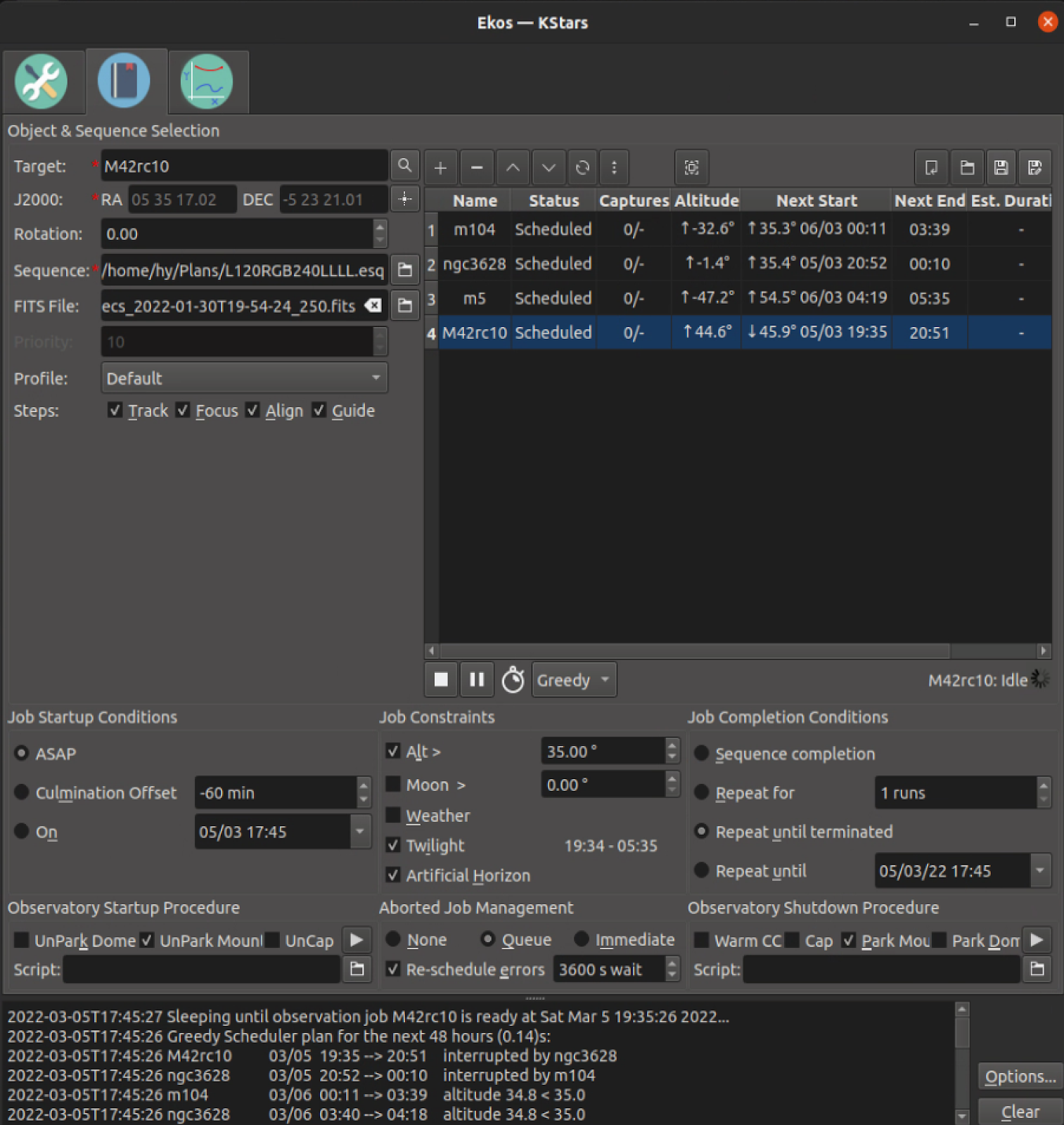
The screenshot above shows the scheduler running with this new scheme. Note that there are 4 jobs, and they are listed in order of precedence. You can see the next start times for each of the jobs on the scheduler table, and the highlighted (4th) job is the one currently running. A schedule for the next 48 hours is also printed in the log window at the bottom.


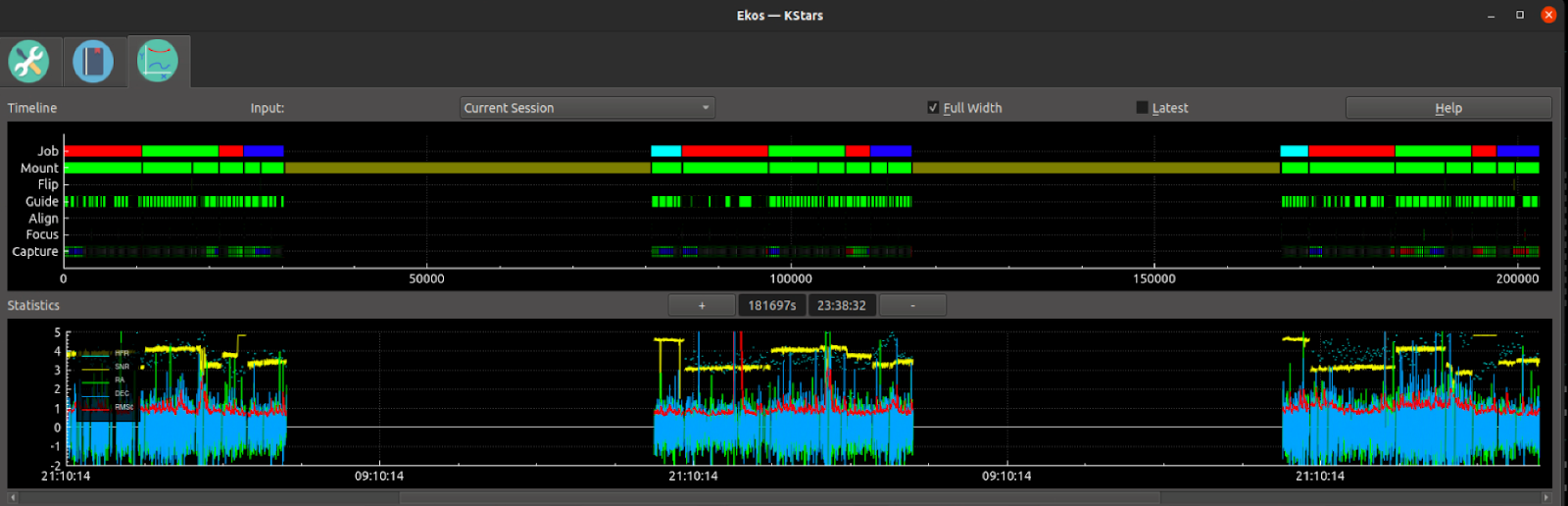
The scheduler is (minimally) integrated with Analyze. During testing I let the Greedy Scheduler run for 3 days. Here's a screenshot of the Analyze timeline for the 3 days. (Note some timelines didn't display well because of screen resolution.) The top line is the new scheduler timeline in Analyze. The different colors correspond to different jobs that were run, each one keeping its same color on different stars. You can see the different jobs ran as expected each night.

Support for Capture Format

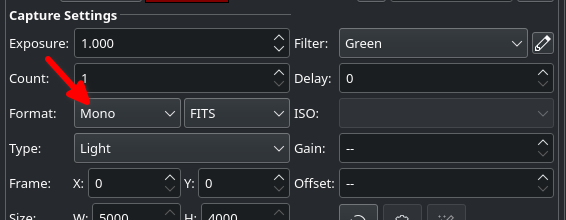
New in this release is support for INDI v1.9.5 Capture Format selection. This was previously explicitly selected by the user in INDI Control Panel but is now available in the Sequence settings in the capture module.


Full change log

907bc629b 2022-03-15 Jasem Mutlaq         Replace repeated message with just a label update
fead0a8d4 2022-03-15 Wolfgang Reissenberger Avoid in-sequence-counter countdown when already zero
b10c443f7 2022-03-14 Robert Lancaster     Forgot Prefix path for DriverSupport
0a552226f 2022-03-14 Jasem Mutlaq         Only emit newCoord when mount is connected
e02adcf48 2022-03-14 Wolfgang Reissenberger Bugfix initial guide deviation set blocks post MF calibration
6853eec35 2022-03-14 Jasem Mutlaq         If telescope device is not defined or connected, do not process coordinates
1640c7a2b 2022-03-13 Robert Lancaster     Moving KStars Mac INDI copy instructions to cmakelists
56cd0535f 2022-03-13 Jasem Mutlaq         Add an exact parameter to findByName so that catalog component can customize its search behavior globally
64b9ec0c3 2022-03-13 Akarsh Simha         Fix  CatalogsComponent::findByName() to find only 1 exact match
0e2a3ab07 2022-03-13 Akarsh Simha         Fixes and some improvements to the "Add catalog object" UI
e22bfc6ed 2022-03-11 Akarsh Simha         Fix truncation of observing list upon adding to it from popup menu
993692eaa 2022-03-13 Akarsh Simha         Make some usability improvements, especially in the Find Dialog
9245f9b75 2022-03-12 Hy Murveit           reduce log spam
e23a7ab8c 2022-03-12 Jasem Mutlaq         Various memory leaks. Still there is definitely memory leaks when performing...
dabeeec3d 2022-03-11 Jasem Mutlaq         Fix compile on 18.04
f34bcb7d9 2022-03-11 Jasem Mutlaq         Disable event-driven setScopeStatus from INDI::Telescope since it sets m_Status which prevents the polling method from working
5033fba01 2022-03-11 Jasem Mutlaq         Fix bug that caused PAA to fail if a driver send HORIZONTAL_COORD as well
836f47c89 2022-03-11 Jasem Mutlaq         Improve Look n Feel tab
23bb6cbfd 2022-03-10 Robert Lancaster     updating to StellarSolver 2.1
f184fd378 2022-03-09 Nicolas Fella        Don't find KAuth
96ed6a6d7 2022-03-10 Jasem Mutlaq         Fix compile on Windows
755c34e96 2022-03-09 Hy Murveit           Make the test_ekos_scheduler_ops tests more stable.
860301309 2022-03-09 Jasem Mutlaq         Fix typo
abec3e796 2022-03-09 Jasem Mutlaq         Extra check
e4685108d 2022-03-09 Jasem Mutlaq         vShapeSolution should be reset in stop
d38a27b17 2022-03-08 Akarsh Simha         Whenever stars have Henry Draper numbers, make them show up as their names
21635a353 2022-03-08 Robert Lancaster     Fix memory leak
4c71e6262 2022-03-07 Jasem Mutlaq         No need to explicitly load the dark frame
50c523bdc 2022-03-07 Jasem Mutlaq         Clear pointers on disconnect
d973ffec2 2022-03-06 Robert Lancaster     Making it faster by reusing stellarsolver.
4ea60c7fe 2022-03-07 Jasem Mutlaq         Capture encoding is now fully implemented in the code along with capture format. Fix issue when setting temperature and filters in non-light frames
e1a1f7c33 2022-03-06 Jasem Mutlaq         Make it compile on 18.04
8e7fd183f 2022-03-06 Hy Murveit           change scheduler colors for analyze
146577ca6 2022-03-06 Robert Lancaster     Fixing a KHelpClient bug on MacOS
3b39d06b4 2022-03-06 Philip Mair          Fixed restoring of bin settings
134d3d8d1 2022-03-06 Yuri Chornoivan      Fix minor typos
52e0e4d1e 2022-03-06 Jasem Mutlaq         Improve tooltip and simplify UI
961575df9 2022-03-05 Robert Lancaster     Improving Tooltips
d2724f80c 2022-03-05 Jasem Mutlaq         Clear sequence array on clear sequence
24d0806b5 2022-03-02 Akarsh Simha         Fix bug due to addition of new sky culture by saving config differently
ec9448cbd 2022-03-05 Hy Murveit           New Greedy Algorithm for Scheduler
a39d48e8e 2022-03-04 Mattia Procopio      Allow to provide a custom URL to download index data from
3e5b922c1 2022-03-04 Robert Lancaster     Fixing some issues found by Jussi Saarvirta
56a377826 2022-03-03 Hy Murveit           fix maxGuidestarsHFR issue, fix test, increase max dither size
cf5db0400 2022-03-02 Robert Lancaster     Updating KStars to support StellarSolver 2.0
9f20fe9e7 2022-03-02 Jasem Mutlaq         Make minimum exposure value 1 for refresh phase
831dc2890 2022-03-02 Hy Murveit           Allow older capture sequence files
cc7225978 2022-03-01 Salman Naheed        Ekoslive dark library
bfa23a060 2022-02-28 Nate Graham          Add Release tags to AppStream metadata file
06d6c0460 2022-02-26 Nate Graham          Make default color scheme default
8fe6068e0 2022-02-24 Salman Naheed        Ekoslive dark library
5dbb32de0 2022-02-23 Hy Murveit           Unconstrain Ekos' main vertical slider
df71cbf3e 2022-02-22 Salman Naheed        Ekoslive dark library
cd1cb58cf 2022-02-22 Wolfgang Reissenberger Timer based update of mount coordinates
8c457d62a 2022-02-22 Jasem Mutlaq         Add support for INDI capture format
2de2a7d0b 2022-02-21 Akarsh Simha         Adding popular asterisms as a sky culture
bbe08f422 2022-02-21 Salman Naheed        Ekoslive dark library
46d5fd47b 2022-02-21 Hy Murveit           Change gpg period spinbox from int to double
5a04cdbaa 2022-02-19 Wolfgang Reissenberger Bugfix selecting guide deviation when guiding is not running
9071245d7 2022-02-17 Wolfgang Reissenberger Bugfix darks jobstate and #158
e23f1c33d 2022-02-16 Hy Murveit           Small bug fixes: calibration not always shown. MultiStar graphics offset by a frame.
5bd737613 2022-02-16 Jasem Mutlaq         Fix meridian flip message, should be KSMessageBox and not newLog
628cf1241 2022-02-15 Yuri Chornoivan      Fix minor typo
99410cd62 2022-02-15 Hy Murveit           Make sure SolverUtils doesn't delete a running StellarSolver
c3bd4bd40 2022-02-14 Wolfgang Reissenberger State machine for capture control | preparation phase
f60d72d9b 2022-02-14 Salman Naheed        Ekoslive dark library
f103653f4 2022-02-14 Jasem Mutlaq         Disable stellarsolver logging
59f0a1301 2022-02-14 Wolfgang Reissenberger Display of filter name corrected
22e0ec011 2022-02-14 Jasem Mutlaq         More refinement to the polynomial method. Discard bad data points.
d606ffd33 2022-02-14 Jasem Mutlaq         Check target position versus current position every N frames
76e733a3e 2022-02-13 Robert Lancaster     removing setLoadWCS in another spot
80eabfa07 2022-02-12 Jasem Mutlaq         Change default guide exposure to 2 seconds
0fd94a4a5 2022-02-11 Hy Murveit           guider bugfix, firstframe improperly set
dd1c4becb 2022-02-10 Jasem Mutlaq         Allow send module frame to send from dark library
be665df18 2022-02-10 Hy Murveit           Check position after captures
ce83f275f 2022-02-08 Jasem Mutlaq         INDI drivers sync
d9e30a0fe 2022-02-08 Jasem Mutlaq         Remove check for parking time over 12 hours since it is acceptable if within 24 hours
6978d77d9 2022-02-08 Robert Lancaster     Removing WCS Coord disabling line
1ba2464c3 2022-02-07 Hy Murveit           Changes needed for upcoming Indi AstroPhysics driver
e40d833de 2022-02-05 Hy Murveit           guider cleanup and bugfix
b831c904e 2022-02-05 Hy Murveit           Add developer options tab, add option to save internal guider images.
62a551549 2022-01-31 Jasem Mutlaq         Catalog search should not be limited so that we can check for multiple identifiers
9305fe2b2 2022-01-31 Hy Murveit           Analyze: update graphics plot for completed capture or focus if latest is checked
3a778dc16 2022-01-27 Jasem Mutlaq         Increase test timeout
1c8e607e9 2022-01-27 Hy Murveit           Adjust dbus interfaces and paths to allow test_ekos_scheduler_ops tests to...
0515257a7 2022-01-27 Hy Murveit           Min #detections to initialize SEP MultiStar
6a5a96382 2022-01-26 Hy Murveit           add missing signal to analyze for focus restarts
0f2a4c951 2022-01-26 Jasem Mutlaq         Fix wrong arg
55b462887 2022-01-25 Toni Schriber        Standardized dialog for guider 'Control Parameters' &'Other Settings'
35236a51c 2022-01-23 Jasem Mutlaq         Check if regionItem is null
b3114467b 2022-01-23 Jasem Mutlaq         Fix issue in treating calibration frames since we used to only check a single channel whereas we were supposed to check all three
8808d3309 2022-01-23 Jasem Mutlaq         Add else for multiple channels
1efbbc7cc 2022-01-22 Robert Lancaster     Adding translations to Mac prebuild
6dafdc27b 2022-01-21 Jasem Mutlaq         Fix bug where filter is sometimes not set in camera or dustcap drivers unless it is set explicitly by the user by selecting it from the dropdown. No..
003a29faa 2022-01-21 Jasem Mutlaq         Fix issue when saving dark flats with sub-second exposures as we need to update the full prefix if duration was selected
0032701b6 2022-01-21 Jasem Mutlaq         Invalidate download timer to avoid bogus reports
18174ad1c 2022-01-21 Jasem Mutlaq         Reduce threashold to 1000ms
ff1ac9cfe 2022-01-21 Salman Naheed        Add generate dark flats to EkosLive
0ecfd135b 2022-01-20 Jasem Mutlaq         Make it so it is possible to create a 1x1 mosaic for purposes of framing
0f5c633c5 2022-01-20 Jasem Mutlaq         Update sequence prefix for ADU-calculated flat frames since full prefix can...
36e47a522 2022-01-20 Jasem Mutlaq         Set Focus module to the filter of the first light job in the sequence so that...
7c0807ad4 2022-01-19 Jasem Mutlaq         Starting KStars v3.5.8 development cycle
06277101e 2022-01-18 Jasem Mutlaq         INDI drivers sync
2e8345b8f 2022-01-17 Jasem Mutlaq         Improve message when failing to establish connection for remote devices
6f94491d3 2022-01-17 Jasem Mutlaq         Move options before ekoslive