Showing posts with label KDE. Show all posts

Wednesday, December 3, 2025

KStars v3.8.0 is Released

KStars v3.8.0 is released on 2025.12.03 for Windows & Linux. MacOS release is expected in one week due to build issue on KDE CI infrastructure.

For Linux users, it's highly recommended to use the official KStars Flatpak hosted at Flathub. You can install the stable flatpak or try out new features by downloading the KStars Nightly Flatpak for x86_64 and arm64 architectures.

Live Stacker: LRGB Stacking

John Evans implemented generation of RGB and LRGB images from individual mono subframes. Watch R, G, B and optionally L directories and combine the individual stacks into RGB or LRGB images.


Add directories for R, G, B and optionally L subs. These are monitored and a single color image is displayed.


RGB images are combined with a Linear Fit type algorithm.  LRGB images are combined with a LRGB Combination type algorithm. SNR algorithm has been rewritten. Appears to work better but is more resource intensive.

Live Stacker: ImageMM Stacking Method

John Evans added an implementation of the ImageMM stacking method. This implementation strikes a balance between speed (it needs to be a Live Stacker) and fidelity.


To use: select ImageMM as the stacking method and play with the available controls. This method is considerably more resource intensive than "regular" stacking because it uses an iterative approach.

Live Stacker: Live Stacker Monitor

John Evans implemented the Live Stacker monitor. Live Stacking Monitor window is a popup from Live Stacker that shows a table of subs that match the chosen directory in Live Stacker.


The purpose is to allow analysis of Live Stacker, for example to allow investigation of bottlenecks in the stacking process.

When a sub is added to the watched directory, the sub is added to the Monitor's table. As the sub is processed by each step of the process information is updated in the table:
  • Waiting to load. The sub is in the queue to be processed but Live Stacker is busy with other subs.
  • Loading. The sub is loaded into memory.
  • Plate solving. The sub is undergoing plate solving (if appropriate).
  • Waiting to stack. The sub is waiting to be stacked (e.g. currently there are insufficient subs loaded to start a stack).
  • Calibration. Dark / Flat calibration.
  • Alignment.
  • Stacking.


Table columns and sort order are configurable. Changing cells can be highlighted (or not)

Task Queue system

Observatory startup and shutdown steps are now replaced by the new highly configurable Task Queue system. The Task Queue System is a modern, flexible automation framework that replaces traditional startup and shutdown scripts with a template-based, configurable task execution system. It provides a visual interface for building sequences of automated operations that can control your observatory equipment through INDI. It is accessible from Ekos Scheduler.


Why use it? The Task Queue system offers several advantages over traditional scripting:

  • Visual Management: Build and monitor task sequences through an intuitive graphical interface
  • Reusability: Use pre-built templates for common operations without writing code
  • Error Handling: Built-in retry logic and configurable failure responses
  • Device Compatibility: Automatic matching of templates to available devices
  • Progress Monitoring: Real-time status updates and detailed execution logs
  • Collections: Pre-defined task sets for startup, shutdown, and other common scenarios
  • Flexibility: Combine templates or create custom variations without programming

Safety Monitor

KStars scheduler now fully supports INDI Safety Monitor driver released part of INDI v2.1.7. A standalone driver may be used (independent of the equipment profile) that is running on a different INDI server to provide 24/7 safety monitor updates to the scheduler. No observatory operations shall take place unless it is deemed safe by the safety monitor.


The INDI Safety Monitor can listen to any number of sources including weather stations, UPS (uninterruptible power supply) monitors, and any auxiliary device that support the INDI's standard SAFETY_STATUS property.

Push-To Assistant 

Wolfgang Reissenberger added an incredibly useful tool for users with manual mounts: Push-To Assistant. Just attached a camera to your dobsonian and use this tool to center the target in the eyepiece. This tool assumes that both the camera center and eyepiece center are already aligned.

The new push-to assistant is intended as plate solving support for mechanical mounts in combination with a digital camera on a finder scope.


Setup: Create an optical train with the Telescope Simulator as mount and configure your combination of finder scope and digital camera.

Usage

  • Start Ekos
  • open the Push-to Assistant located in the Tools menu
  • move your scope as good as possible to the target you want to find
  • select the target from the catalog or enter its coordinates manually and press "Select target"
  • press "Solve position" to determine the position your scope is currently pointing at
  • as soon as the position has been solved, the assistant displays hints in which direction you should move your mount to be closer to the target
  • correct your mount position and press "Solve position" again

if you want to automatically repeat plate solving, configure the delay and press the "Repeat" button.


Bug Fixes


Wednesday, August 13, 2025

KStars v3.7.8 is Released

KStars v3.7.8 is released on 2025.08.13 for Windows & Linux. MacOS release is pending. It's a bi-monthly bug-fix release with a couple of exciting features.

Live Stacking

The moment many of you have been waiting for has arrived! John Evans has introduced the highly anticipated Live Stacking feature to Ekos, seamlessly integrated into the FITS Viewer. Once you configure your live stacking directory, any FITS images added will be automatically stacked in real-time.

This feature works independently of your existing sequences or scheduler sessions, allowing you to configure the live stacker to process captured images for an enhanced view of your final results. It's particularly valuable for public observatories and star parties, where real-time feedback can greatly enhance the viewing experience.

Since Live Stacking is still in beta, we welcome your feedback and suggestions for improvement. Check out the demonstration videos below to see the feature in action and learn about its capabilities.


Equipment Profile Editor

The Ekos Equipment Profile editor has received a complete redesign. We've eliminated the limitations of the previous editor—you can now add unlimited drivers to your equipment profiles without restrictions. Need three different mounts in a single profile? No problem!

Both driver and profile lists now include search functionality, making it quick and easy to locate specific drivers. This flexibility gives you unprecedented control over your equipment configurations.


Focus History Navigation

Wolfgang Reissenberger has added an invaluable Focus History navigation feature. When autofocus encounters issues, you can now navigate through your focus frame history to inspect images from all autofocus runs, making troubleshooting much more effective.

The Focus module now includes a dedicated navigation panel. To optimize screen real estate, we've moved the detected stars display and current HFR readings above the V-Curve rather than below it, freeing up valuable space.


To use this feature, simply configure the maximum number of stored frames in your Focus settings. The navigation controls are active only when autofocus sequences aren't running.


FITS Viewer Stretch Presets

Hy Murveit has refined the FITS Viewer stretch sliders and added a convenient preset button that cycles through seven different stretch configurations, offering various combinations of background brightness and contrast levels.

When you display the histogram and zoom in, the sliders provide much finer resolution control—particularly useful for precise black point adjustments.

Flatpak Support

Thanks to extensive collaboration between the Ikarus Technologies team, KDE Infrastructure team, and the Flathub community, we now offer both Stable and Nightly Flatpak packages.

The KStars Flatpak includes all INDI drivers and runs securely within the flatpak sandbox environment. This allows you to install both Stable and Nightly versions simultaneously without conflicts; perfect for testing the latest features and bug fixes while maintaining access to the stable release.

For installation on a brand new system, you'll need to install INDI firmware files. We've prepared comprehensive instructions and a simple installation script for both stable and nightly versions to facilitate this process.

Polar Alignment Improvements

Hy Murveit improved the Polar Alignment algorithm, especially when it the mount is close to the meridian. Wolfgang Reissenberger improved the the size of the arrows indicating the direction of the necessary adjustments so they're more visible in the Polar Alignment Assistant.

Migration to Qt6

This release represents a significant technical milestone with our complete migration to Qt 6 and KDE Frameworks 6. KStars is still compatible with Qt 5 until all major distributions fully switch to Qt 6. While these changes happen behind the scenes, they provide a more robust foundation for future development.

The entire KStars development team contributed to this substantial effort. Special recognition goes to Eric Dejouhanet and Robert Lancaster, who invested countless hours reworking our complex CI/CD pipelines and macOS support builds in KDE's Craft system. This release wouldn't have been possible without their exceptional dedication.


Tuesday, April 1, 2025

KStars v3.7.6 is Released


KStars v3.7.6 is released on 2025.04.01 for Windows, MacOS & Linux. It's a bi-monthly bug-fix release with a couple of exciting features.

Scheduler Plans Visualized


Hy Murveit added a graph to the Scheduler page that displays visually the scheduler's plans--the same plans described in the log at the bottom of that page, and partially described in the scheduler's table. You can see altitude graphs for all the scheduler jobs, which are highlighted in green when that job is planned to be active. The next two nights of the plan can be accessed using buttons to the right (and left) of the graph. The graph can be enlarged or hidden by sliding the "splitter" handle above it up or down.


PHD2 & Internal Guider RMS


Many users reported differences between the RMS value reported by Ekos internal guider vs PHD2. This is not a new issue as there was a difference in RMS calculations ever since Ekos Guider module was developed over a decade ago. In this release, we updated the internal Guider RMS calculations to use the same algorithm used by PHD2. This way, there is now a more consistent metric to judge the performance of the two guider systems.

Weather Scheduler Integration


Weather station integration with the scheduler was improved. The weather enforcement is now global and not per job. If weather enforcement is enabled, you can adjust the Grace Period (default 10 minutes) in cases where the scheduler cannot be started due to a weather Alert or Warning. 


When a weather warning is received, existing jobs can continue to execute but new jobs will not be executed until the weather situation improves. Upon detecting a weather hazard, the scheduler execute a Soft shutdown mode where it can park the mount and dome, but still retains connection with INDI drivers to continue monitoring the weather situation. If the weather does not improve by the Grace Period, it then commences a full shutdown of the observatory. Otherwise, it should resume the job from where it was left.

Contrast Based Focusing


John Evans added an option to allow focusing on non-star fields by using various contrast based algorithms. This is suitable for Lunar, Solar and planetary imaging.


Autofocus Optimization


John Evans added an option has been added to Focus that allows an Autofocus run to re-use a previous successful Autofocus result if the previous AF run occurred within a user-defined time period, say <10mins ago. This can speed up certain situations when using the Scheduler where multiple Autofocus requests can happen within a short period of time.


Imaging Planner Improvements


Hy Murveit pushed a new Imaging Planner catalog release along with improvements to the KStars Imaging Planner.
  • It should now start up much more quickly on first use, or first use after a catalog upgrade.
  • There were stability improvements.
  • The catalog was extended to include 770 objects.
Upgrade to KStars 3.7.6, use Data -> Download New Data to get the latest Imaging Planner catalog, and run Load Catalog in the Imaging Planner tool to take advantage of all these improvements.

Quick Go & Rotate


Added support to Go and Rotate in Framing Assistant. This would command fast go to target and then followed by rotation to match position angle indicated. Simply adjust the Position Angle to your desired angle then command Ekos to solve and rotate in one go.

Scheduler Coordinates Flexibility


Wolfgang Reissenberger introduced enhancements for handling target coordinates in the scheduler module:

  • Add an option to switch the target coordinates between J2000 and JNow. This is interesting for those cases where the user wants to enter the coordinates manually, but has the coordinates only in JNow - for example when taking them over from the align module.
  • Add a "use the current target" button. Currently, there is only an option to take over the current skymap center.
Furthermore, during the time where the moon is visible, it should be possible to schedule only those jobs that are not disturbed by moonlight (e.g. H-alpha captures). To enable this, a new optional constraint is introduced where the maximal moon altitude could be set.

Use PHD2-scheme graph


Toni Schriber modified the internal guider chart to use PHD2-scheme (RA/DEC) for graph of guide mount drift. This should help comparisons between PHD2 and internal guider more consistent.

Monday, February 3, 2025

KStars v3.7.5 is Released

KStars v3.7.5 is released on 2025.02.03 for Windows, MacOS & Linux. It's a bi-monthly bug-fix release with a couple of exciting features. Here are the release notes organized by developer.

Jasem Mutlaq

  • Added dome slit visualization on sky map. Specify the Dome Measurement parameters in the INDI Dome driver to see a live dome slit overlay in the Sky Map.

  • Implemented generic DBus methods for KStars options
  • Added SchedulerSleeping event
  • Added mutex protection for multi-threaded resources
  • Enhanced scheduler loading and settings management
  • Improved filter manager operations
  • Fixed video subframing. Up to 50x improvement in subframed video feeds.
  • Fixed multiple profile editor issues
  • Added VSCode development setup support

Hy Murveit

  • Fixed DMS delta angle calculation
  • Added mandatory settle to PAA
  • Improved imaging planner stability


  • Fixed pierside placeholder directory usage
  • Added START_AT scheduler test
  • Fixed Abell planetary nebula lookup
  • Enhanced PAA adjustment estimation

Wolfgang Reissenberger

  • Implemented video sequence capture. Preliminary support for capturing Video files as regular sequences in the Capture module. Great news for EAA.

  • Fixed focus options
  • Improved remote directory handling
  • Fixed flats with wall position
  • Enhanced filter wheel integration

John Evans

  • Enabled focuser controls when camera disconnected
  • Improved focus measure framing
  • Fixed focus advisor code warnings
  • Updated aberration inspector functionality

Toni Schriber

  • Fixed overshooting cosine in CachingDms calculation
  • Implemented calibration reuse after rotation. Guide calibration data can now be re-used between sessions after rotation.

Ben Cooksley

  • Removed CMake trace/debug logs from CI runs

György Balló

  • Set window icon

Oliver Kellogg

  • Fixed typo in FITS Viewer configuration

Akarsh Simha

  • Fixed right-click popup menu on deep stars

Technical Highlights

  • Improved capture sequence stability: Set 5-minute timeout for transient operations (dome motion, mount parking/unparking, dust cap operations, focusing, filter wheel changes) to prevent indefinite sequence stalling.
  • Improved mount rotation processing
  • Enhanced scheduler loading mechanism
  • Added mutex protection for multi-threaded resources
  • Improved capture operation timeout handling

Thursday, December 5, 2024

KStars v3.7.4 is Released

KStars v3.7.4 is released on 2024.12.05 for Windows, MacOS & Linux. It's a bi-monthly bug-fix release with a couple of exciting features.

Imaging Planner

Hy Murveit added a brand new Imaging Planner in KStars to facilitate imaging.

The Imaging Planner tool helps users choose which objects to image. Users can download catalogs of recommended objects, or possibly create and share their own catalogs. The tool computes when the objects in a read-in catalog may be imaged on the selected night given constraints such as minimum altitude, terrain and moon separation.

It can sort the objects along several different dimensions including the number of hours an object may be imaged tonight (given the users geography, constraints and possibly artificial horizon), its peak altitude, distance from the moon, constellation, name and type. Objects can also be filtered out for several reasons (e.g. type of object, whether it was previously imaged, keywords the user has added, whether the object has been selected, user not interested, etc). 

This tool helps users research the objects by showing small images of the objects, showing the objects' sky locations on the skymap, and by providing links to follow to internet sites with more information and images. It allows users to attach notes and links to objects, and select certain of them for further consideration. This tool can be used in conjunction with the Ekos imager or any other imaging tool. It does not currently directly interact with the actual imager; it only helps the user decide what to image.

Simbad Integration with FITSViewer

John Evans added a new, experimental feature to the FITSViewer that allows the user to dynamically query the SIMBAD astronomical database and highlight the results on the image in the FITSViewer. The user draws a circle on the image and the objects within that circle are then displayed in a table and on the image.

It is possible to filter by object type and click through to the Simbad / CDS or NED websites for more information about the objects.


This is an interesting tool to see what is in your image, be it a subframe whilst you are imaging or a completed image that you have reloaded into the FITSViewer.

In order to use the feature you will need an internet connection to access the online Simbad database and an image must have WCS enabled within the FITSViewer. For the most accurate results, plate solve the image with the build-in FITSViewer plate solver. The feature is controlled by a toggle in the FITSViewer options.

New Focus Measures

John Evans introduced a new contrast based focusing algorithm suited for solar and planetary imaging. 

4 new focus measures have been added to the Focus Module to complement the existing measures of HFR, FWHM, etc.
·      StdDev. This is similar conceptually to the Fourier Algorithm but is simpler. It uses an algorithm based on the standard deviation of the pixels in the image as the measure of focus. It can be used on star fields.
·      Contrast based measures use algorithms that can be found in other areas of image processing and uses the contrast of texture in the image in various way as a measure of focus. The following measures are available:

o   Sobel
o   Laplassian
o   Canny

These measures require some form of extended object in the image so will not work on star fields. They are intended for Solar, Lunar and planetary focusing.


These algorithms can be used on the whole image or with the existing mask features, or with a user-defined region-of-interest that is used in single-star mode for star based focusing measures.
 
This new feature requires the openCV library to be installed (a standard installation is fine). This library is not installed by default with Kstars so anyone wishing to use these features will need to first install openCV and then rebuild Kstars on their system. It will not be available with pre-built executables.

Thursday, October 3, 2024

KStars v3.7.3 is Released

KStars v3.7.3 is released on 2024.10.03 for Windows, MacOS & Linux. It's a bi-monthly bug-fix release with a couple of exciting features.

Extension Interface

Ed Lee contributed the Extension Interface for KStars.

Extensions are small programs that can be added to interact with KStars/Ekos/INDI in order to provide extra functions and features. Extensions are separate from KStars. They are not provided as part of this software. Only a means to call them is provided for convenience. Make sure that you understand the requirements and risks of using an extension.


Three extensions are ready for release:

  • FireCapture launcher (FC_launcher): disconnects the current primary camera INDI driver and launches FireCapture. Upon close restarts the INDI driver.
  • KStars Backup (KS_backup): provides a GUI for the archiving and restoration of KStars/INDI (and optionally others) configuration directories to/from .tar.gz archives/
  • Sirial_EEA: provides live stacking of the preview job from the Capture Module and displays it auto-stretched in the Ekos preview window.

Each extension must have a companion configuration file also located in the extensions directory, named the same as the executable with the addition of a .conf eg: an extension named example must also have a configuration file named example.conf A configuration file is a plain text file that provides configuration settings to the extension program and usage information to the user. A configuration file is only valid if it contains a line starting with: minimum_kstars_version=x.y.z The x.y.z is the minimum release of KStars that the extension is designed/tested against. This value is checked against the current KStars KSTARS_VERSION macro defined in version.h and must be equal or lower for the extension to be considered valid. The extension should also check that this minimum_kstars_version string matches what it expects.

Optionally each extension can also provide an icon file for display in the Extension drop down list. Again the naming should match the extension executable with a valid file extension (.jpg, .bmp, .gif, .png or .svg) and be placed in the same extensions directory. A default icon is used for any extension that does not provide it's own icon.

Several new DBus functions/signals are added to enable general extension use and for a specific upcoming extension.

Multi-Target Scheduler

Wolfgang Reissenberger continued the development of multi-camera acquisition and now scheduling with many exciting updates!

Multi-Camera Scheduling

With this new release it is possible to create and run schedules for two or more optical trains in parallel within the same KStars instance. All mount related events like slewing, dithering, alignment and meridian flip are synchronized, i.e. capturing on all optical trains takes these events into account.

Lead and follower jobs

If you want to run capturing on multiple optical trains in parallel, you need to decide, which of the optical trains is the lead job, which defines the target and the scheduling criteria. All other optical trains will be follower jobs, for which only the capture sequence to be used is relevant.

Job Synchronization

Ekos ensures that no mount motion happens while one of the optical trains is capturing to avoid star trails.

In case of dithering, the capture module decides what to do as soon as dithering is requested, depending on the setup of the lead job. If the remaining capture time of a follower train is more than 50% of the lead job exposure time, capturing of the follower train is stopped and restarted after dithering. If the remaining capture time is less than 50%, the Capture module waits for the follower to finish its capture.

For the meridian flip and re-alignment: both are controlled by the lead job. All running follower capturing sequences are stopped and restarted after a successful completion of the respective action.

Recommendations

  • The lead job should have the longest exposure times, especially if dithering is used.
  • If you use re-focusing, consider to not suspend guiding during focusing, since the other optical train might capture in parallel.
  • Configure the same optical train in the Align module that you use in the lead job. This is important if you use the re-alignment check option of the scheduler.
Do not use the Force re-alignment before re-starting jobs, since each new iteration of the lead job stops capturing of the follower trains. Consider using Verify captured image position every n frames instead, since this option triggers re-alignment only if it is necessary.

Adhoc focus with Multi-Camera setups

Wolfgang Reissenberger added support for simultaneous parallel focusing when you are running multi-camera setup. It would be a good idea to disable Suspend Guiding so that guiding is unaffected when focusing operation commences.

Invent Multi-Star Guide Star

Hy Murveit introduced an experimental Multi-Star parameter. In the original (conservative) multi-star guiding implementation, although many stars contributed to the computed guiding drift computation, there still was one more important star that anchored the scheme.

With this change, all the guide stars contribute equally to the guiding calculations. This removes the risk that an unfortunate selection of a double star for the more-important main guide star would degrade performance.

Improvements & Bug fixes

Saturday, August 3, 2024

KStars 3.7.2 Released

KStars v3.7.2 is released on 2024.08.03 for Windows, MacOS & Linux. It's a bi-monthly bug-fix release with a couple of exciting features.

A few members of the KStars development team were enjoying their summer holidays over the past few weeks, but we still have a couple of exciting features in this release!

Multi-Camera Support

Wolfgang Reissenberger devoted countless hours to bring this complex feature that required lots of architectural changes in Ekos. If you have double rigs (or even more), we have a new great feature: multi camera support! If you have more than one optical train on your mount, you now will be able to run capture sequences for each of your optical trains in parallel from the same KStars instance. You simply need to create an optical train for each of your telescopes on your mount, create camera tabs for each optical train, create their own sequence and let them run in parallel.


This new feature may also be used in combination with the scheduler: in this release, the scheduler itself will control the first camera. On top of that, you could configure additional cameras in the capture tab which could execute their own capture sequences. Enhancing the scheduler such that it could control multiple optical trains in parallel is already under development and will be part of one of the next releases. So stay tuned!

Focus Advisor v4


John Evans refactored the Focus Advisor to make it simpler while still offering a lot of insight on parameters tuning. It is now more accessible to new users and has added functionality to optimize values for 2 of the more difficult Focus parameters: Step Size and Backlash (or AF Overscan).


In addition, Focus Advisor contains a convenience tool to locate stars by searching the range of motion of the focuser and another convenience tool to highlight differences between current Focus parameter settings and those recommended by Focus Advisor.

Friday, April 5, 2024

KStars 3.7.0 is Released

KStars v3.7.0 is released on 2024.04.05 for Windows, MacOS & Linux. It's a bi-monthly bug-fix release with a couple of exciting features.

CI & CD Infrastructure


We say goodbye to KDE's binary factory as we transition to fully use Gitlab's CI/CD pipelines to build, test, and publish KStars. Over the last two months, Eric Dejouhanet worked with the KDE's Craft & System admin teams to transition KStars pipelines to the new framework. 


Short status on pipelines:
  • Merge requests run the custom build and the CI builds
  • Master runs the CI build (though there could be other things we run, such as CVE scans)
  • Craft recipes are run from the last commit of the master or release branch, they require "build" and "build-and-test-stable" to be run manually beforehand.
  • Publishing to Microsoft store is available after the Windows Craft is run.
This is still an ongoing process and we hope to have this process fully automated by 3.7.1 release where we will automatically publish latest releases for both stable and master branches.

Donut Buster


Rejoice Newtonian, SCT, and RC owners! With KStars new Donut Buster feature, your donut focusing woes might be something of the past. John Evans implemented this experimental feature to help protect against outliers that might affect your autofocus routine. In addition to that, the Focus Advisor is now automatically applied when creating new profiles. Based on the type of equipment you have in your optical train, the Focus Advisor would try to guess the optimal focus settings for your setup. Both features are experimental and would benefit from your feedback.

Custom Views


Akarsh Simha introduced the ability to orient the sky map to match the view through any instrument.

A view is a collection of settings: the orientation of the sky map, how the orientation changes as the sky map is panned, whether it is mirrored or not, and optionally the field-of-view to set the map to.

If no views are defined, KStars introduces a set of standard / "demo" views by default. Existing views can be edited and new views can be added using the "Edit Views..." interface. They can also be re-ordered in the interface. The ordering of the views in the "Edit Views..." dialog defines the order in which views will be cycled through using the keyboard shortcuts Shift + Page Up and Shift + Page Down. Thus, you can set up the views for easily switching between naked eye / finder scope / telescope views for easy star-hopping.


Furthermore, there is a new option in the View menu that enables mirroring the sky map so as to be able to match the view through an erecting prism used for example on a Schmidt-Cassegrain or Refracting type telescope.

The rotation feature overlay now also marks East in addition to north and zenith, so as to know easily whether the display is mirrored or not.

Blinking


Hy Murveit
added a very useful Blinking feature to the FITS Viewer tool. This adds several ways to blink; that is, compare multiple images.

In Analyze, one can now move from one session to the next (forward or backward).
Keyboard shortcuts are provided for that.

Another set of keyboard shortcuts both advance and show the next image in the same FITS Viewer.

Thus, for example, one can advance through all the captured images of the evening, showing all the captures on the FITS Viewer by repeating a keyboard shortcut.

A useful complement to this might be adding the ability to delete bad captures, but for now that will have to wait for a rainy day.


In the FITS Viewer, the Open File menu command (both in the main KStars top menu, and in the FITS Viewer menu) now allows multiple files to be selected. If they are then the files are opened in individual tabs.

Shift-selecting would select files from the first to the shift-clicked file. Clearly one wouldn't want to select 100 files resulting in 100 tabs, but this can be used to, e.g. compare 10 images.

Going along with the above, keyboard shortcuts have been added to move to the next or previous FITS Viewer tab, Also helpful to the above is a new command to zoom in/out all tabs (not just the current one).

There is a new Blink Directory menu command (in both menus, as above) which will open a single tab with a list of all the images below the directory selected (that is, both in that directory, and in directories below it). It initially displays the first image, but new commands work in that tab to switch to displaying the next (or previous) image file in the list. This could be used to blink hundreds of files.

Sky Flats


Dušan Poizl
added an option to capturing sky flats. When shooting flats at sky it often end up in never-ending loop of adjusting exposure because intensity of light change and calculation of exposure break down. Adjust the tolerance to 2000 ADU to higher for a better chance at capturing sky flats.

Scheduler Refactor


Wolfgang Reissenberger continues with his work on Separating Business Logic from UI in Scheduler. Over the years the Scheduler has grown to one of the most complex classes. With this release we refactored the Scheduler class and separated the UI from the underlying state model and its business logic. This opens the door for future development of new scheduling features and a much modular approach towards more flexible sequencing approaches.

Standalone Editor


To add any job to the scheduler, you need at minimum the following:
  1. Target
  2. Sequence File
The sequence file contains all your sequence settings (e.g. Capture 20x15 LRGB images). To create this file, you first need to add sequence job in the Capture module and then save the corresponding sequence. While this facilitates re-usability across different sessions, some users wanted to create sequence on-the-fly in the scheduler.


Hy Murveit developed the standalone sequence editor in the scheduler module where it relies on settings saved from your last astrophotography session. Now it's easier than ever to plan scheduler jobs without having Ekos or your equipment profile running!


Sunday, December 3, 2023

KStars 3.6.8 is Released


KStars v3.6.8 is released on 2023.12.03 for Windows, MacOS & Linux. It's a bi-monthly bug-fix release with a couple of exciting features.

Aberration Inspector


John Evans introduces the very exciting Aberration Inspector tool. The Aberration Inspector is a tool that makes use of Autofocus to analyze backfocus and sensor tilt in the connected optical train. It solves up to 9 virtual tiles on the sensor as defined by the existing Mosaic Mask.


The information is then used to analyze:
  • Back focus.
  • Sensor Tilt.
There are 4 sections:
  • V-curve for the each tile.
  • Table of data detailing the curve fitting results.
  • Analysis of back focus and tilt.
  • 3D Surface graphic to explain the Petzval Surface intersection with the sensor.
This release provides display only functionality. In future it would be possible to add functionality to offer recommendations for adjustments using Octopi, PhotonCage, etc.

Sub-exposure Calculator


Joseph McGee continues to add improvements and fixes for the Sub-exposure calculator. For usability, the window is now re-sizeable, an issue with the display of tool tips was corrected, and an indicator has been added for the sensor type of the selected camera (Mono / Color).  For functionality: the upper limit of the Noise Increase input parameter was increased, support was added for cameras with non-variable read noise, (cameras with CCD sensors).


Several new camera data files were added to the KStars source code repository, and a function to allow direct direct download of camera files from the repository was enabled. (Note: users who have created their own camera data files, may wish set the file attribute to read-only, and/or make a back up copy in case of an accidental over-write from the download function if the camera file has the same name).

A new experimental graphical tool to determine an appropriate number of sub-exposures for integration was added. This tool allows the selection of an exposure time to noise ratio for a stacked image; the tool will compute the number of sub-exposures required to achieve that value.

Added several new camera data files:
  • Atik-16200CCD_Mono.xml
  • FLI-16200CCD_Mono.xml 
  • QHY_CCD_294M_Pro.xml
  • QHY_CCD_461_PH.xml
  • QHY_CCD_163C.xml 
  • QHY_CCD_163M.xml
  • QHY_CCD_268C.xml
  • QHY_CCD_294M.xml
  • QHY_CCD_600_PH.xml
  • ZWO_CCD_ASI294MC
  • Pro.xml ZWO_CCD_ASI294MM
  • Pro.xml ZWO_CCD_ASI533MC
  • Pro.xml ZWO_CCD_ASI2600MC
  • Pro.xml ZWO_CCD_ASI6200MC
  • Pro.xml ZWO_CCD_ASI533MC
  • Pro.xml ZWO_CCD_ASI533MM
  • Pro.xml Nikon_DSLR_DSC_D5100_(PTP_mode).xml Nikon_DSLR_DSC_D700_(PTP_mode).xml

FITSViewer Solver


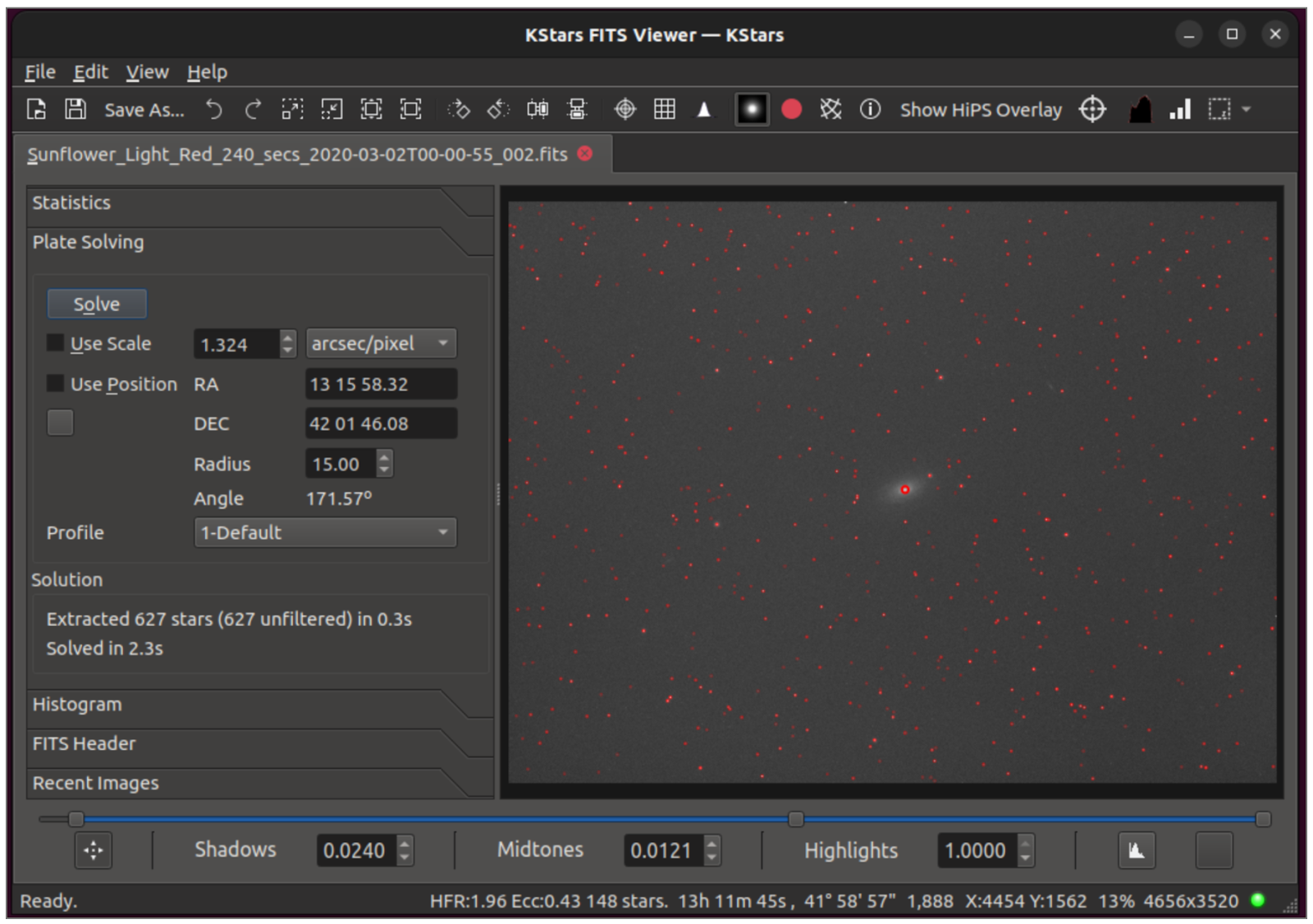
Hy Murveit added a very useful feature to the FITS Viewer: a built-in solver!

The FITS Viewer Solver is used to plate-solve the image loaded in the FITS Viewer's tab. It only works with the internal StellarSolver. You get the RA and DEC coordinates for the center of the image, the image's scale, the angle of rotation, and the number of stars detected in the image. Its main use case is debugging plate-solving issues in Ekos, though the information displayed can be generally useful. The controls and displays are described below.


This adds a new tool inside the splitter on the FITS Viewer. It plate-solves the displayed image, and allows the user to experiment with a number of plate-solving parameters, and thus help debug plate-solving issues.

How to test it out?
  • Open the sliding panel on the left part way, click on Plate Solving, and resize the windows appropriately.
  • Experiment with the parameters available (Use Scale, Use Position, the scale and RA/DEC positions, choose a profile and/or edit it)
  • Click Solve, and the image is solved and the solution presented in the Scale and RA & DEC and Angle boxes.
  • If you enable "Mark Stars" above the image window, you will also see the stars that were detected.

Quality of Life improvements

  • Make "Set Coordinates Manually" dialog more intuitive.
  • Telescope name specified in the optical trains are now saved in the  FITS header (the mount name was saved before).
  • New placeholders for ISO, binning and pure exposure time added.
  • Add a new not-default scheduler option to disable greedy scheduling.
  • Reduce latency between captures, especially when guiding / dithering.
  • Fix issue with differential slewing.
  • Separate Business Logic from UI in Scheduler.
  • Fix bug in estimating job time, capture delays were misinterpreted.
  • Fixed guide start deviation was not saved properly in esq file.
  • Bugfix in one-pulse dither. Dither pulses were going the wrong way.
  • Fix Scheduler hangs when Focus does not signal Autofocus start failure.
  • Focus Guide Settle Bug.

Tuesday, October 3, 2023

KStars v3.6.7 is Released

KStars v3.6.7 is released on 2023.10.03 for MacOS & Linux. Windows build is still pending and should hopefully be released by 10th of October. It's a bi-monthly bugfix release with a couple of exciting features.

Image Overlay Component


Hy Murveit introduced a long requested feature: Custom Image Overlays!

With this new feature, a user can add their own processed/completed astro-images, and the system will display them scaled and rotated appropriately on the Sky Map.

The feature is controlled in the KStars Settings menu, in a new tab labelled Image Overlays. First the user needs to add files into a directory, parallel to the logs directory, called imageOverlays. Simply add the images there (typically jpegs). Ideally these aren't massive files for performance reasons, but probably width 1000 or 2000 are fine. I have been testing with larger files, which will also work be use more system resources on slower CPUs.


The user then uses the Image Overlays menu in KStars Settings to (one-time) plate-solve the images and check a box to enable the image display. Successful plate-solve info is stored in the user-db so that it doesn't have to be done again. The images should, from then on, appear in the SkyMap in the proper position. There is a way to easily navigate to the images without manipulating the SkyMap by selecting a row in the overlay table and clicking on the "Show" button. You can move from one image to the next with up/down arrow keyboard commands.

A user can adjust the plate-solve timeouts. As these are mostly blind solves (jpegs won't have any header info, and as currently implemented, no header info is used) the plate solving can be problematic. You can choose a default image scale (arcseconds-per-pixel) or leave that to 0.0 to not use scale. If there are files that won't solve, the user can add RA,DEC into the image's row in the table displayed, which would get the solver to use the sky position as a constraint. The user can also add the scale that way. In fact, if the user knows all the info for the image, he/she can populate all the fields on the image's row and simply set the status field to OK, and plate-solving would no longer be required.

Rotator Dialog Improvements


Toni Schriber continued simplifying the Rotator Dialog. Rotator Flip Policy was introduced. This (global) policy is an answer to this question and to this wish. It's now possible to define how the rotator reacts after a flip or if the result of a solved reference image reports a different pierside respective to the actual mount pierside. Preserve Rotator Angle will keep the rotator position and the camera is virtually rotated by 180°. Preserve Position Angle will keep the camera position angle.

The rotator always turns the camera to the original position angle and the image will show the original star arrangement. Flip Policy can be altered in the StellarSolver Options under Rotator Settings.

More File Placeholders


Due to popular demand, Wolfgang Reissenberger added support for camera temperature %C, gain %G, offset %O and pier side %P.


This is not only applicable to locally captured images, but also for images captured on a remote INDI server.

Thursday, June 1, 2023

KStars v3.6.5 is Released


KStars v3.6.5 is released on 2023.06.01 for MacOS, Linux, and Windows. It's a bi-monthly bugfix release with a couple of exciting features.


Sky Map Rotation


Akarsh Simha added a new feature to allow the user to rotate the sky map. It also allows some standard settings like inverted view. Here are some the highlights:
  1. Rotate the sky-map freely: Shift + mouse drag on the sky map
  2. Pick pre-defined orientations: Zenith Up / Zenith Down / North Up / North Down depending on the coordinate system being used
  3. A magic mode for Dobsonians: The Erect Observer Correction feature, when selected along with Horizontal Coordinates / Zenith Down settings, will reproduce the orientation seen in the eyepiece of a Dobsonian. May need a one-time adjustment for your specific Dobsonian using the shift + drag feature.


Optimal Sub-Exposure Calculator


Joseph McGee made his first contributor to KStars with the Optimal Sub-Exposure Calculator. This is the first iteration of the calculator and only a handful of camera profiles is supported. There are different points of view within the astrophtography community on how optimal sub-exposure should be calculated and whether we should consider other factors such as processing time given the volume of data produced. Your feedback would be appreciated on this first iteration of the calculator.

Implementation of an optimal sub-exposure calculator based upon the work of, and presentation by, Dr Robin Glover. The calculator considers multiple inputs to determine a sub-exposure time which will provide minimal overall noise in the image:


  • A sky quality measurement (SQM) for light pollution
  • The optic focal length
  • A filter bandwidth
  • Camera read-noise (based upon gain/iso)
  • An optional adjustment to the allowable increase in noise from light pollution

As inputs are adjusted the calculator will refresh graphic presentation of potential exposure times of the range of gains, and update calculated outputs. The output values are separated into two sections: one for the sub-exposure, and another for image stacks of various integration times.

The sub-exposure outputs are:

  • the optimal sub-exposure time
  • the count of electrons produced from light-pollution
  • the shot noise, (noise from light pollution)
  • the total exposure noise, (the combined noise from light-pollution and camera read-noise)

The image stack information is presented in a table showing:

  • planned integration hours
  • the count of exposures to reach the planned integration hours
  • the actual stack (integration time) in seconds
  • the noise for the stack
  • a ration of stack time to noise, (as a indicator of quality)

An instance of the sub-exposure calculator can be started from a new 'clock' icon on the ekos capture screen. Multiple instances of the sub-exposure calculator can be started concurrently so that side-by-side comparisons can be made for variations in inputs.

Data for camera read-noise will be provided through individual xml files which will be user maintained and published in a repository. These camera data files persisted within a folder "exposure_calculator" under user/local/share/kstars. The calculator includes the capability to download camera files from a repository. Upon the initial start of the calculator at least one camera data file download will be mandatory before the calculator can be instantiated.

The intent is that camera data file names will be used to allow the calculator to select an appropriate camera data file based upon the device id of the active camera. (But some of the initial camera files were named using educated guesses, and will likely need to be re-named).


Rotator Dialog Improvements


Toni Schriber merged improvements and fixes for the Rotator Dialog. As shown in the illustrations the user interface is very simple and there is only one parameter to set: The Camera Position Angle. It is a very consistent term and easy to understand. The same Position Angle (PA) is also used in Alignment, Scheduler, and the Sky Map.


In the gauge this angle is presented in the same color as the FOV in the planetarium sky and in viewing direction. This way one can relate and understand this angle intuitively. The rotator angle is presented in gray and also in viewing direction. This angle is calculated from the Camera PA and the Cameras Offset Angle which is calibrated each time a [Capture & Solve] or a [Load & Slew] is brought into action. For further clarity the rotator angle and the camera offset is displayed again in a information window together with the current pier side.

The Rotator Settings can be accessed either in the Capture or Align modules.


Focus Linear 1 Pass Improvements


John Evans continued his phenomenal improvements to Ekos Focus module with L1P Phase 2 changes as detailed in the Linear Focus Phase 2 document. Here are the highlights:

  1. Optimized curve fitting . Should be faster and more accurate and includes outlier rejection.
  2. Currently HFR is the only fitting "measure" available. The following have been added: a) HFR Adj (adjusted HFR to compensate for star brightness vs background variation) b) FWHM c) Number stars (max at focus rather than a min) d) Fourier Power (alternative focus method not requiring star detection)
  3. Focus units can be displayed in pixels or arc-seconds.
  4. Critical Focus Zone - a calculator with 3 different algorithms has been added
  5. Focus Offset Utility to automatically build focus offsets.
  6. Take flats at same focus point as lights has been fixed.
  7. Focus Adviser. Still working on this but a tool to help with focus parameters (since there are now so many).
  8. SEP parameters suggestions for focus. Keen to get some feedback on this.
  9. Adaptive focus to adapt the focuser position between Autofocus runs, aiming to keep optimum focus for each sub-frame. Adaptations for Temperature and Altitude are supported.
  10. Adaptive focuser start . The starting position for an AF run can be filter and Adaptive Focus adjusted.
  11. Focus walks added to control how the inward sweep of the AF process performs.
  12. AF Overscan originally implemented in the Linear algorithm and then reused by Linear 1 Pass now extended to all focuser movements.

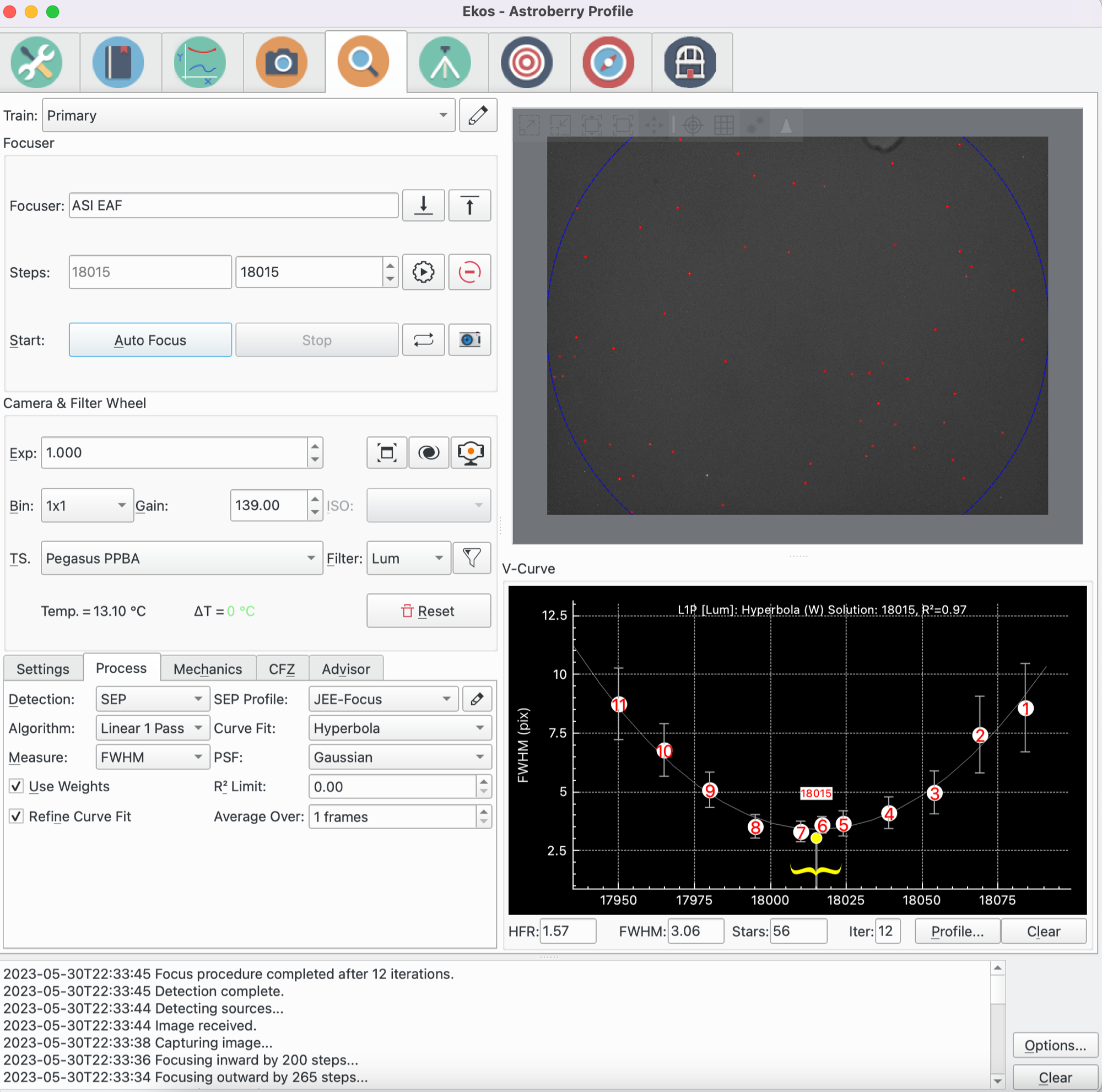
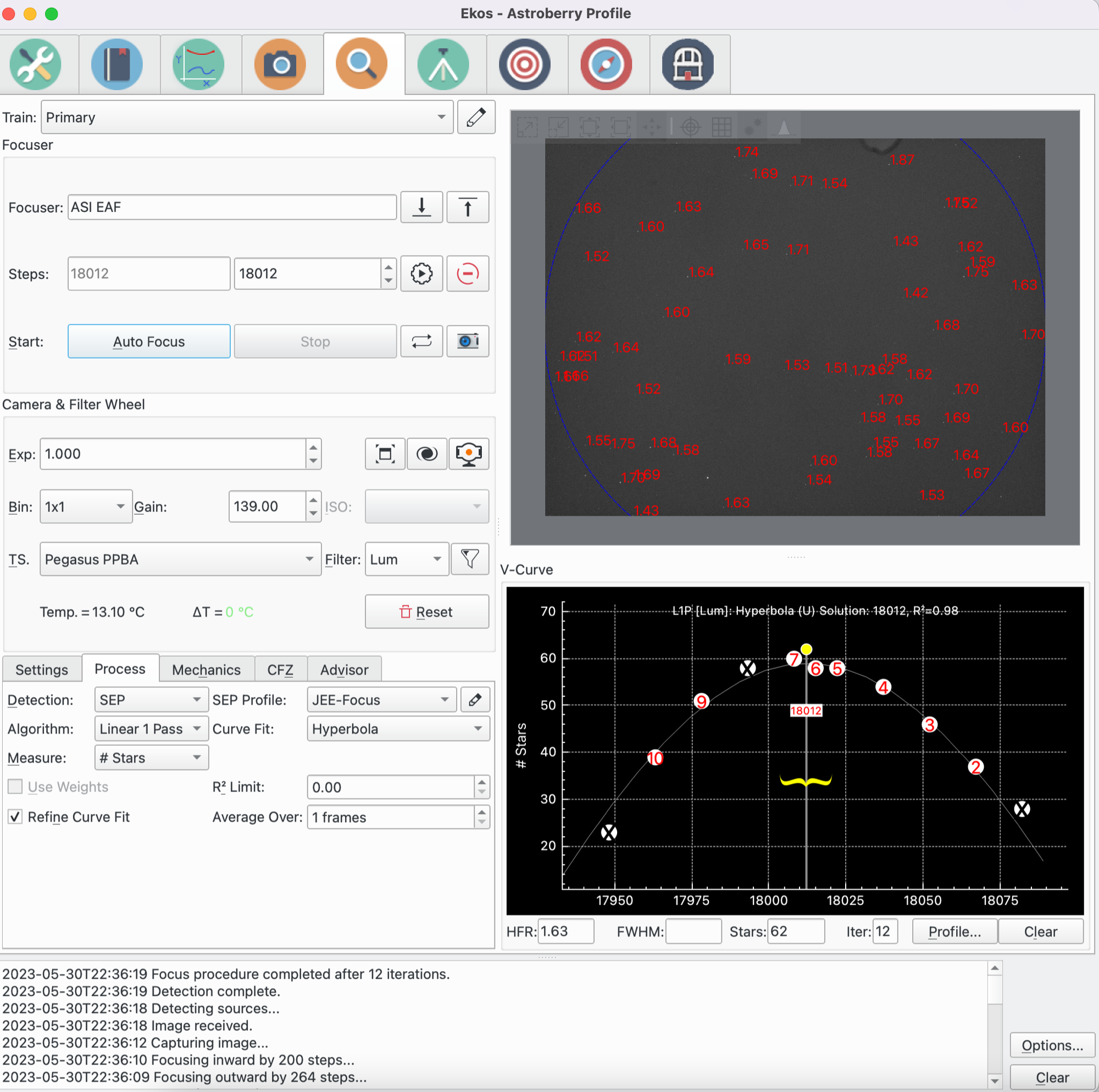
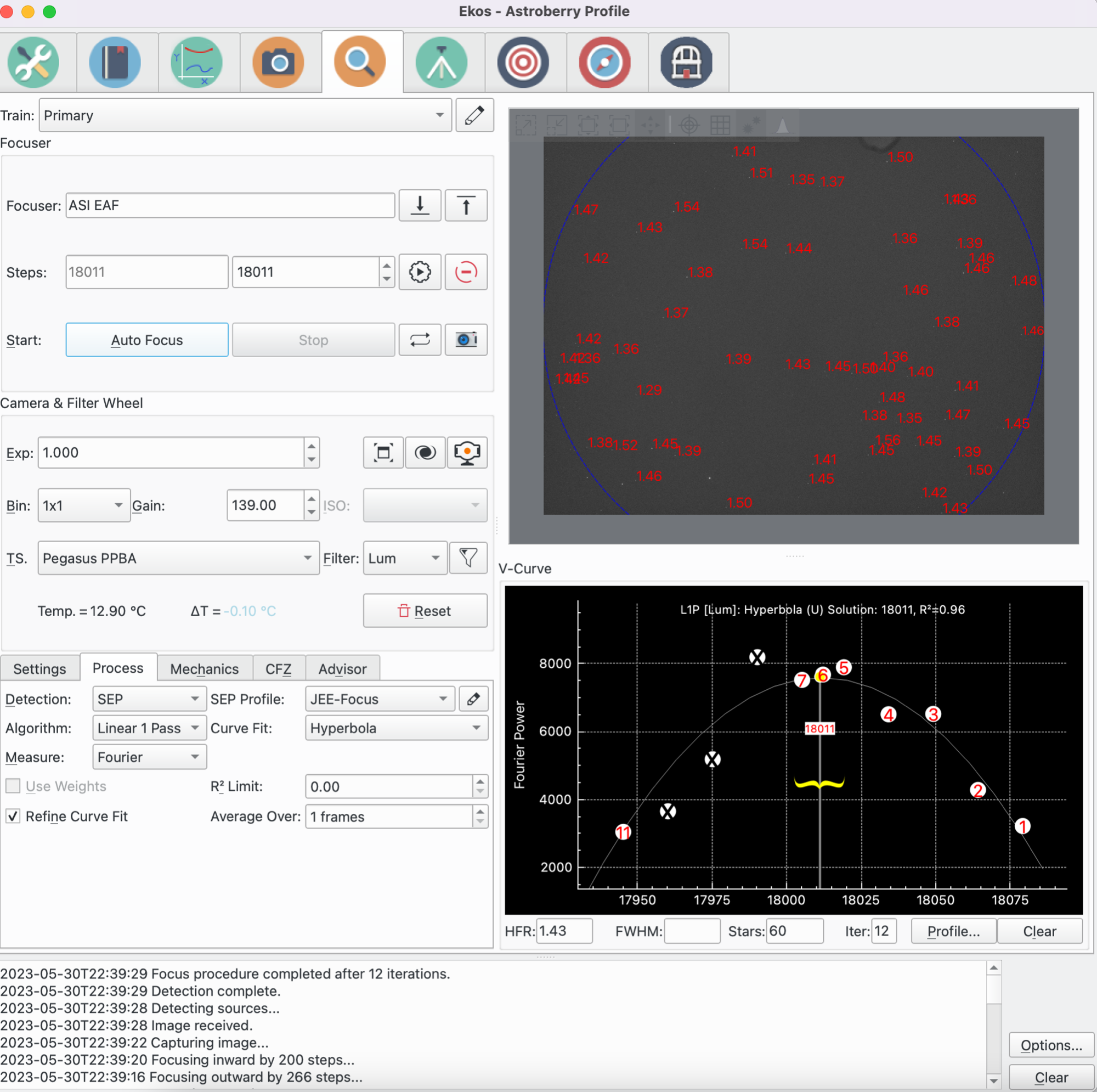
In addition to HFR, you can now use different measurements (FHWM, # of Stars, Fourier Power) that may work well with your setup and environment. Here are some focus runs with each of the new measurements types. You will notice that the solutions are very close to each other.

FWHM


# Of Stars


Fourier Power


Focus Aberration Inspector


Wolfgang Reissenberger introduced the mosaic view well known from PixInsight's AberrationInspector script that builds a mosaic from all image corners and center tiles such that they can be compared directly.

Supernovae are back


The last few releases was missing supernovae data since the online source that was providing the data decided to go offline. Thankfully, Philipp Auersperg-Castell communicated with the fine folks over the Transient Name Server (IAU Supernovae Working Group) to obtain daily supernovae updates and imported them to KStars. All Recent supernovae should be available now in KStars.