Showing posts with label AutoFocus. Show all posts

Sunday, December 3, 2023

KStars 3.6.8 is Released


KStars v3.6.8 is released on 2023.12.03 for Windows, MacOS & Linux. It's a bi-monthly bug-fix release with a couple of exciting features.

Aberration Inspector


John Evans introduces the very exciting Aberration Inspector tool. The Aberration Inspector is a tool that makes use of Autofocus to analyze backfocus and sensor tilt in the connected optical train. It solves up to 9 virtual tiles on the sensor as defined by the existing Mosaic Mask.


The information is then used to analyze:
  • Back focus.
  • Sensor Tilt.
There are 4 sections:
  • V-curve for the each tile.
  • Table of data detailing the curve fitting results.
  • Analysis of back focus and tilt.
  • 3D Surface graphic to explain the Petzval Surface intersection with the sensor.
This release provides display only functionality. In future it would be possible to add functionality to offer recommendations for adjustments using Octopi, PhotonCage, etc.

Sub-exposure Calculator


Joseph McGee continues to add improvements and fixes for the Sub-exposure calculator. For usability, the window is now re-sizeable, an issue with the display of tool tips was corrected, and an indicator has been added for the sensor type of the selected camera (Mono / Color).  For functionality: the upper limit of the Noise Increase input parameter was increased, support was added for cameras with non-variable read noise, (cameras with CCD sensors).


Several new camera data files were added to the KStars source code repository, and a function to allow direct direct download of camera files from the repository was enabled. (Note: users who have created their own camera data files, may wish set the file attribute to read-only, and/or make a back up copy in case of an accidental over-write from the download function if the camera file has the same name).

A new experimental graphical tool to determine an appropriate number of sub-exposures for integration was added. This tool allows the selection of an exposure time to noise ratio for a stacked image; the tool will compute the number of sub-exposures required to achieve that value.

Added several new camera data files:
  • Atik-16200CCD_Mono.xml
  • FLI-16200CCD_Mono.xml 
  • QHY_CCD_294M_Pro.xml
  • QHY_CCD_461_PH.xml
  • QHY_CCD_163C.xml 
  • QHY_CCD_163M.xml
  • QHY_CCD_268C.xml
  • QHY_CCD_294M.xml
  • QHY_CCD_600_PH.xml
  • ZWO_CCD_ASI294MC
  • Pro.xml ZWO_CCD_ASI294MM
  • Pro.xml ZWO_CCD_ASI533MC
  • Pro.xml ZWO_CCD_ASI2600MC
  • Pro.xml ZWO_CCD_ASI6200MC
  • Pro.xml ZWO_CCD_ASI533MC
  • Pro.xml ZWO_CCD_ASI533MM
  • Pro.xml Nikon_DSLR_DSC_D5100_(PTP_mode).xml Nikon_DSLR_DSC_D700_(PTP_mode).xml

FITSViewer Solver


Hy Murveit added a very useful feature to the FITS Viewer: a built-in solver!

The FITS Viewer Solver is used to plate-solve the image loaded in the FITS Viewer's tab. It only works with the internal StellarSolver. You get the RA and DEC coordinates for the center of the image, the image's scale, the angle of rotation, and the number of stars detected in the image. Its main use case is debugging plate-solving issues in Ekos, though the information displayed can be generally useful. The controls and displays are described below.
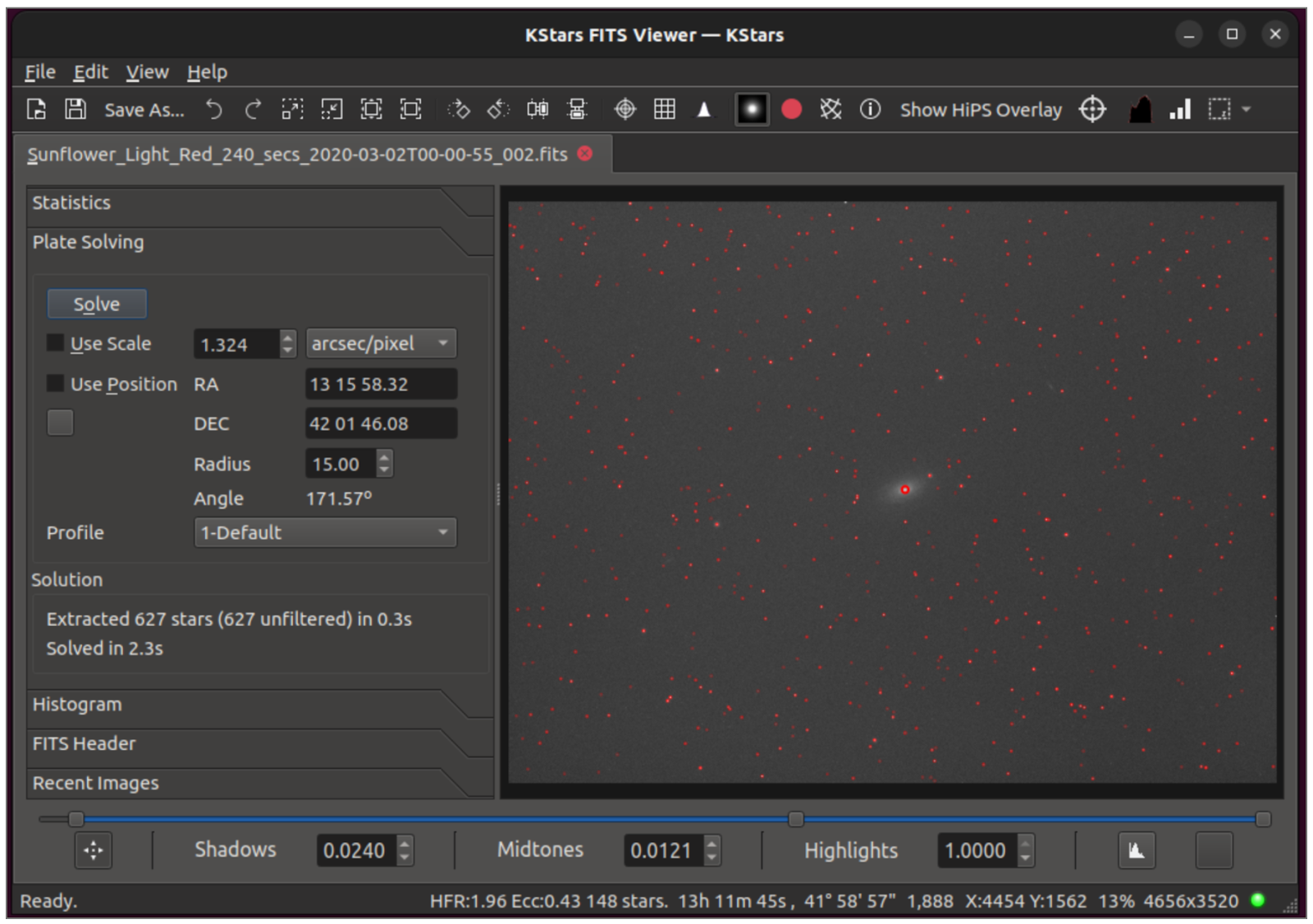

This adds a new tool inside the splitter on the FITS Viewer. It plate-solves the displayed image, and allows the user to experiment with a number of plate-solving parameters, and thus help debug plate-solving issues.

How to test it out?
  • Open the sliding panel on the left part way, click on Plate Solving, and resize the windows appropriately.
  • Experiment with the parameters available (Use Scale, Use Position, the scale and RA/DEC positions, choose a profile and/or edit it)
  • Click Solve, and the image is solved and the solution presented in the Scale and RA & DEC and Angle boxes.
  • If you enable "Mark Stars" above the image window, you will also see the stars that were detected.

Quality of Life improvements

  • Make "Set Coordinates Manually" dialog more intuitive.
  • Telescope name specified in the optical trains are now saved in the  FITS header (the mount name was saved before).
  • New placeholders for ISO, binning and pure exposure time added.
  • Add a new not-default scheduler option to disable greedy scheduling.
  • Reduce latency between captures, especially when guiding / dithering.
  • Fix issue with differential slewing.
  • Separate Business Logic from UI in Scheduler.
  • Fix bug in estimating job time, capture delays were misinterpreted.
  • Fixed guide start deviation was not saved properly in esq file.
  • Bugfix in one-pulse dither. Dither pulses were going the wrong way.
  • Fix Scheduler hangs when Focus does not signal Autofocus start failure.
  • Focus Guide Settle Bug.

Friday, February 14, 2020

KStars v3.4.0 is Released


Celebrate Valentines' Day with some KStars Love! Happy to announce the release of KStars 3.4.0 on February 14th, 2020 on Linux, MacOS, and Windows.

What's new with this release?

The Linear Focus Algorithm.


Hy Murveit continued to work on linear focusing algorithm. This is an alternative auto-focus algorithm available in the Process section of the Focus tab.


You can think of this algorithm as "slow and steady". It should be less sensitive to backlash and measurement noise, but will likely take more samples to achieve its minimum HFR than a successful polynomial search. If you are having issues with auto-focus, you should consider trying this out.

It takes regularly sampled HFR values, i.e. (mostly) moving the position inward by a fixed amount--step size in the 1st pass of the algorithm, and 1/2 step size in the 2nd pass. The polynomial algorithm varies the change in position. Linear rarely changes direction, and mostly moves inward. In its first pass it takes a number of samples inward to establish a V-curve and an approximate minimum-HFR position, then makes a 2nd inward pass looking for that minimum. It only samples the HFR after an inward move. When it needs to move outward, e.g. in between the the 1st and 2nd passes, it moves outward much further than needed, and then moves back in before capturing an image.

The system should be at rough focus before the algorithm starts. The most important parameter is the step size, which needs to be found experimentally. See the screenshot as to how it was chosen (step size = 25) for a Moonlight v2 focuser. Recommend that full-field and the SEP detection algorithm be used with it.

Faster Astrometry.net Solver


Robert Lancaster added an option to use Sextrator as the primary method to identify stars within an image. This has two benefits:

1. It removes the python dependency, which was a painful issue for MacOS users.
2. It vastly improves the solver speed, according to some early reports from our beta testers.


You can turn on the Sextrator option in Astrometry.net settings. 


You can see the astrometry.net solver in now noticeably faster and more reliable than before!

Improvements & Bug Fixes

  • Fixed a few memory allocation issues to reduce the process memory usage.
  • Fixed DSLR ImageToFITS loading when auto convert is used.
  • Fixed focus direction for relative DC focusers.
  • Improved reliability of setting snoop property for the active profile.
  • Fixed File name sanitization issues.
  • Communication with remote INDI Web Manager is now mostly asynchronous.
  • Align property labels in the INDI dialog vertically on top.

Thursday, February 28, 2019

KStars v3.1.0 is released!

I'm glad to announce KStars first release of 2019: v3.1.0 for MacOS, Linux, and Windows. This release focuses on improvements to stability & performance of KStars. In 3.0.0, we introduced quite a few features which resulted in a few regressions that we worked hard to iron out in this release.


Ekos Scheduler


Eric Dejouhanet fixed a few bugs with the Ekos Scheduler along with making steady improvements to cover all corner cases for multi-object multi-night scheduling which can become quite complex.


Ring-Field Focusing


Eric also added a new feature to the Focus module: Ring-field focusing. This method limits the area which stars are detected between an inner and an outer ring. This can be useful in images where
galaxies or nebulaes can be mistaken as stellar object which often lead to erroneous HFR reporting.

This can only be used for full-field focusing.


Meridian Flip


Wolfgang Reissenberger migrated the Meridian Flip handling code to the Ekos Mount tab. This makes meridian flip possible even if there is no capture process going. If the mount is tracking and passes the meridian, it can be triggered to flip now in the Mount Module.


Ekos Documentation


Yuri Chornoivan migrated online Ekos documentation to KStars official documentation. This was a tremendous effort due to the volume of the documentation data involved. Now Ekos documentation are properly managed by us in KDE and should get translations like the rest of the official documentation.


Ekos PAA for Non-GOTO mounts


Sebastian Neubert introduced manual workflow for users who would like to use Ekos Polar Alignment Assistant Tool with manual non-GOTO mounts. Now the users are prompted to rotate the mount when it is required to do so until the process is complete. This is Sebastian's first code contribution to KStars, welcome to the team!


MacOS Build Script


Robert Lancaster developed a comprehensive script along with detailed documentation for building KStars with Craft on MacOS. This enables users to wish to either develop for KStars or use the latest bleeding edge versions from trying it out with a single script that pulls all the sources and compile them accordingly with the aid of KDE's spectacular Craft technology.


DSLR LiveView


The LiveView window received a few enhancement to enable zooming and panning for supported DSLR cameras.


Other Fixes & Improvements

  • The FITS Viewer window is now automatically raised to the foreground when a new image arrives.
  • Dark Library now considers all DSLRs to be shutterless.
  • Mounts are grouped by manufacturer in the Equipment Profile Editor.
  • Preliminary support for websocket to INDI::CCD on the client side.
  • DBus interface expansion to provide more fine control over KStars.
  • Fixed relative focuser bug in autofocus mode.
  • Improved multi-channel histogram by providing dedicated controls to each channel.
  • Fixed Auto-Stretch affecting raw image values.
  • Support for compressed FITS (*.fits.fz) in INDI. This can cut the transmission time to 30%!
  • Improved display of Parked status.
  • KStars defaults to limited resource mode on ARM architecture.
  • When there is binning change, always FORCE setting of frame values even if they did not change

Tuesday, April 24, 2018

KStars 2.9.5 is out!

KStars v2.9.5 is now available for Windows, MacOS, and Linux.

Autofocus module users would be happy to learn that the HFR value is now responsive to changing seeing conditions. Previously, the first successful autofocus operation would set the HFR Threshold value of which subsequent measurements are compared against during the in-sequence-focusing step.

However, this method suffers from two issues:

  1. Seeing could change during the night.
  2. HFR value could be different for different filters.
These issues can lead to interesting artifacts under the right conditions, most notably repeatedly running a complete autofocus run after each subsequent exposure thereby losing precious observation time in a futile attempt to bring the HFR value down.

In KStars 2.9.5, we introduce an experimental adaptive HFR Thresholding algorithm that selects the median HFR value filter-wise. It still has to be seen whether this is an overall better approach, so go out and test this!

Ekos Scheduler module has received major patches from Eric Dejouhanet to improve its reliability and fix some corner cases. More patches are in the pipeline to make the scheduler rock solid in various complex scenarios.

A quite illusive and annoying time-zone related bug was fixed when using INDI GPS devices. Now KStars correctly accounts for the UTC offset. Another related issue is related to preventing race conditions between multiple devices that may send time information, such as mounts and GPS devices, so now you can explicitly select which device to receive the location and time information from.


Finally, Align module FOV now default to zero on startup. Previously, FOV as calculated from the telescope focal length & camera pixel size was used to derive other values passed to the solver. However, it turns out that the FOV for real optical trains can be different. Using focal reduces, coma correctors, and even filter wheels or spacers can alter this value, sometimes quite significantly to the unsuspecting user.

Therefore, relying alone on the calculated FOV might actually cause astrometry.net to fail since the actual FOV might fall beyond the field of view threshold boundary. With this addition, the first solver run would take a little bit longer but it would also produce a quite accurate effective FOV. You can think of the effective FOV as the real FOV that your combination of your camera, telescope, and whatever sits in between (aka optical train) ends up producing.


This effective FOV is then saved for each Profile-Telescope-Camera combination for future use. This is all done behind the scenes to make user experience much more pleasant and bullet proof when using the Ekos Alignment module.

Clear skies!