Sunday, October 27, 2013

Demo of Ekos Alignment module

Yesterday, I field tested Ekos Alignment Module using EQMod for Linux driver with my Orion Atlas telescope. The module utilizes astrometry.net solver to find the actual celestial coordinates in a given image, making scope alignment quite a trivial procedure with amazingly accurate GOTOs.

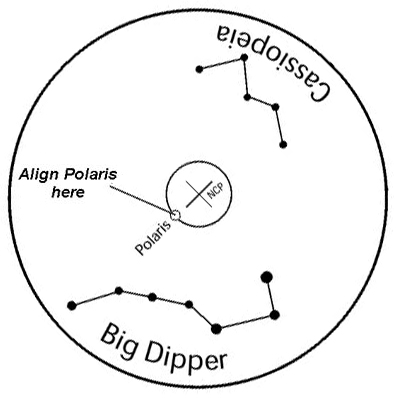
To use Ekos for alignment, first you have to put your telescope in the starting home position, which simply means that it should be leveled and pointed at the North Celestial Pole (NCP), if you are in the northern hemisphere. With my mount (HEQ5), I have a polar finder scope so pointing it at the NCP was quite trivial simply by adjusting the mount altitude and azimuth knobs until polaris is within a small circle designated in the polar find scope.


Next, I fired Ekos and started it with two drivers: EQMod & QSI CCD INDI drivers. It would have been possible to use the Synscan driver, but the driver is very limited compared to EQMod. After you use EQMod, you never look back.

Then I asked EQMod to track a nearby star. Now this is where the magic of Ekos comes. You don't have to do anything yourself! No more looking in the eye piece or CCD image to align your scope. You just hit "solve" and it figures where in the sky the telescope is really pointing. Once it finds a solution, you can ask it to either sync the telescope coordinates to the solution coordinates, or sync and slew back to the target we were tracking just earlier. I set it to "Slew to Target" and I had to stop the first iteration of the solver because it was taking too long, but after adjusting some options (as you can see in the video), the solver only took 8 seconds to find a solution.

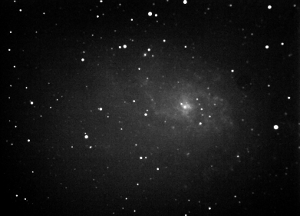
Each time the solver finds a solution and syncs, an alignment point is added to EQMod Alignment Model, which is N-Star by default. The more alignment points you have, the more accurate your slews become. I then asked EQMod to track another nearby star and repeated the same process, this time the solver only took 2 seconds. Finally, to show that the alignment is really working, I slewed to M31, took an image, and it was dead in the center!

All those exciting Ekos features are coming up in the next KDE 4.12 release. Have to give a shout-out to Jean-Luc Levaire, INDI EQMod driver developer, and Dustin Lang from astrometry.net for all their hard and beautiful work!

Check out this Youtube video showing the whole process!


Saturday, October 12, 2013

Accurate GOTO with plate solving alignment module in KStars

Any amateur astronomer must have experienced the woes of aligning their mount. First, your mount has to be aligned with the polar axis. Second, you need to perform an alignment procedure to enable the built-in GOTO firmware to slew and track your objects of choice. Often we are offered to align the mount with 2 or 3 bright stars spread all over the sky which then enables the firmware to build a simple model for the mount errors that it has to correct for when it slews to a target. Also, at this point, the firmware knows where the telescope is looking at in the sky, or so it thinks as we find out below.

While the simple 2 or 3 star alignment is often sufficient for visual observation, it becomes a source of frustration in astrophotography. After slewing to your target, you often have to perform framing to center the actual object within the CCD desired field of view.  Once that's done, your mount is now tracking the object, and you can begin to take your photos.

For deep sky astrophotography, you typically have to take multiple long exposures frames and later stack them. The mount tracks the object sidereally (i.e. in RA), but most commercial mounts suffer from manufacturing defects in the worm gears and other parts that makes accurate sidereal tracking difficult. Furthermore, your mount has to be perfectly aligned with the earth polar axis as any deviation will cause tracking errors.

This is where Ekos Alignment module comes into play. Alignment module performs the following:

  1. Highly accurate GOTO.
  2. Determine polar alignment errors.
Ekos Alignment Module

The way it works is by capturing an image of a star field, feeding that image to astrometry.net solver, and getting the central coordinates (RA, DEC) of the image. The solver essentially performs a pattern recognition against a catalog of millions of stars. Once the coordinates are determined, the true pointing of the telescope is known. Often, there is a discrepancy between where the telescope thinks it is looking at and where it is truly pointing. The magnitude of this discrepancy can range from a few arcminutes to a couple of degrees. Ekos can then correct the discrepancy by either syncing to the new coordinates, or by slewing the mount to the desired target originally requested.

Furthermore, Ekos can measure the misalignment in the polar axix by taking a couple of images near the meridian and east/west of the meridian. This will enable the user to adjust the mount until the misalignment is minimized.

With the addition of the alignment module, Ekos is now the ultimate astrophotographer tool under Linux!

Saturday, April 20, 2013

M81 & M82

Last week, I attempted to capture an image for the beautiful galaxy pair M81 & M82 in the constellation of Ursa Major. Since I live in a heavily light polluted city in Kuwait, I knew that broadband imaging is quite challenging, and was quite shocked when I found out that the background level due to light pollution noise cuts half the dynamic range of the CCD!

So even after processing, I ended up with a quite poor image:


So I decided to pick my gear, and head to AlSalmy, which is an isolated desert area northwest of Kuwait. While the skies there are not as dark as I'd like it to be, it's the best thing we have in Kuwait, for the time being at least as I'm pretty sure light pollution will ruin it within a decade or less. The trip was well worth the effort, and despite a waxing gibbous moon that lured close to the zenith, the background noise was substantially better than the inner city, no surprises here.

Here is the final image, taken with Ekos, and processed with PixInsight.

Lum: 8x240
Red: 5x240
Green: 5x240
Blue: 5x240


Friday, March 29, 2013

Say Hi to J065514.3+540858

For the last couple of years, I have been working on building a 5 meter radio telescope for educational purposes in my free time. Its primary purpose is to map neutral hydrogen distribution in the milky way. Hydrogen, the simplest atom, shines at the radio frequency of 1.42 Ghz (or 21 cm line), and we use multistage amplifiers to boost the very weak radio signal to something that can be processed by the electronics of a spectrometer.

Using INDI + KStars as the control platform, the user can command the telescope to slew and track objects. Slewing to an object is quite trivial. The telescope is equipped with absolute optical multiturn encoders that provide the positional feedback to the control system. If we know the home position of the telescope and the encoder to degrees ratio, it would be possible to command the dish to move to a new position and stop whenever the new desired angle is reached. Tracking, however, is another matter.

The telescope motion is in Alt-Az (Altitude-Azimuth) while objects rotate due to the motion of the earth from east to west at sidereal rate. Hence, both altitude and azimuth axis must move in a step-wise ladder direction to keep up with the sidereal motion. Due to limitation in the mechanical system of the dish, the minimum speed of both axis is still a lot faster than the sidereal rate, and therefore, tracking was developed to keep the object within the beamwidth of the radio dish, which is 3 degrees, at all times via a user configurable tracking threshold. Whenever the threshold is exceeded, the dish corrects itself using the minimum speed possible.

The following is a screenshot taken for the creatively named J065514.3+540858 radio source in the constellation of Lynx. It is a relatively bright radio source with integrated flux of 1371 mJy @ 1.42 Ghz.


In the next few days, the goal is to fine tune the pointing accuracy and to calibrate the overall system noise. Finally, I'd like to thanks the developers of Kst for making such a great program! I use Kst to stream real time measurements from the continuum spectrometer, and this saved a lot of development time and effort. Kudos to the Kst team!

Saturday, October 20, 2012

M42 with Ekos & PixInsight

A few days ago, I used Ekos to take a 100-seconds exposure for M42, the Orion's Nebula, using Orion EON 120mm scope and QSI 583wsg CCD.

Initially, I processed the image using KStars FITSViewer histogram tool to bring out the contrast, then I used GIMP to crop and fine tune the image using the curves tool. Only the light frame was captured, no Dark, Bias, or Flat frames were taken, and hence no pre-processing was performed. The outcome was the following:

M42 with minimal processing

You can immediately notice that the M42 core is over exposed, as it can get quite tricky to balance long exposures to bring out the nebula details without saturating the core. Therefore, I decided to process the image under PixInsight, a multi-platform advanced image processing tool tailored for astrophotography. Using Dynamic Background Extraction (DBE), HDR transforms, and ACDNR noise reduction tool, the results were quite impressive:

M42 after PixInsight processing
With Ekos & PixInsight, I finally have everything I need for astrophotography under Linux!

Tuesday, October 9, 2012

First image with Ekos!

For the past few weeks, Ekos, KStars Astrophotography tool, went thought a lot of updates and testing. Today I was able to use Ekos to take my first astrophotography image of M33, the Triangulum Galaxy using QSI 583wsg CCD.


M33 - 5 minutes exposure

During the course of the night, and after setting up my Orion EON 120mm refractor, Loadstar autoguider, and Robofocus at the roof of my house, I began with using Ekos Autofocus tool to get the CCD focused, then used the autoguiding tool to keep the M 33 field of view centered during the 5 minute exposure run. This is a raw image with no filters and no dark or flat frames taken to perform post-processing and calibration. It was processed by GIMP by adjusting levels to bring out the contrast. Unfortunately, GIMP does not handle 16bit depth images as of now, which limits its capability in processing astrophotography images.

It is very exciting to finally use 100% based Linux software to perform astrophotography tasks. Ekos is still under heavy development, and is slated for release in the next KDE 4.10 release.

Sunday, September 9, 2012

Autoguiding in KStars


In a previous post, I briefly talked about developing the Autoguide feature in KStars. Guiding is process by which a star field is kept stationary within the field of view of a telescope when performing long exposure astronomical imaging. The telescope mount must keep tracking the selected celestial object during the imaging process as it transit the sky. Due to imperfections in the mechanics of the mount and periodic errors, the star field may drift with time. If the drift is not corrected, the resulting image may contain star trails among other deformities. The guiding process depends on selecting a reference star in the frame and correcting the telescope motion by detecting drifts in the telescope axes, and issuing correction commands accordingly.

Guiding under Ekos
Autoguiding feature was once a GSoC 2012 project, but students who got accepted were selected for other projects in KStars, so I decided to implement the feature myself. KStars supports INDI which can operate and control numerous astronomical devices. The goal of the GSoC project is to add autoguiding support to KStars Ekos tool. Ekos is a tool to aid amateur astronomers in astrophotography. It enables focusing, guiding, and capture of astronomical images using INDI.


So instead of reinventing the wheel, I decided to base the autoguiding code on existing open source software. Under Linux, the primary tools are OpenPHD and Lin Guider.  After researching both options, Andrew Stepanenko lin_guider was selected because it was battle tested, and especially since it is based on Qt and hence, import will be easier. After a couple of weeks of importing the code and rewritings part of it to fit KStars and INDI framework, the autoguider tool was complete, at least under simulation. The autoguiding tool, in addition to the autofocus tool previously developed should now complete the basic stack of tools required by astrophotography. The next step is to field test all those features!

The following is a video illustrating the autoguide feature in KStars: