Showing posts with label Linux. Show all posts

Saturday, July 8, 2017

KStars 2.7.9 Released for Linux, Mac, Windows, and Android!

A new release of KStars is out! v2.7.9 is now available for Linux, Mac, and Windows. At the same time, we released an update to KStars Lite for Android.

This is mostly a bugfix release where we concentrated on fixing bugs as reported by our users. But that didn't stop us from creating new tools that were long requested by the community, including the Mount Control tool that facilitates motion and GOTO commands with a simple interface.

On the other hand, KStars GSoC 2017 project started with lots under the hood work taking place. Csaba went full throttle with migrating the C++ code to modern C++14 standards while updating the build process to be stricter, more secure, and efficient. The whole code base was formatted and countless warnings resolved. Furthermore, several enhancements were made to decrease memory usage and increase performance of tools such as Observation Planner.

For KStars Lite on Android, it now supports Automatic Mode where you can identify stars, planets, and constellations simply by pointing the phone toward the sky and looking at the live Sky Map within the App. Significant performance gains were made in FITS files that support WCS data. Since processing WCS is very CPU intensive, loading WCS data is now performed on demand. This is especially important for embedded devices where resources are limited.

Robert Lancaster implemented automatic download of Astrometry.net index files directly from the GUI. No longer the user have to go and hunt for index files, calculate FOVs for different equipment...etc. With the updated system, all the required index files are highlighted automatically by Ekos, and all you have to do is to click and download them!

Special thanks to all those who made this release possible. Outstanding work from KDE's Craft team, led by Hannah Von Reth, for making this great tool that enables KStars to reach users across all major platforms.

New Field Rotator Conrol


Monday, May 8, 2017

KStars 2.7.7 Released for Linux, Mac, and Windows!

The New What's Interesting Tool
I'm glad to announce the release of KStars 2.7.7 for Linux, Mac, and Windows!

In this release, Robert Lancaster dedicated a lot of time to improving KStars What's Interesting Tool (WIT). It is now significantly improved and offers a rich educational experience to explore the heavens! Users can now explore many naked eye and deep sky objects, in addition to addon catalogs offered by KStars such as the Sharpless Catalog.

Users wishing to have more fine control on what objects to observe and/or image should be using the Observation Planner that enable filtering of objects with custom constraints and limits. For casual users looking to find out what's interesting tonight, then this tool is the optimal choice.

Whether you're simply viewing the sky unaided with your eye or using binoculars/telescopes, find out which objects are available and how to locate them in the night sky.

The WIT fetches images and information on the objects and interest and can even fetch information from online sources like Wikipedia.

Mac Canon users will be glad to know the new release now enables them to fully control their DSLRs under OSX. Furthermore, the Mac release includes support for ZWO ASI cameras. We hope to add support for QHY for Mac in the next release.

Access to thousands of images like this

While KStars includes downloadable addons for images that appears in the detail dialog, John Sadler did a fantastic job of compiling images for over 18,000 NGC/IC objects!! These images are now available as downlodable addons, and now you can enjoy images of thousands of objects right within KStars. A small update to the Observation Planner enabled support for viewing images in there as well to help you plan what to observe and image ahead.


A few fixes were made to the Ekos Guide module to detect timeout in image captures and to take appropriate actions before giving up. Also, dithering failure does not necessary lead to autoguiding process failure. This behavior is now controlled by the user. By default, the autoguide process shall proceed even if dithering fails for whatever reason.


Finally, I added SkySafari support to INDI and now SkySafari users can enjoy using their app & KStars simultaneously to control their equipment without resorting to exotic hacks.

Thursday, March 23, 2017

KStars 2.7.6 for Windows & OSX released

I am glad to announce the release of KStars 2.7.6 release for Windows & OSX. Linux users using the official PPA can install the latest release as well.

In this release, we introduce the Ekos Mount Modelling tool developed by Robert Lancaster. It's currently in Beta now and we would appreciate any feedback. The tool enables you to build a comprehensive mount model if supported by your mount. Any mount that improves its internal pointing model after a SYNC command is applicable. Furthermore, INDI mounts that supports INDI Alignment Subsystem (EQMod, Nexstarevo, Synscan..etc) are also applicable.


Along with the advanced mount modelling tool comes the new Solution Results plot in the Align Module. It displays the quality of your GOTO after each solve and it can help you to identify if there are issues with your mount or the quality of the image..etc.


You can zoom, pan, and drag to explore the plot in details. Annotation for the quality of each GOTO is available on mouse over.

Ekos Polar Alignment Assistant tool also received a few bug fixes from the community feedback. Most users were able to achieve impressive results using the this easy to use Polar Alignment tool.

While Ekos is designed for ease of use, it can be intimidating for new users unfamiliar with the architecture of Ekos/INDI on several operation systems. Therefore, a new Ekos Profile Wizard is now available to guide the users to setting up their equipment for the first time in Ekos across several operating systems and connection topologies.


With INDI v1.4.1+, figuring out which port to use for your mount & focuser is now trivial across Linux & OSX. INDI automatically scans ports on your system and can even automatically connect to all potential available ports as well until a successful connection is established.


Last, but not least, KStars' NEO (Near-Earth-Object) data query from NASA's JPL is now properly working again thanks to our newest KStars developer Valentin Boettcher. Valentin (aka Hiro) is only 18 years old but is quite brilliant and experienced with KDE/Qt development environment. Welcome abroad!

Wednesday, December 23, 2015

Create Super Mosaic Images with Ekos

Hubble-like super wide field images of galaxies and nebulae are truly awe inspiring, and while it takes great skills to obtain such images and process them; many notable names in the field of
astrophotography employ gear that is not
 vastly different from yours or mine. I emphasize vastly because some do indeed have impressive equipment and dedicated observatories worth tens of the thousands of dollars. Nevertheless, many amateurs can obtain stellar wide-field images by combining smaller images into a single grand mosaic.
M31 3x2 Mosaic in Ekos
We are often limited by our camera+telescope Field of View (FOV). By increasing FOV by means of a focal reducer or a shorter tube, we gain a larger sky coverage at the expense of spatial resolution. At the same time, many attractive wide-field targets span multiple FOVs across the sky. Without any changes to your astrophotography gear, it is possible to create a super mosaic image stitched together from several smaller images. There are two major steps to accomplish a super mosaic image:
  1. Capture multiple images spanning the target with some overlap between images. The overlap is necessary to enable the processing software from aligning and joining the sub-images.
  2. Process the images and stitch them into a super mosaic image.
The 2nd step is handled by image processing applications such as PixInsight, among others, and will not be the topic of discussion here. The first step can be accomplished in Ekos Scheduler where it creates a mosaic suitable for your equipment and in accordance to the desired field of view. Not only Ekos creates the mosaic panels for your target, but it also constructs the corresponding observatory jobs required to capture all the images. This greatly facilitates the logistics of capturing many images with different filters and calibration frames across a wide area of the sky.
Before starting the Mosaic Job Creator in Ekos Scheduler, you need to select a target and a sequence file. The Sequence File contains all the information necessary to capture an image including exposure time, filters, temperature setting...etc. Start the Mosaic Job Creator by clicking on the icon next to the Find button in Ekos Module.

Next, enter the desired number of horizontal and vertical panels (e.g. 2x2, 3x3...etc) and then click
 Update. The target FOV shall be calculated given the number of panels and your camera's FOV and the mosaic overlap shall be displayed. By default, the percentage of the overlap among images is 5%, but you can change this value to your desired value. You can also move the complete mosaic structure around to fine tune the position of the mosaic panels. When satisfied, click Create Jobs and Ekos shall create an observation job and a corresponding customized sequence file for each panel. All the jobs shall be saved to an Ekos Scheduler List (.esl) file that you can load on any suitable observing night and it will pick off where you left. Before starting the Mosaic Job Creator, check that all the observation job conditions, constraints, and startup/shutdown procedures are as per your requirements since these settings shall be copied to all the jobs generated by the Mosaic tool.On first use, you need to enter your equipment settings including your telescope focal length in addition to camera's width, height, and pixel dimensions. Finally, you need to enter the rotation of the camera with respect to north, or the position angle. If you don't know this value, start Ekos and slew to to your desired target then use the Align module to solve the image and obtain the position angle.
With Ekos Scheduler, multi-night imaging is greatly facilitated and creating super mosaics has never been so easy. Get started with Ekos now and don't forget to post your results to INDI forums!

Wednesday, February 18, 2015

Automatic Meridian Flip in Ekos

Over the past couple of weeks, I worked on a new feature in Ekos: Automatic Meridian Flip.

Equatorial mounts flip after crossing the meridian in order to prevent the imaging equipment train from hitting the tripod. With Ekos, you can set an hour angle limit which if exceeded, the mount will be commnded to flip. The mount must begin tracking east of the meridian in order to the meridian flip to be commanded in Ekos.

When commanding a meridian flip, Ekos will suspend the autoguiding process and waits until the mount completes the flip. Once the mount begins tracking again post meridian flip, Ekos will plate-solve and make any necessary slew commands to bring the mount to the exact location it was tracking prior to the flip.

Next, it will automatically capture a frame and select a suitable guide star, performs calibration, and resumes autoguiding. If In-Sequence focuing is enabled, it will also capture and focus a suitable star. It then resumes the capture process form where it left.

All these steps are completely automated and require no user intervention! Watch the video below for a live demo of this feature!


Tuesday, February 3, 2015

3D Cube FITS & Debayer support in KStars

Recently I was finally able to close BUG#305960 where a user requested support for 3D Cube FITS support in KStars. The FITSViewer tool always supported monochrome images since its inception, as this is what most CCD cameras in astronomy use. But single-shot color CCDs and DSLRs' utilization within the astrophotography world kept growing over the last few years.

Now the FITSViewer tool can display any 2D (monochrome) & 3D (color) cube FITS, and while most of the operations in KStars are geared toward single-channel images, the migration to 3 channel support was relatively smooth.


In addition to the 3D cube support, the FITSViewer tool can debayer images captured from color cameras and stored in RAW format with a specific color filter array (CFA).

DSLR users will gladly welcome this feature as they can inspect their color RAW images in color and may adjust the debayer parameters to produce a clear image of their target. Internally, KStars converts the debayerd image to a 3D Cube FITS without changing the RAW data at all. While the user may save the file as a 3D Cube FITS, it is not recommend. In fact, the debayer functionality should only be used to inspect the image, and the RAW image should always be processed under a dedicated astrophtography tool like PixInsight in order to carry out proper calibration procedure before any integration and registration processes.


In addition to DSLRs, the SBIG CCD INDI driver now also supports color CCDs. More INDI CCD drivers will have color support soon.

Sunday, August 3, 2014

NGC6992 with Ekos

A lot has changed in the last few months in Ekos, KStars advanced astrophotraphy tool. The powerful builtin sequence queue is more robust now and can support in-sequence autofocusing, autoguiding limits with dither support, and autopark functionality. The astrometry.net based alignment module has been improved to support the online astrometry solver using Web Services, thereby eliminating the need for an offline astrometry solver that requires gigabytes of star indexes in order to solve.

Coupled with an ever improving INDI drivers, Ekos provides users with a complete astrophotography stack in Linux. While the majority of Ekos development takes place indoors with the help of INDI's powerful device simulator, nothing beats on-site testing with all the hardware connected and ready to go. So a couple of days ago, I decided to put Ekos to the test!

Since I live in a heavily light polluted area about 30 KM south of Kuwait City, my friend and I decided to conduct the astrophotography session some 100 KM away northwest of Kuwait in AlSalmy desert. It's a quite desolate desert, but it is more rocky than sandish so that would help a lot in case we get some wind our way. After setting up the equipment (Orion Sirius EON 120mm APO, QSI 583 CCD, Lodestar autoguider, and Moonlite focuser), I performed the initial autofocus routine, followed by plate-solving a frame in order to establish the telescope's actual position in the night sky. Before Ekos alignment module, this process would take anywhere between 10-20 minutes to get the scope properly aligned using 2 or 3 star alignments, and even after that, the GOTO might not be accurate. With Ekos alignment module, GOTO is highly accurate and it increases in accuracy with each subsequent frame captured and solved.

Using Ekos Sequence Queue, I added 4 jobs, each consists of 6x300s exposures in each filter (Hydrogen Alpha, Red, Green, and Blue). Then I used the Guide module to calibrate the guider and start the autoguide process after slewing to NGC6992 and engaging tracking.

After the light frames were completed, flats and darks were taken. The flats were captured using an artificial uniform light source. Due to a temperature of 39 degrees Celsius in the desert (around 8:15 PM),  the CCD was only cooled to zero degrees.

The next day I downloaded all the images to my desktop and used PixInsight to process them. PixInsight is a really powerful tool if mastered well, and there is still a lot of learn from this great tool. I ended up with a decent image that was captured and processed 100% in Linux!


Monday, January 6, 2014

Remote observatory using Raspberry PI

One the great strengths of the INDI protocol is that it is based on a Server/Client architecture where commands are sent back and forth in XML over TCP/IP. Therefore, network transparency is built right at the protocol level and it makes distributed data acquisition and control quite trivial.

For the last few months, I have been running all my astrophotography gear (HEQ Mount, QSI CCD, Lodestar Guider, MoonLite focuser) on my HP laptop using INDI & KStars/Ekos. As it was getting quite cold recently (even in Kuwait it gets quite cold!), I found myself using VNC to access the laptop which sits with all my equipment on the roof. While the performance was OK since it is a local network, I was curious to try to use Raspberry PI (RPi) to run the INDI server and drivers, and connect to them remotely from Ekos.

Building and installing the drivers on RPi was straightforward. Due to power limitations of the RPi, I used a powered USB hub to connect all my equipment. That worked pretty well, and to my surprise, everything worked without a hitch from the first time! I used a USB WiFi dongle on the RPi and gave it a static IP address as well.

Connecting to the RPi from Ekos was straight forward, and I was able to carry on 6+ hours of continious image aquisition, guiding, and focusing without any issues! While all my equipment only sit less than 20 meters away, the same principle is applicable to 2000 km away as long as you have a reliable network connection.

For those curious about using RPi with their astro gear, I wrote a tutorial on getting started with INDI & Raspberry PI.

Friday, November 1, 2013

Joystick support in the next INDI release!

So it took me a couple of days, but I finally got around to adding support for joysticks in INDI. This is very exciting and it became quite important recently when I started using EQMod driver. For now, all LX200 and EQMod drivers supported. I didn't put a lot of functionality into the telescope drivers joystick control section yet, just the basic N/S/E/W motion and selection of slew speeds.

This is particular useful for EQMOd where it was a pain to try to center any star using the INDI control panel, while at the same time, trying to look in the eye piece! Of course, now with Ekos Alignment module & astrometry.net solver I don't have to do that anymore, but this functionality is indeed essentials for all of those tired of jumping back and forth between the scope and the laptop.

All those features will be available in the next INDI Library v0.9.7 release.

Here is a quick video for controlling LX200 GPS:

Sunday, October 27, 2013

Demo of Ekos Alignment module

Yesterday, I field tested Ekos Alignment Module using EQMod for Linux driver with my Orion Atlas telescope. The module utilizes astrometry.net solver to find the actual celestial coordinates in a given image, making scope alignment quite a trivial procedure with amazingly accurate GOTOs.

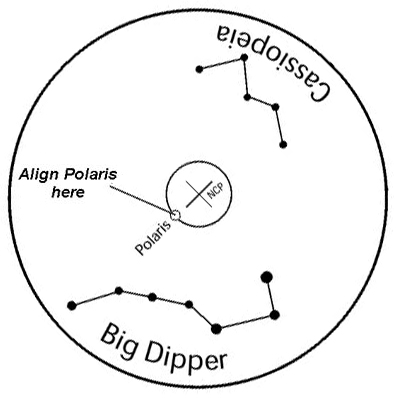
To use Ekos for alignment, first you have to put your telescope in the starting home position, which simply means that it should be leveled and pointed at the North Celestial Pole (NCP), if you are in the northern hemisphere. With my mount (HEQ5), I have a polar finder scope so pointing it at the NCP was quite trivial simply by adjusting the mount altitude and azimuth knobs until polaris is within a small circle designated in the polar find scope.


Next, I fired Ekos and started it with two drivers: EQMod & QSI CCD INDI drivers. It would have been possible to use the Synscan driver, but the driver is very limited compared to EQMod. After you use EQMod, you never look back.

Then I asked EQMod to track a nearby star. Now this is where the magic of Ekos comes. You don't have to do anything yourself! No more looking in the eye piece or CCD image to align your scope. You just hit "solve" and it figures where in the sky the telescope is really pointing. Once it finds a solution, you can ask it to either sync the telescope coordinates to the solution coordinates, or sync and slew back to the target we were tracking just earlier. I set it to "Slew to Target" and I had to stop the first iteration of the solver because it was taking too long, but after adjusting some options (as you can see in the video), the solver only took 8 seconds to find a solution.

Each time the solver finds a solution and syncs, an alignment point is added to EQMod Alignment Model, which is N-Star by default. The more alignment points you have, the more accurate your slews become. I then asked EQMod to track another nearby star and repeated the same process, this time the solver only took 2 seconds. Finally, to show that the alignment is really working, I slewed to M31, took an image, and it was dead in the center!

All those exciting Ekos features are coming up in the next KDE 4.12 release. Have to give a shout-out to Jean-Luc Levaire, INDI EQMod driver developer, and Dustin Lang from astrometry.net for all their hard and beautiful work!

Check out this Youtube video showing the whole process!


Saturday, October 12, 2013

Accurate GOTO with plate solving alignment module in KStars

Any amateur astronomer must have experienced the woes of aligning their mount. First, your mount has to be aligned with the polar axis. Second, you need to perform an alignment procedure to enable the built-in GOTO firmware to slew and track your objects of choice. Often we are offered to align the mount with 2 or 3 bright stars spread all over the sky which then enables the firmware to build a simple model for the mount errors that it has to correct for when it slews to a target. Also, at this point, the firmware knows where the telescope is looking at in the sky, or so it thinks as we find out below.

While the simple 2 or 3 star alignment is often sufficient for visual observation, it becomes a source of frustration in astrophotography. After slewing to your target, you often have to perform framing to center the actual object within the CCD desired field of view.  Once that's done, your mount is now tracking the object, and you can begin to take your photos.

For deep sky astrophotography, you typically have to take multiple long exposures frames and later stack them. The mount tracks the object sidereally (i.e. in RA), but most commercial mounts suffer from manufacturing defects in the worm gears and other parts that makes accurate sidereal tracking difficult. Furthermore, your mount has to be perfectly aligned with the earth polar axis as any deviation will cause tracking errors.

This is where Ekos Alignment module comes into play. Alignment module performs the following:

  1. Highly accurate GOTO.
  2. Determine polar alignment errors.
Ekos Alignment Module

The way it works is by capturing an image of a star field, feeding that image to astrometry.net solver, and getting the central coordinates (RA, DEC) of the image. The solver essentially performs a pattern recognition against a catalog of millions of stars. Once the coordinates are determined, the true pointing of the telescope is known. Often, there is a discrepancy between where the telescope thinks it is looking at and where it is truly pointing. The magnitude of this discrepancy can range from a few arcminutes to a couple of degrees. Ekos can then correct the discrepancy by either syncing to the new coordinates, or by slewing the mount to the desired target originally requested.

Furthermore, Ekos can measure the misalignment in the polar axix by taking a couple of images near the meridian and east/west of the meridian. This will enable the user to adjust the mount until the misalignment is minimized.

With the addition of the alignment module, Ekos is now the ultimate astrophotographer tool under Linux!

Friday, March 29, 2013

Say Hi to J065514.3+540858

For the last couple of years, I have been working on building a 5 meter radio telescope for educational purposes in my free time. Its primary purpose is to map neutral hydrogen distribution in the milky way. Hydrogen, the simplest atom, shines at the radio frequency of 1.42 Ghz (or 21 cm line), and we use multistage amplifiers to boost the very weak radio signal to something that can be processed by the electronics of a spectrometer.

Using INDI + KStars as the control platform, the user can command the telescope to slew and track objects. Slewing to an object is quite trivial. The telescope is equipped with absolute optical multiturn encoders that provide the positional feedback to the control system. If we know the home position of the telescope and the encoder to degrees ratio, it would be possible to command the dish to move to a new position and stop whenever the new desired angle is reached. Tracking, however, is another matter.

The telescope motion is in Alt-Az (Altitude-Azimuth) while objects rotate due to the motion of the earth from east to west at sidereal rate. Hence, both altitude and azimuth axis must move in a step-wise ladder direction to keep up with the sidereal motion. Due to limitation in the mechanical system of the dish, the minimum speed of both axis is still a lot faster than the sidereal rate, and therefore, tracking was developed to keep the object within the beamwidth of the radio dish, which is 3 degrees, at all times via a user configurable tracking threshold. Whenever the threshold is exceeded, the dish corrects itself using the minimum speed possible.

The following is a screenshot taken for the creatively named J065514.3+540858 radio source in the constellation of Lynx. It is a relatively bright radio source with integrated flux of 1371 mJy @ 1.42 Ghz.


In the next few days, the goal is to fine tune the pointing accuracy and to calibrate the overall system noise. Finally, I'd like to thanks the developers of Kst for making such a great program! I use Kst to stream real time measurements from the continuum spectrometer, and this saved a lot of development time and effort. Kudos to the Kst team!

Thursday, October 16, 2008

KDevelop installation nightmare

What's a better way to start ranting than to talk about package management in Linux! Yes, you've all heard that package management hell is over in Linux with all these FSM-sent repos supporting thousands of packages with just a few clicks!

Being an avid SUSE fan since the days of 7.2, I kept the tradition and upgraded to a clean install of openSUSE 11. After suffering horribly from previous upgrades, now I keep a separate partition for /home, and now I can comfortably tortue myself to the 6-month release cycle business. The KDE4 LiveCD installation was pretty straightforward, a few clicks and you're done.

OpenSUSE 11 ships with KDE 4.0.4, which might as well be called KDE 4.0 pre-alpha as far as most users are concerned. But hey, coming from a guy who compiles kdelibs/kdeedu from SVN trunk almost daily, I didn't mind that at all. In fact, it offers a better testing environment for me as a developer. Nevermind that it crashes on me every few minutes with no useful traces, but who am I to complain.

And so I wanted to start hacking right away, and after checking out the modules I needed from SVN, I wanted to load them in my favorite IDE: KDevelop. Except that it's not available in the default installation, which makes perfect sense for a LiveCD. So I fired up Yast2 and selected KDevelop. Apparently, the KDevelop team hasn't released any stable version for KDE4 yet, so I had to select KDevelop3, no problems, it works good enough for my needs. Then Yast2 asked me to agree to a huge list of dependecies that I didn't even look at before clicking OK, only to find out that I have to download ~400 MB worth of packages JUST TO INSTALL KDevelop?

Ok, so I can understand SOME of the dependencies, kdelibs3..yada yada, but why the hell do I need to install OpenOffice_org-thesaurus-en?!!! or gnomeui?!! or gnome-icon-theme?? I'm installing a KDE application after all, aren't I? I thought this is totally insane and just clicked the abort button. Hell, I'm not installing 400 MB of packages to get an IDE working. Anyway, why not use Kate? Sure, that would get the job done.

No, Thank-You-Very-Much

Except for the fact that it crashes everytime on startup. Hmmm, what choices am I left with? Hey, how about vi or Emacs? After all, real developers don't need pretty GUI to hack, right?!! Maybe, but you can call me a spoiled brat. At the end of the day, I decided to give Eclipse IDE for C++ a try and boy was I glad with the results, it's one solid IDE. Slow? yes. ugly? absolutely. functioning? Hell yes. Up until KDevelop4 matures enough to be usable (and useful for that matter), I'm sticking with Eclipse.