Tuesday, January 18, 2022

KStars v3.5.7 Released

KStars v3.5.7 is released on January 18th for Windows, MacOS, and Linux. This release includes a number of new features and bug fixes.

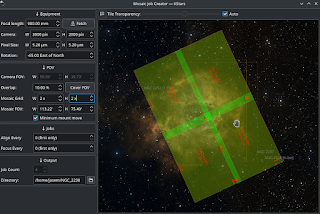
Mosaic Dragging


This feature is finally implemented in 3.5.7. Many assumed it existed before and were disappointed when they couldn't drag the mosaic panels around for finer adjustments.


Better MacOS support


Robert Lancaster worked vigilantly on improving KStars & INDI support for MacOS. This includes working on all the plumping required to get a daily build going in KDE Binary Farms using KDE's Craft technology so that MacOS users may finally have access to nightly builds.

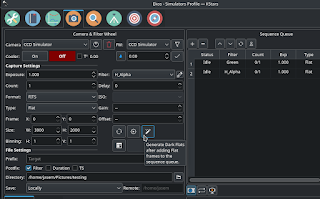
Flat Darks


Capture Flat Darks with a click of a button. After adding your desired flat frames, simply click the Flat Dark generator icon to add Dark Flats to your sequence queue. When Ekos completes capture of the flat frames, it will use the same exposure time (per filter, if one exists) for the dark flats. 


Please note that for this to work, the flats must be captured in the same session. That is, you cannot partially capture flats, restart Ekos, and then proceed to capture dark flats.

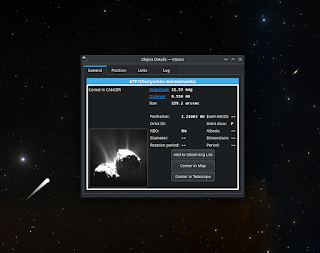
Comets Visibility


Hy Murveit made comets more discoverable in KStars by displaying them on almost all zoom levels. You'll find a lot more comets to learn and discover about in this release.


Internal refactoring


Wolfgang Reissenberger introduced State Machine for Capture Control changes as part of Ekos Road map to separate state machines, command processors, and business logic into their own manageable silos. While this is not exactly a user-facing activity, it remains to be critical for Ekos stability and growth in the future.


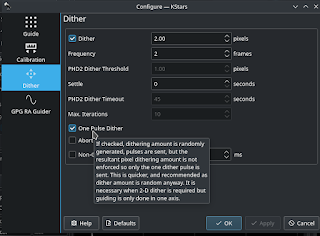
Faster Dithering


Hy Murveit introduced a One Pulse Dither option in Ekos guide module with randomly generated pulse. This should reduce the time it takes to dither at the expense of verifying that the guide star moved by the specific number of pixels required. Experiment with this new option and let us know what you think!


More highlights

  • Wolfgang Reissenberger: Bugfix for capture guiding deviation recovery
  • Eric Dejouhanet: Mosaic Tool documentation update
  • Akarsh Simha: Fix bugs involving the reading and writing of user's notes (logs) on objects
  • Wolfgang Reissenberger: Deactivating meridian flip while PAA is running
  • Paweł Pleskaczyński: change guide graph style to line graph
  • Wolfgang Reissenberger: Display FITS viewer only when option is set
  • Jasem Mutlaq: Compressed FITS image with fpack are now properly loaded in KStars when they are sent as buffer
  • Antonio Escriban: Standardized dialog for guider 'Control Parameters' &'Other Settings'
  • Hy Murveit: Display comets at almost all zooms, default names now 1AU.
  • Jasem Mutlaq: Extend properties that can be saved in a sequence file beyond just numbers

Thursday, September 16, 2021

KStars v3.5.5 Released!

KStars v3.5.5 is released on September 16th for Windows, MacOS, and Linux. This release includes a number of new features and bug fixes.

Google Summer of Code 2021

Let's start with the highly successful Google Summer of Code project: KStars Deep-Sky-Objects Overhaul by Valentin Boettcher. This is mostly backend plumping and refactoring to enable KStars to process very large DSO catalogs without impacting memory or processor utilization. This required the development of a new Python-based catalog generator that consolidates and de-duplicates deep sky catalogs in a form usable by KStars.


The legacy system for handling DSO catalogs in KStars has grown rather organically and was a tangle between databases, CSV files and special case implementations. Many catalogs were hard-coded explicitly, making it hard to extend and generalize. Also, the sources of the catalogs and methods how they were transformed into the KStars format were inhomogeneous and hard to reproduce, making deduplication almost impossible.

De-duplication is a process to identify when different designations are used to denote the same deep sky object. For example, the infamous Andromeda Galaxy is known as M31 in the Messier catalog, whereas in the NGC catalog, its designation is 224, and in the PGC catalog, it is 2557 and so forth. Previously, when each catalog was loaded separately in KStars, there was no way to know whether these designations were actually referring to the same physical object. This led to interesting side-effects as these designations were sometimes loaded as separate unique objects in KStars. This is where de-duplication comes into play, it prevents duplication of the same object even when it is exists in multiple catalogs with different designations.

Another limitation for KStars deep sky catalog management is memory handling. KStars just loaded all the DSOs into memory and computed their position on the virtual sky for every draw cycle, which made all too large catalogs infeasible. Valentin task was to implement a unified catalog format which can be loaded into a central database and supports de-duplication. Furthermore, taking inspiration from the handling of star catalogs in KStars, the objects should be trixel indexed and cached in and out of memory (but only for large catalogs). Finally, it would be very desirable to make the creation/compilation of the catalogs reproducible and easily extendable to facilitate future maintenance.


Valentin developed a new python framework to generate KStars catalogs from sources. To learn how to create new DSO catalogs for KStars, please checkout the documentation.

While the above method is the recommended method to create highly efficient catalogs, you can still import DSOs using a basic CSV importer. This might be helpful to add a few DSOs of interest to some users.


With the previous legacy catalogs, the DSO object colors were hard-coded in the catalog itself. Now you can customize the color of each catalog to get the best experience possible suited to your needs.


Port Selector Tool

When creating a new Ekos Equipment profile, you will be presented with the Port Selector tool if any of your devices is a serial or networked device.

Your equipment profile may contain one or more serial and/or network-enabled devices. Although INDI performs an auto-search when you connect to your serial devices, it's recommended to select the appropriate ports and baud rates before connecting for the first time.


If a device is available on the network (WiFi or Ethernet), then you can configure the device host-name (or IP address) and port. It must be located on the same network where Ekos is running in order for them to communicate with each other. The port selector tool can be toggled at any time and not only during initial connection phase.

Re-usable Widgets


Wolfgang Reissenberger implemented new reusable widgets to be used across Ekos. These widgets replace the legacy raster-based pixmaps that were used in the Summary screen to report progress in focus, capture, and guide modules. Not only this reduces the memory footprint of KStars, but it also present fully interactive widgets at native resolution. 

You can switch back and forth between the available widgets to select the desired information to display.

Scheduler Artificial Horizon Restriction

Hy Murveit implemented a feature that was requested by our users for years: Artificial-Horizon -aware-scheduler! 

Users may define an artificial horizon zones where visibility is obstructed by natural or man-made structures. Furthermore, a terrain map can be superimposed to provide a 360 degree view of the horizon.

Artificial Horizon constraints, when enabled via the standard artificial horizon UI, will now be used by the scheduler to start or interrupt jobs. That is, if there is an artificial horizon constraint at a given azimuth, it will be used by the scheduler, along with the standard altitude constraint to determine if a job can start or continue. The scheduler uses the max of the altitude constraints as the constraint to enforce.

Ekos Internal Guider Improvements


Hy Murveit overhauled the Guider UI starting with simplifying the Guider Options Menu (GOM):
  • Dither options used to be in GOM's Guider Tab. Now the GOM has a Dither tab for dither parameters.
  • Moved the control parameters (e.g. DEC proportional gain = 133) to the GOM's Guide tab (where dither parameters used to be).
  • Removed the Control sub-tab from the Guide page (the sub-tab next to "Drift Plot" and "Calibration Plot").
  • Removed UI controls related to image guiding and rapid guiding
Furthermore, The standard control algorithm now uses calibration information when computing pulses. The control gain parameter for RA and (a separate one for DEC) now go from 0 to 1.0. It multiplies the error and the calibrated arcsec_per_ms_pulse. (Similar adjustments were made to the optional integral_gain.)
proportionalResponse = arcsecDrift * proportionalGain * arcsecPerMsPulse
The Proportional Gain was renamed to the industry standard name of Aggressiveness. The guider's min-pulse and max-pulse (both in milliseconds) parameters were changed to Min Error and Max Response, both with units of arc-seconds instead of milliseconds of pulse. Hopefully more intuitive to users. The derivative gain control was dropped since it was never used in the code before.

Users are highly recommended to revise their internal guider settings to achieve the best results.

More Improvements & Fixes

  • Add shortcuts for increasing and decreasing the time scale (by Nate Graham).
  • Control Mount with arrow keys (by Siyu Zhang)
  • Eliminating formerly required Python options for local astrometry.net on MacOS (By Robert Lancaster)
  • Stable alphabetical INDI device order (by Dušan Poizl)
  • Remove pre-calculated pixel-to-WCS lookup table which takes huge amounts of memory (two floats per pixel) and slows down image loading (by Jarno Paananen)
  • Broad Documentation updates with updated screenshots (by Antoni Bella Pérez)
  • Batch add option in the Observation Planner (by Akarsh Simha)
  • Better sectioning for translation (by Yuri Chornoivan)
  • Fix core computations in SkyPoint and StarObject, and a few other improvements (By Akarsh Simha)
  • Move focuser back to initial position when interrupted by a meridian flip (By Wolfgang Reissenberger)
  • Save Binning, Fits filter settings (guider), Camera gain (solver) and configure SEPMultistarOptions correctly (By Antonio Escriban)
  • Resize manager: change the size of the log view (By Jürgen Terpe)
  • Update skyculture sternenkarten simplifying some constellation lines adding new constellation lines for the southern hemisphere (By Edgar Scholz)



Monday, March 1, 2021

KStars v3.5.2 is released

KStars v3.5.2 is is released on March 1st, 2021 for Windows, MacOS, and Linux. This release incorporates significant improvements to Ekos Polar Alignment Tool in addition to supporting manual rotations in the Alignment Module.

Brodrick Bassham added a manual rotation dialog to the Alignment module in Ekos for Load & Slew. Now users without motorized rotators can adjust their camera manually in order to achieve the desired frame orientation. Check the video below for a demonstration of this feature.


Hy Murveit contributed major improvements to Ekos Polar Alignment Assistant. There are two major changes to Ekos' semi-automated polar alignment scheme:

  1. Polar Alignment may now be performed while pointing anywhere in the sky. Thus, for example, if a tree is blocking your view of the pole, you can still polar align.
  2. The user interface has been adjusted. As before, you select a star to help you adjust your mount's altitude and azimuth settings. Ekos now displays a triangle, and you move your selected star (which is circled) over the yellow line to adjust your altitude, and then over the purple line to adjust your azimuth. While you're doing so, if you have "Update PA Error" checked, the system estimates the remaining polar-alignment error.

Eric Dejouhanet fixed a few issues in Focus module including restart and detection of disconnected focusers. Furthermore, a number of issues detected by Coverity scans (MR 214 & 216)  were addressed in this release.

To reduce memory footprint on device with low resources, an Adaptive Sampling option was introduced to conserve memory when displaying images in the FITS Viewer. It checks the available memory and performs on-the-fly downsampling of images to reduce memory consumption. This only affect the display and not the actual data.

Saturday, November 21, 2020

KStars v3.5.0 is Released

Glad to announce the release of KStars v3.5.0 for Windows, MacOS, and Linux. This release marks a significant milestone for KStars with the integration of StellarSolver, the Cross Platform Sextractor and Astrometry.net-Based Internal Astrometric Solver.

Check out the Change log for more details.

StellarSolver

Robert Lancaster spent a significant portion of 2020 developing and refining this amazing library. Here is an excerpt from StellarSolver Github on the motivations behnd its development:

Astrometry.net is a fantastic astrometric plate solver, but it is command line only and has many dependencies such as python, netpbm, libjpeg, cfitsio, and many other things. It is fairly easy to install on Linux and works incredibly well in that environment. With the correct recipes in homebrew, craft, macports, or other package managers, it can be installed and run from the command line on Mac OS X as well. On Windows, however, it must be run within a compatibility layer such as Microsoft Subsystem for Linux, Cygwin, or Ansvr. None of these things will stop the program from running, but it does make it more difficult to set up and use and all of the files and dependencies and configuration files must be setup properly in order to get it to work.


StellarSolver major features:
  • An Astrometric Plate Solver for Mac, Linux, and Windows, built on Astrometry.net and SEP (sextractor)
  • Meant to be an internal library for use in a program like KStars for internal plate solving on all supported operating systems
  • Python is not required for the library.
  • Netpbm is not required for the library.
  • Internal Library, so calls to external programs are not required.
  • No Astrometry.cfg file is needed, the settings are internal to the program
  • Directly loads the image data into SEP and then takes the generated xy-list internally from Sextractor into astrometry.net, so there is no need to save any files.
  • No temporary files need to be created for solving and no WCS file needs to be created to read the solved information. Although astrometry.net does monitor for the creation of 2 files indicating that a field is solved or a cancel was made, so these are created for now.
  • The Index Files are still required for solving images, but the program or the user can specify the folder locations rather than putting them in the config file.

It took significant re-tooling inside KStars to integrate StellarSolver, but right now we are confident in the benefits in will bring to all our users. For the first time since Ekos was developed back in 2012, KStars does not require any external applications to perform any of its astrophotography related tasks. The solver is completely built-in and supported on all platforms equally. Windows users would be glad to learn they do not have to download and install extra programs to get the astrometry functionality to work.


But StellarSolver is not only limited to astrometry, its major function in Ekos is actually for star detection. Therefore, it is now used in Capture, Guide, and Focus modules as well. Future versions should pave the way to perform photometric calculations right within FITS Viewer.

FITS Viewer

While the name remains as FITS viewer, we also added support to load JPG/PNG and RAW files from DSLR cameras. Granted, not all the features of a FITS file is going to be available, but this feature has long been requested by users and now we finally have it baked in!


Analyze Module

Hy Murveit introduced a new Ekos module to help analyze the imaging session in details. It records and displays what happened in an imaging session. That is, it does not control any if your imaging, but rather reviews what occurred.


Sessions are stored in an analyze folder, a sister folder to the main logging folder. The .analyze files written there can be loaded into the Analyze tab to be viewed. Analyze also can display data from the current imaging session.The Analyze Module records and displays what happened in an imaging session. That is, it does not control any if your imaging, but rather reviews what occurred. Sessions are stored in an analyze folder, a sister folder to the main logging folder. The .analyze files written there can be loaded into the Analyze tab to be viewed. Analyze also can display data from the current imaging session.

Testing Framework

This release culminates 3 months of continued incremental improvements to KStars testing framework spearheaded by Eric Dejouhanet. These tests cover both Unitary tests and User Interface tests. While we are still far away from covering sufficient tests for all KStars uses, it paves the way to Test Driver development approach in which tests are created to illustrate the issue and then fixes.

MR #114 by Wolfgang Reissenberger perfectly highlights Test Driven development and we hope to follow this model in upcoming releases.

Sunday, July 19, 2020

KStars v3.4.3 is Released

After 3 months of development, we're glad to announce the availability of KStars 3.4.3 for Windows, MacOS and Linux.

Let's check out the highlight of this release!

New Bahtinov Mask Focus Assistant

Patrick Molenaar added a long requested feature: The Bahtinov Mask focus assistant tool. Users can activate the new algorithm in the Focus module.

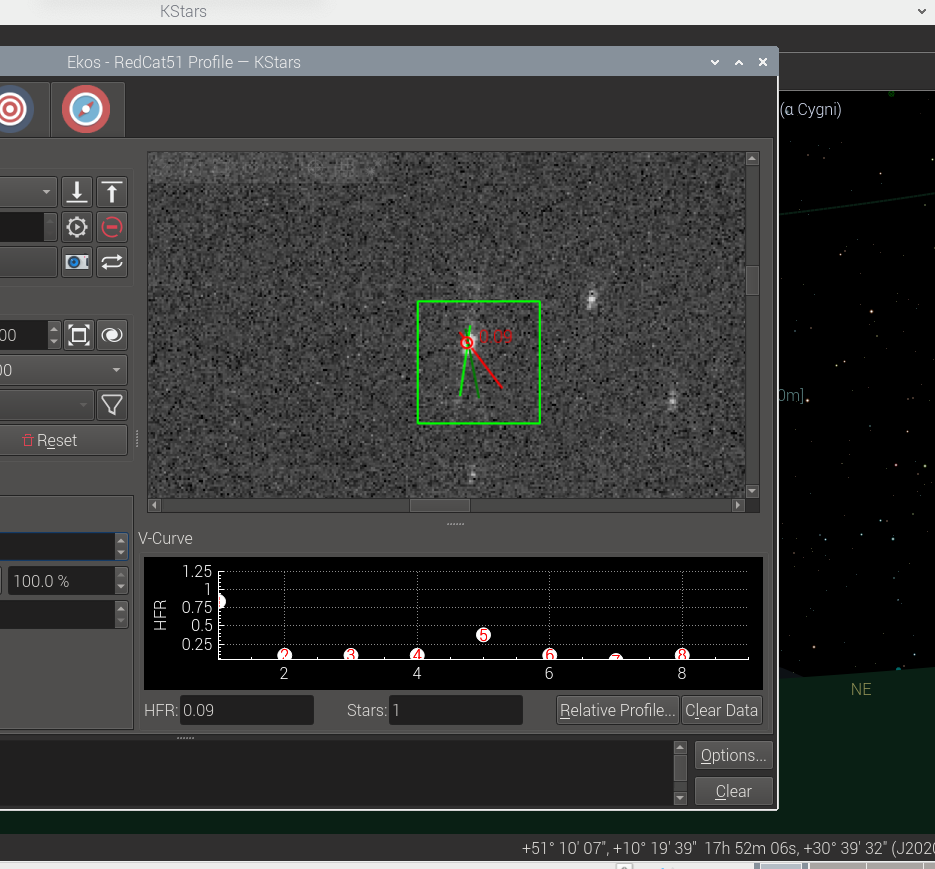
Focus Bahtinov Assistant Tool

It is useful for users who do not have a motorized focuser and prefer to focus manually with the aid of the mask. After capturing an image in the focus module with the Bahtinov mask algorithm selected, Ekos would analyze the images and stars within it.  if Ekos recognizes the Bahtinov star pattern, it will draw lines over the star pattern en circles on the center and on an offset to indicate the focus.

Autofocus on Temperature Change


Florian Signoret added support for triggering autofocus procedure when the temperature exceeds a certain delta threshold in the capture module. The temperature is sourced primarily from the focuser itself, and in unavailable, then it falls back to the weather station, if any.

Focus Logs

Doug Summers added a dedicated focus logger to help users analyze their autofocus runs to better understand their behavior and improve them in the future.

Camera Driver Restart

An experimental camera driver restart feature was added to the capture module. It should be used as a last resort option in case the camera driver is unresponsive. This feature commands the INDI server to only restart the camera driver without affecting any other drivers, so you don't have to shutdown the whole INDI server if one driver misbehaves. 


Restarting a camera driver might lead to quite a few complicated since it interacts with many subsystems in Ekos. Therefore, it is flagged as experimental in this release pending user feedback.

Mount Hour Angle Limits


Previously Ekos Mount module supported enforcing Altitude limit for the mount motion. The mount is active stopped if its slew or track past there limits. Chris Rowland added the Hour Angle (HA) limits to prevent limit the mount from slewing and/or tracking past there limits. This can protect the equipment in case of a runaway motion that might lead a pier collision.

Filter Names Editor


A simple, but convenient editor was added in Capture module to edit filter names. Previously, you had to change filter names directly in INDI Control Panel which was not intuitive for quite a few users.

Internal Guider Features


Hy Murveint contributed significant new features and improvement to the Ekos Internal Guider.

New Detection Algorithm: SEP MultiStar

This is a new guide-star detection, tracking & drift computation algorithm.


You can select this in the Guide options menu (click Options... in the lower right corner of the Guide tab), and then click on "Guide", and then choose from the "algorithm" menu. There choose the guide-star detector. (e.g. there choices include Smart, SEP, Fast, ...). Try SEP MultiStar. It is more stable in all three respects (guide star selection, detection and drift calculation). You may not notice much difference in a normal guiding session when things are going well, except, perhaps, better choice of a guide star.

GPG RA Guiding: New control algorithm for RA guiding.

Hy added a new guiding algorithm. This is for RA only--that is, guiding for DEC still happens, but using the existing guiding algorithms. This guider is based on the work in this PhD thesis and is the same as the well-regarded PHD2 guide algorithm known as Predictive PEC. You will see Copyright 2014-2017 Max Planck Society, now in the KStars credits for this system. It estimates the periodic error in the guiding system, and tries to fix it before it happens. This system should perform about the same as the standard guider for the first period or two of your mount's periodic error, then improve. When using this system, it's best to set in advance what your mount's worm-gear period is. For example, the Orion Atlas pro is about 480s. You enable this in the Guide options menu, in the GPG RA tab, and then checking "Enable GPG". There are other parameters you can change, but as indicated earlier, the main one to think about is "Major Period".

Graphics Improvements

  1. Added a guide-star SNR plot. This can be useful, e.g. when the SNR starts taking a dive, you know things aren't going well, perhaps a cloud is passing by.
  2. Added a plot of the RMS error (i.e. RA and/or DEC arc-second error RMS-averaged over the past 50 guiding samples).
  3. Separated the zooming for x and y axes. You can use '+' and '-' buttons below the x-axis to change the time scale of the plot (number of minutes plotted), and you can use the mouse scroll (same as before) to zoom in/out of the Y-axis. When you mouse-over the plot, you can see all the values for the different graphs.BTW, in case you didn't know (this isn't something I changed), you can change the amount of space allocated to the drift plot (the circle) and the drift graph by placing your mouse over the short dotted line between them and dragging left of right.

Calibration Backlash Removal

A backlash removal section was added to the "calibration dance". Before it starts calibrating DEC, the Ekos guider will now take 5 DEC steps, without measurement, to make sure there's no backlash in the DEC gears. This should improve the quality of the calibration, however, if you don't like this, you can remove it by unchecking "Remove DEC backlash in guide calibration" in the Guide options menu, in the "Calibration" tab there.

Calibration Plot

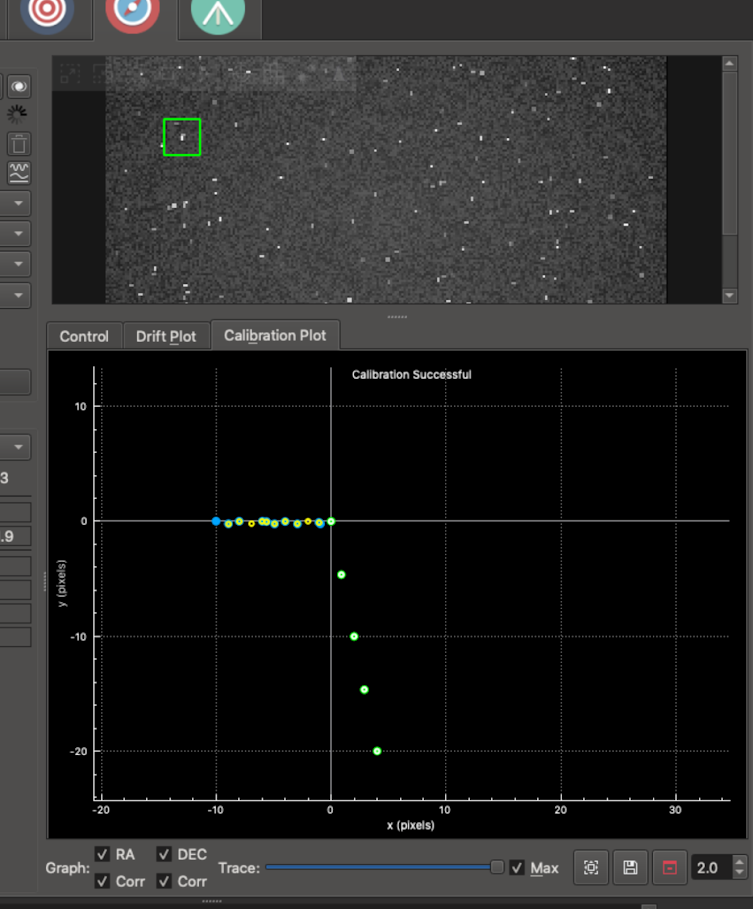
A Calibration Plot subtab was added to the right right of the Drift Plot.  It shows the mount positions recorded during internal-guider calibration.

Basically, if things are going well, it should display dots in two lines which are at right angles to each other--one when the calibration pushes the mount back and forth along the RA direction, and then when it does the same for the DEC direction. Not a ton of info, but can be useful to see. If the two lines are at a 30-degree angle, something's not going well with your calibration! Here's a picture of it in action using the simulator


The colored dots (same color scheme as the internal guider) shows the RA and DEC samples on their way out, and the small white and yellow circles show their return paths.

PHDLogView compatibility


phdlogview is a program written by Andy Galasso to analyze PHD2 logs. It's very nice. I've tried to have the internal guider output a mostly compatible log file so that if you installed phdlogview, you could use it to also browse your logs from the Ekos internal guider. A few things to note:
The logs are placed in a directory parallel to the standard KStars logs directory. Instead of logs, it is guidelogs. So, for example, on Linux you'd find them in this directory ~/.local/share/kstars/guidelogs/
You can turn on/off this logging by going into the Options menu on the internal guider tab, clicking on the Guide tab on the left and checking/un-checking the box labeled "Save Internal Guider User Log".

There are many features in phdlogview. Explore and look at Galasso's documentation for how to use it.

PHD2 Integration Fixes

Eric Dejouhanet significantly improved fault tolerance during PHD2 interactions. This includes the following situations.
  • Star does not move enough for calibration to complete. PHD2 may:
    • be looping instead of calibrating, while still notifying calibration.
    • abort but continue to send guide steps and frames.
    • => Fixed: calibration failures are now properly handled in that situation, and forwarded to Guide module.
  • Star disappears because of a mount glitch. PHD2 may:
    • declare star lost and stop without further notice.
    • => Fixed: star-lost notification is now properly handled, and will time out properly (and not restart).
  • Device disconnects briefly. PHD2 may:
    • declare device unusable, eventually after some time (camera timeout is 15s by default), requiring reconnect.
    • => Fixed: equipment dis/connection is now properly handled from both sides, aborts operations and is robust.
  • KStars/Ekos crashes while guiding and is restarted using the existing indiserver.
    • The currentCCD may be null when restoring connection, upon call to executeOneOperation.
    • AppState has to be taken into consideration to restore state as it was before the crash.
    • => Fixed: app-state polling improves robustness, requires up-to-date INDI build.
  • If Ekos is told the equipment is disconnected, it will consider an external cause and will not attempt to reconnect.
    • Ekos will not reconnect, to allow manual intervention is required on PHD2 side.
    • Ekos will detect reconnection and change state automatically.
  • However PHD2 v2.6.8 crashes when INDI drivers are killed, so no solution except restarting PHD2 in a loop (use systemd).
  • One issue remains in Guide, where the stop button remains enabled sometimes (regression?).
    • May not fix in the context of this MR.
  • One issue remains upon server loss, which triggers perpetual reconnect unless the end-user disconnects manually.
    • Issue related to state kept at disconnected.
image

New LED indicators were added for each stage as a visual feedback for the user.

Other Fixes


Check out the complete changelog for more details.

Monday, April 27, 2020

KStars v3.4.2 is Released

Glad to announce the latest release of KStars v3.4.2 on April, 27th, 2020 for Windows, MacOS, and Linux.

This release brings even more stability enhancements to KStars in addition to better memory management, especially on embedded devices.

FITS Viewer Memory


Hy Murveit submitted patches to reduce memory usage of FITS Viewer tool, sometimes by up to 50%.

The maximum zoom factor was hard-coded to 400% in the FITS View. However, it now dynamic (On Linux & MacOS, Windows in the next release). On systems with limited memory, the maximum zoom is at 100%, while if you have 16GB+ RAM available, you can zoom in up to 600%.

Testing Framework


This is an under-the-hood improvement in KStars championed by Eric Dejouhanet to standardize unit and GUI tests for KStars in order to ensure reliability and detect any regressions that might affect the code. While this will not affect end users directly, it greatly enhances KStars reliability in the long term.

INDIHub Support


Preliminary support for INDIHub project by Dennis Zaytsev. INDIhub is a global networks of telescopes powered by INDI. You can share your equipment with others, or can opt in for remote robotic operation to help in scientific studies. This is in the very early phases of development and the KStars team shall add more support to INDIHub integration in the upcoming releases.

Improvements & Bug Fixes

  • Correct bug in median computation
  • Re-enabled the Jupiter's Moons tool
  • Add a warning if the dust cap is missing instead of total abort.
  • Fixed KStars deadlock on disconnecting from INDI server.
  • Mount box layout corrected so that everything fits well into the window
  • SEP Focus improvements

Friday, February 14, 2020

KStars v3.4.0 is Released


Celebrate Valentines' Day with some KStars Love! Happy to announce the release of KStars 3.4.0 on February 14th, 2020 on Linux, MacOS, and Windows.

What's new with this release?

The Linear Focus Algorithm.


Hy Murveit continued to work on linear focusing algorithm. This is an alternative auto-focus algorithm available in the Process section of the Focus tab.


You can think of this algorithm as "slow and steady". It should be less sensitive to backlash and measurement noise, but will likely take more samples to achieve its minimum HFR than a successful polynomial search. If you are having issues with auto-focus, you should consider trying this out.

It takes regularly sampled HFR values, i.e. (mostly) moving the position inward by a fixed amount--step size in the 1st pass of the algorithm, and 1/2 step size in the 2nd pass. The polynomial algorithm varies the change in position. Linear rarely changes direction, and mostly moves inward. In its first pass it takes a number of samples inward to establish a V-curve and an approximate minimum-HFR position, then makes a 2nd inward pass looking for that minimum. It only samples the HFR after an inward move. When it needs to move outward, e.g. in between the the 1st and 2nd passes, it moves outward much further than needed, and then moves back in before capturing an image.

The system should be at rough focus before the algorithm starts. The most important parameter is the step size, which needs to be found experimentally. See the screenshot as to how it was chosen (step size = 25) for a Moonlight v2 focuser. Recommend that full-field and the SEP detection algorithm be used with it.

Faster Astrometry.net Solver


Robert Lancaster added an option to use Sextrator as the primary method to identify stars within an image. This has two benefits:

1. It removes the python dependency, which was a painful issue for MacOS users.
2. It vastly improves the solver speed, according to some early reports from our beta testers.


You can turn on the Sextrator option in Astrometry.net settings. 


You can see the astrometry.net solver in now noticeably faster and more reliable than before!

Improvements & Bug Fixes

  • Fixed a few memory allocation issues to reduce the process memory usage.
  • Fixed DSLR ImageToFITS loading when auto convert is used.
  • Fixed focus direction for relative DC focusers.
  • Improved reliability of setting snoop property for the active profile.
  • Fixed File name sanitization issues.
  • Communication with remote INDI Web Manager is now mostly asynchronous.
  • Align property labels in the INDI dialog vertically on top.